
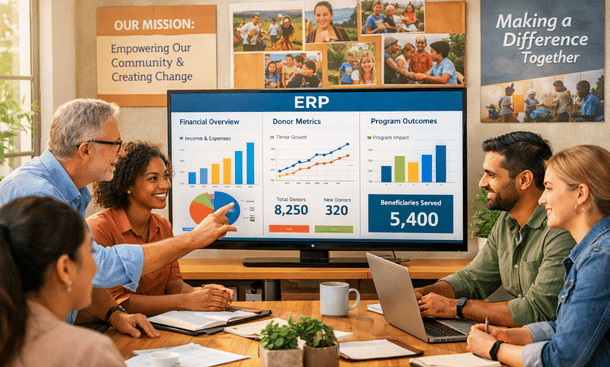
Running a nonprofit in California means juggling a million things at once. You’re managing restricted grants from three different foundations, tracking outcomes for government contracts, stewarding donors who expect personalized communication, and trying to prove your impact to a board that wants real-time data. Meanwhile, your finance team is drowning in spreadsheets, your development director can’t figure out why donor retention dropped, and your program managers are manually entering the same client data into four different systems.
Sound familiar? You’re not alone.
The problem isn’t your team’s dedication or competence. The problem is that most nonprofits are trying to run modern, complex organizations using technology designed for much simpler times. QuickBooks served you well when you had a $500,000 budget and five staff members. But now you’re managing $8 million across 15 funding sources, employing 40 people, serving thousands of clients annually, and your disconnected systems are actively holding you back.
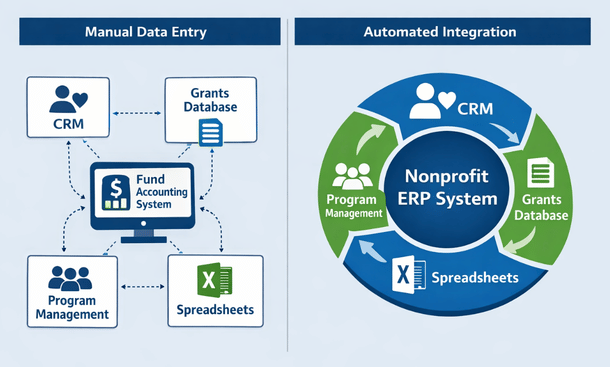
This is where enterprise resource planning systems come in. ERP platforms integrate your finance, fundraising, grants, programs, and operations into one connected system where data flows automatically and real-time visibility replaces month-old reports. Instead of exporting data from your donor database, reformatting in Excel, and importing into accounting software, everything talks to everything else. Your development team sees financial data. Your finance team accesses program metrics. Everyone works from the same source of truth.
But here’s the thing—ERP implementation isn’t simple or cheap. You’re looking at investments ranging from $50,000 to $300,000 and projects lasting six to twelve months. Making the wrong choice wastes precious resources and creates years of frustration. Making the right choice transforms your operations and amplifies your mission impact.
This guide breaks down everything California nonprofits need to know about ERP systems. We’ll cover what these platforms actually do, which features matter most, how leading solutions compare, what implementation really looks like, and how to decide if you need a full ERP or if simpler fund accounting software makes more sense for your organization.
Whether you’re a $2 million community foundation in Sacramento or a $50 million social services agency in Los Angeles, understanding ERP technology helps you make smarter decisions about the systems that power your mission.
What Is Nonprofit ERP Software and Why Your Organization Needs It in 2026
ERP stands for enterprise resource planning, which sounds incredibly corporate and boring until you understand what it actually means for nonprofits trying to create change in their communities.
At its core, an ERP system brings all your critical organizational functions into one integrated platform. Instead of managing separate software for accounting, donor relationships, grant compliance, program delivery, human resources, and reporting, everything lives together in a unified system where data connects automatically.
Think of it like your smartphone. Twenty years ago, you carried a phone, camera, GPS, music player, calendar, and calculator as separate devices. Now everything integrates seamlessly in one device where your photos sync to your calendar, your location data improves your maps, and everything works together. ERP does the same thing for your nonprofit’s operations.
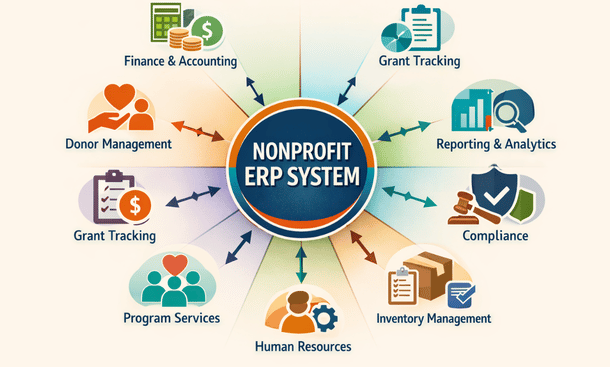
Nonprofit ERP Infographic
Traditional business ERPs were designed for manufacturing companies tracking inventory, production, and sales. Those systems think in terms of profit margins, cost of goods sold, and revenue recognition. But nonprofits operate fundamentally differently. You track restricted funds rather than revenue streams. You measure impact outcomes instead of sales conversions. You report to multiple stakeholders with competing information needs.
Nonprofit-specific ERPs understand these differences at their core. They handle fund accounting natively, where every dollar gets tracked by its source and restrictions. When the Smith Foundation gives you $75,000 for youth programming, the system knows that money can only be spent on approved youth activities before December 2027. It won’t let you accidentally pay rent from restricted funds or spend grant money on ineligible expenses.
These platforms recognize that donor relationships differ completely from customer relationships. A customer buys a product and the transaction ends. A donor makes a gift and begins a relationship that could span decades. Your system needs to track lifetime giving history, engagement across touchpoints, tribute gifts, planned giving commitments, and communication preferences in ways that standard CRMs weren’t designed to support.
Grant management represents another massive differentiator. Foundations and government agencies impose specific reporting requirements, compliance checkpoints, deliverable deadlines, and budget restrictions that corporate project management tools never anticipated. Nonprofit ERPs build this functionality directly into the platform rather than forcing you to track grants in separate databases or spreadsheets.
The benefits of this integration compound across your organization. Your finance team closes the books faster because donation data flows automatically from fundraising with proper fund coding. Your development director sees giving patterns in real-time rather than waiting for monthly reports. Program staff access budget information without bugging the CFO. Everyone makes better decisions because they’re working with current, accurate data instead of outdated reports pieced together from multiple sources.
For California nonprofits specifically, ERP systems help navigate the state’s complex regulatory environment. Whether you’re complying with AB 5 worker classification rules, managing California Nonprofit Integrity Act requirements, or tracking program outcomes for state contracts, having integrated systems with strong audit trails and compliance features reduces risk and simplifies reporting.
The shift from disconnected tools to integrated ERP platforms mirrors what’s happening across the nonprofit sector. Organizations that embraced cloud technology, data integration, and modern workflows are scaling their impact while keeping overhead reasonable. Those still cobbling together outdated systems are spending 20 to 30 percent of staff time on manual workarounds that automated systems would eliminate.
Size matters less than complexity. A $3 million nonprofit managing 15 grants across three programs with 25 staff members might need ERP capabilities more urgently than a $10 million organization with straightforward funding and simple operations. The question isn’t how big you are but how complex your needs have become and whether your current systems support or hinder your mission.
Understanding what nonprofit ERP software actually is and whether it fits your organization’s needs provides the foundation for making informed technology decisions. From here, knowing which specific capabilities separate great nonprofit ERPs from mediocre business software helps you evaluate options intelligently. Our detailed breakdown of nonprofit ERP features you can’t ignore walks through fund accounting, donor management, grant tracking, and other essential functionalities that should drive your platform selection.
Top Features to Look for in ERP Systems for Nonprofit Organizations
Choosing an ERP isn’t about finding the platform with the longest feature list. It’s about identifying capabilities that solve your actual problems and support how your nonprofit actually works.
Let me walk you through the features that separate purpose-built nonprofit ERPs from generic business software that claims it can serve mission-driven organizations.
Fund Accounting Capabilities That Actually Work
This is non-negotiable. Your ERP needs to handle fund accounting as a core function, not a bolt-on module that feels like an afterthought.
The system should manage multiple fund types simultaneously without breaking a sweat. Unrestricted general operating funds, temporarily restricted grants, permanently restricted endowments, and board-designated reserves all need to coexist in your financial structure. When someone asks about your cash position, the answer isn’t a single number—it depends entirely on which fund they’re asking about.
Restriction tracking needs to happen automatically. When you receive a $40,000 grant for environmental education from the California Coastal Conservancy, that money gets tagged with the funder, program area, allowable expense categories, geographic restrictions, and time period. Six months later when you’re coding expenses, the ERP should only allow charges that match those restrictions. This prevents the nightmare scenario of accidentally spending restricted funds on ineligible activities and having to return money to funders.
Multi-dimensional accounting is essential for complex organizations. You need to track a single expense across multiple dimensions simultaneously—by fund, program, department, location, grant, and project. That instructor salary might need allocation across three different grants, two program areas, and attribution to your Oakland office. Your ERP should handle this complexity through intuitive coding screens, not complicated journal entry workarounds.
Budget management features must support multiple budget versions running concurrently. You have your board-approved annual budget, but also grant-specific budgets, departmental budgets, and scenario planning budgets for strategic decisions. The ability to compare actual spending against any budget version in real-time keeps programs on track and prevents the painful discovery of overspending during month-end closing.
Period and year-end closing functionality matters more than most people realize initially. Your system should allow monthly period closes while still permitting necessary adjustments to prior periods when you discover errors or receive late information. Year-end closing should be a controlled process that locks historical data permanently while rolling balances forward to the new fiscal year with clear audit trails documenting every adjustment.
Donor and Constituent Management Beyond Basic CRM
Generic customer relationship management systems don’t understand philanthropic relationships. Your ERP needs purpose-built donor management that recognizes how nonprofit fundraising actually works.
Comprehensive constituent profiles go way beyond name, address, and email. You need complete giving history showing every contribution amount, date, campaign, fund designation, payment method, and acknowledgment status. But also soft credits for married couples, tribute and memorial gifts, matching gift employer relationships, planned giving commitments, and donor-advised fund connections.
Household and relationship mapping becomes critical as your donor base matures. When John and Mary Martinez are both in your database, the system needs to recognize their marriage, track individual and joint gifts appropriately, understand who receives tax receipts, manage communication preferences for each person individually while recognizing the household relationship, and handle scenarios where they give separately to different programs.
Engagement scoring helps prioritize limited development staff time. Your ERP should track not just donations but also event attendance, volunteer hours, email engagement, website activity, and program participation. Automated scoring algorithms identify major donor prospects hiding in your database, flag donors showing signs of lapsing, and surface highly engaged supporters who deserve personalized cultivation even if their giving hasn’t been substantial yet.
Campaign and appeal tracking lets you measure fundraising effectiveness with precision. You need to know which campaigns generated revenue, what your cost per dollar raised was across different strategies, how various audience segments responded, and which messages resonated. This data should flow directly into your financial system so development revenue reconciles automatically with accounting records without manual intervention.
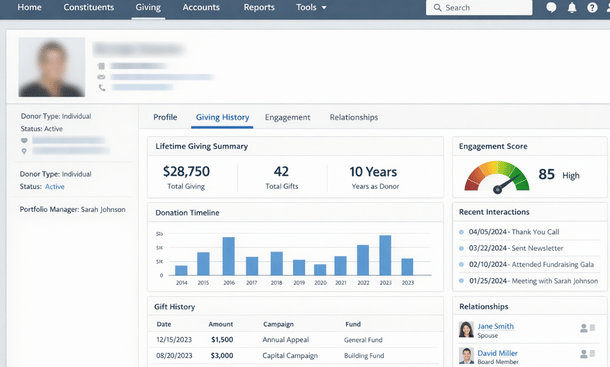
Automated acknowledgment workflows eliminate the manual bottleneck that plagues many development teams. When a gift arrives, the system should trigger appropriate thank-you letters, tax receipts, and internal notifications based on gift amount, donor type, fund designation, and communication preferences. A $25,000 major gift might trigger immediate email alerts to your development director and executive director, while a $50 online donation gets an automated receipt within minutes and queues a personalized call from a volunteer next week.
Pledge and recurring gift management needs to be bulletproof. The system should track outstanding pledge balances accurately, send automated payment reminders on customizable schedules, process recurring credit card gifts automatically on designated dates, flag failed payments for immediate follow-up, and project revenue from pledges and recurring commitments to improve cash flow forecasting for finance teams.
Grant Tracking and Compliance Tools
Grant management separates nonprofit ERPs from everything else in the market. The complexity of managing multiple grants with different requirements, reporting schedules, deliverables, and compliance rules requires specialized functionality that generic business software simply doesn’t provide.
Your system needs complete grant lifecycle visibility from initial prospect research through final closeout. From the prospecting and application stage through award notification, active management, interim and final reporting, to formal closeout and lessons learned, everything should live in one searchable repository. You should see at a glance which grants are in pipeline, newly awarded, actively running, approaching deadlines, or completed with filterable views by funder, program, or staff member.
Budget versus actual tracking by individual grant is absolutely non-negotiable. Every grant has an approved budget, and you need real-time visibility into spending against that budget with alerts when variance thresholds are exceeded. The system should flag when a grant is approaching its budget limit, when spending is falling significantly behind projections which might indicate implementation problems, and when line-item spending deviates from approved budgets requiring amendment requests.
Deliverable and milestone tracking keeps complex grants on schedule. Your ERP should let you define required reports, site visits, outcome metrics, participant recruitment targets, and other deliverables for each grant with assigned owners and due dates. Automated reminders ensure nothing falls through the cracks. Dashboards should show all upcoming deliverables across your grant portfolio so leadership can allocate resources appropriately.
Indirect cost allocation is technical but incredibly important financially. Most grants allow you to charge a portion of shared overhead costs like rent, utilities, executive salaries, accounting services, and technology infrastructure. Your ERP needs to calculate these allocations based on approved methodologies, whether that’s a federally negotiated indirect cost rate, simplified de minimis rate, or direct cost allocation methods. Getting this right can mean hundreds of thousands in recovered overhead for larger nonprofits.
Compliance documentation and audit trail maintenance protects your organization. The system should track every change to grant budgets, amendments to agreements, approval workflows for grant-funded expenses, financial and programmatic reports submitted to funders, and maintain complete revision history for auditors and program officers to review. When a federal auditor arrives for a single audit, you should be able to pull complete documentation for any questioned grant expenditure within minutes.
Financial Reporting for Multiple Stakeholders
Nonprofits answer to everyone—boards, individual donors, foundation program officers, government contract managers, independent auditors, the IRS, and the general public. Your ERP needs to generate reports satisfying all these different audiences without creating separate reporting workflows for each.
Standard nonprofit financial statements must be easy to produce following generally accepted accounting principles. Statements of financial position, activities, functional expenses, and cash flows following FASB standards should be standard reports requiring no custom development. The system should handle net asset classifications correctly across unrestricted, temporarily restricted, and permanently restricted categories, and present expenses by both nature and function as required for external reporting.
Board reporting packages need to be executive-friendly and digestible. Monthly financial summaries, cash flow projections with scenario modeling, fundraising performance dashboards showing progress toward annual goals, and program performance metrics should be available in formats that board members without accounting backgrounds can quickly understand and act upon. Visual dashboards with charts and trend graphs work infinitely better than dense spreadsheets full of numbers.
Funder-specific reports are inevitable and time-consuming without good systems. Whether it’s a family foundation requiring quarterly financial reports in their custom template, a corporate sponsor wanting specific outcome metrics, or a government contract with detailed line-item reporting and certified payroll, your ERP should let you create and save custom report templates that pull live data. Even better if the system can automatically generate and email these reports on specified schedules without manual intervention.
Form 990 preparation support saves weeks of painful work annually. The best nonprofit ERPs either generate IRS Form 990 schedules directly or export data in formats that tax preparation software accepts without extensive manual manipulation. Having your financial data already organized in functional expense categories, properly classifying net assets, and tracking board compensation, related party transactions, and program accomplishments in required formats turns 990 preparation from a three-month nightmare into a manageable two-week project.
Real-time dashboards fundamentally change organizational culture from reactive to proactive. Instead of waiting two weeks for month-end financials to understand where you stand, executives should check current cash position, fundraising progress toward goals, program expenses versus budgets, and key operational metrics anytime from any device. This shift from historical reporting to real-time monitoring changes how organizations operate and respond to challenges or opportunities.
Program Management and Outcomes Tracking
Your ERP should help you manage and measure program impact, not just track financial transactions. The most sophisticated systems integrate program delivery with financial management in ways that illuminate true program costs and outcomes.
Client and participant management lets you maintain comprehensive records for everyone your programs serve. Whether you’re tracking students in education programs, clients receiving social services, patients in healthcare settings, or participants in community events, this data should integrate seamlessly with your financial and reporting systems. You should be able to see not just how many people you served but also the total cost per participant and outcomes achieved.
Service delivery documentation proves you’re delivering on mission commitments. Case notes, service hours, program attendance, milestone achievements, assessment results, and progress tracking create auditable records of your work. This becomes especially critical for government contracts and outcome-focused foundation grants where payment may be contingent on documented service delivery.
Outcomes measurement capabilities let you track the actual impact you’re creating in communities. If your job training program aims to place 100 unemployed adults in living-wage employment, your ERP should track participant enrollment, training completion, job placement, 90-day retention, and starting wages. Connecting outcomes to program costs and funding sources demonstrates return on investment to funders and helps you identify which program models deliver the strongest results.
Waitlist and enrollment management helps programs operate efficiently. The ability to manage application processes, maintain waitlists with priority scoring, track available enrollment slots across program cohorts, and communicate with applicants through your ERP eliminates yet another separate system to maintain and keeps program staff focused on service delivery rather than administrative coordination.
Understanding which features truly matter for your nonprofit’s specific situation helps you evaluate platforms more effectively and ask better questions during vendor demonstrations. Seeing how leading ERP solutions stack up against each other in terms of features, pricing, and real-world performance gives you the comparison data needed for confident selection decisions. Our comprehensive comparison of the best ERP software for nonprofits in 2026 breaks down how NetSuite, Dynamics 365, Sage Intacct, Blackbaud, and other leading platforms perform across these critical feature areas.
Best ERP Software for Nonprofits: 2026 Comparison and Reviews
Evaluating ERP platforms feels overwhelming when every vendor claims their solution is perfect for nonprofits. Let me cut through the marketing and give you honest assessments of what’s actually working for California organizations right now.
NetSuite for Nonprofits: Enterprise Power for Complex Organizations
NetSuite delivers serious enterprise capabilities wrapped in a cloud platform that’s evolved significantly in serving nonprofits over the past few years.
The platform excels at multi-entity consolidation, making it ideal for national nonprofits with state chapters, local affiliates, or multiple subsidiary organizations. You can manage dozens of separate legal entities while consolidating financials for overall organizational reporting. The workflow automation becomes incredibly powerful once you invest time in proper configuration, enabling sophisticated approval processes and automated journal entries that eliminate repetitive manual tasks.
Fund accounting capabilities are robust and handle complex scenarios well. The system tracks fund restrictions natively, manages complex allocations across multiple dimensions, and handles grants with solid compliance features built in. Revenue recognition follows nonprofit accounting standards, and financial reporting meets external audit requirements without extensive customization or workarounds.
Donor management exists within NetSuite but honestly isn’t the platform’s greatest strength. You can track constituent relationships and gift history, but organizations serious about sophisticated fundraising typically integrate NetSuite with dedicated platforms like Salesforce Nonprofit Cloud or Blackbaud Raiser’s Edge. The API makes these integrations feasible, though they add implementation complexity and ongoing maintenance requirements.
Pricing sits firmly at the higher end of the nonprofit ERP market. Expect annual investments between $50,000 and $150,000 depending on user count, modules implemented, and organizational complexity. Implementation costs typically run $75,000 to $200,000 for professional services including configuration, data migration, and training. For organizations with revenue under $10 million annually, this feels steep and difficult to justify. But for larger, complex nonprofits managing $25 million or more across multiple entities and programs, the capabilities often justify the investment.
The major advantages include exceptional scalability that grows with you from $5 million to $500 million in revenue without system replacement, comprehensive functionality spanning finance through operations, strong financial management and reporting, and excellent consolidation for multi-entity structures.
The downsides involve significant complexity that can overwhelm smaller organizations, substantial cost that prices out mid-sized nonprofits, a steep learning curve requiring dedicated staff or ongoing consultant support, and customer support that users report as inconsistent in quality and responsiveness.
NetSuite works best for national nonprofits managing multiple entities, organizations planning significant growth trajectories, those needing sophisticated financial consolidation and reporting, and larger nonprofits with budgets exceeding $20 million where the investment represents a reasonable percentage of operating expenses.
Microsoft Dynamics 365: Familiar Ecosystem with Nonprofit Configurations
Dynamics 365 leverages Microsoft’s massive ecosystem advantages and provides nonprofit-specific configurations through a network of specialized implementation partners.
The nonprofit accelerator provides pre-built templates and configurations specifically designed for mission-driven organizations. Fund accounting, program management, constituent relationship tracking, and outcomes measurement come configured based on nonprofit best practices, though you absolutely need a qualified partner to implement these properly. The Nonprofit Common Data Model creates standardized data structures that work across the Microsoft ecosystem.
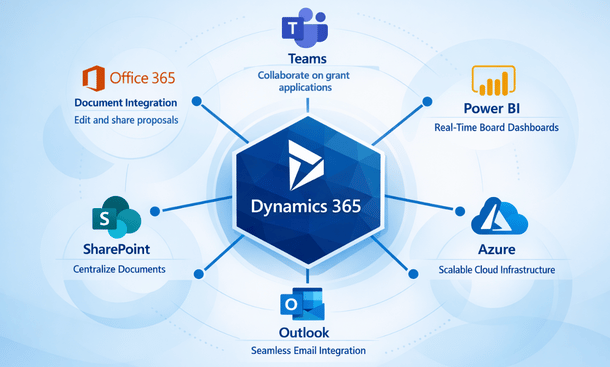
Integration with Microsoft’s broader platform is seamless and powerful. Organizations already using Office 365, Teams, SharePoint, OneDrive, and Power BI find incredible synergy. Your ERP data flows naturally into familiar productivity tools your team already uses daily. Power BI dashboards connected to live Dynamics data create stunning visualizations and interactive reports without purchasing third-party business intelligence tools or learning new platforms.
Flexibility represents both a significant strength and potential challenge. Dynamics can be configured to match virtually any workflow or business process, but that customization capability means implementation requires careful planning and deep expertise. Cookie-cutter deployments rarely deliver optimal results. You need implementation partners who understand both Dynamics architecture and nonprofit operational realities.
Pricing operates on a modular structure where you license specific capabilities rather than buying everything upfront. Core user licenses range from $95 to $210 per user monthly depending on functionality required. For a 20-user nonprofit, expect $30,000 to $60,000 annually in software licensing plus implementation costs ranging from $50,000 to $150,000. Microsoft offers substantial nonprofit discounts through TechSoup and direct programs that significantly reduce total cost.
The key benefits include deep integration across the Microsoft ecosystem that improves productivity, flexible customization to match unique workflows, a strong partner ecosystem with nonprofit specialists, modern cloud architecture with regular feature updates, and nonprofit-specific templates accelerating implementation.
The challenges center on complexity requiring skilled implementation partners, variable partner quality where not all Dynamics consultants truly understand nonprofits, steeper learning curves compared to purpose-built nonprofit platforms, and out-of-box experiences that aren’t as polished as some competitors.
Dynamics 365 works best for Microsoft-centric organizations already invested in the ecosystem, nonprofits needing heavy customization to match unique processes, those with existing Dynamics expertise on staff or relationships with qualified implementation partners, and organizations valuing best-of-breed tool integration over all-in-one simplicity.
Sage Intacct: Financial Management Excellence
Sage Intacct focuses intensely on financial management and delivers exceptional capabilities specifically for nonprofits with complex accounting needs.
The fund accounting functionality stands out as truly outstanding among ERP platforms. Multi-dimensional tracking, automated allocations, sophisticated grant management, and comprehensive reporting come standard without customization. The platform was architected for complex financial requirements, and that focus shows in every feature and workflow. Month-end closing processes that consumed two weeks in legacy systems happen in three to four days with Intacct once you’re fully implemented and optimized.
Dimensional reporting lets you analyze financial data from virtually any perspective without building custom reports. Revenue by fund by program by location by campaign by grant—all available through intuitive report builders that finance staff can use without IT support. The ability to create dynamic reports that users can drill into and manipulate themselves dramatically reduces burden on your finance team while improving data access across the organization.
Automation capabilities shine particularly bright in Intacct. Recurring transactions, automated cost allocations, workflow-based approval routing, and scheduled report generation and distribution eliminate huge volumes of repetitive manual work. One environmental nonprofit in the Bay Area reported that Intacct cut their routine accounting tasks by 40 percent within six months of implementation, freeing finance staff for higher-value analysis and strategic support.
The user interface feels refreshingly modern and intuitive compared to legacy nonprofit accounting systems. Navigation is logical, screens are uncluttered, and common tasks require fewer clicks. Training new finance staff takes days instead of weeks, and the learning curve for occasional users accessing basic functions is quite manageable. Cloud access means your distributed team works from anywhere without VPN complications or remote desktop headaches.
Pricing is more accessible than enterprise platforms while delivering enterprise-grade financial capabilities. Organizations typically invest $25,000 to $75,000 annually for licensing and $30,000 to $100,000 for implementation services. The value proposition is compelling for mid-sized nonprofits with budgets between $5 million and $50 million.
The advantages include exceptional financial management depth, outstanding automation reducing manual work, user-friendly interfaces improving adoption, strong nonprofit focus in product development, and reasonable pricing relative to capabilities delivered.
The limitations involve relatively basic built-in CRM and donor management requiring integration with dedicated fundraising platforms, program management features that are adequate but not exceptional compared to all-in-one solutions, and a narrower feature set outside core financials compared to broader ERP platforms.
Sage Intacct works best for nonprofits prioritizing financial management excellence above all else, organizations with complex fund accounting and grant compliance requirements, those willing to integrate best-of-breed specialized tools rather than seeking all-in-one platforms, and finance teams that want powerful capabilities without enterprise-level complexity.
Blackbaud Financial Edge NXT: Purpose-Built for Nonprofits
Blackbaud dominates the nonprofit technology market for fundraising and donor management, and Financial Edge NXT extends that deep sector expertise into comprehensive ERP territory.
The nonprofit DNA runs deeper at Blackbaud than anywhere else in the market. The company has served mission-driven organizations exclusively for decades and understands nonprofit operations, terminology, and workflows better than vendors serving multiple industries. Financial Edge was designed specifically for nonprofits from the ground up, and every feature reflects that singular focus. Fund accounting, grant tracking, and nonprofit-specific reporting work exactly as you’d expect without workarounds or adaptations.
Integration with Blackbaud’s broader fundraising ecosystem represents the platform’s killer feature. If you’re using Raiser’s Edge NXT for comprehensive donor management, the integration is seamless and bidirectional. Revenue from fundraising flows into Financial Edge automatically with proper fund coding, campaign attribution, and constituent linking. This eliminates the reconciliation nightmares that plague nonprofits using separate finance and fundraising systems from different vendors.
Cloud deployment and mobile access bring modern convenience and accessibility. Your team accesses the system from anywhere on any device, and Blackbaud handles all updates, maintenance, security patches, and infrastructure management. You’re always running the current version without disruptive upgrade projects consuming IT resources and staff time.
User experience has improved dramatically with the NXT generation of products. Earlier Blackbaud versions felt dated and clunky compared to modern cloud applications. The NXT platform is cleaner, faster, more visually appealing, and significantly more intuitive, though still not quite as sleek as some newer competitors built from scratch for cloud-first experiences.
Pricing requires direct conversation with Blackbaud sales representatives, but expect annual investments of $20,000 to $60,000 for mid-sized organizations, with implementation costs ranging from $25,000 to $80,000. Existing Blackbaud customers often receive favorable pricing when adding Financial Edge to their technology stack.
The benefits include unmatched nonprofit expertise and sector knowledge, outstanding integration if you’re already in the Blackbaud ecosystem, solid fund accounting meeting complex requirements, strong support resources including extensive training and active user communities, and purpose-built features that don’t require explanation or adaptation.
The drawbacks involve becoming increasingly locked into the Blackbaud ecosystem where switching becomes harder over time, less customization flexibility compared to platforms like Dynamics, less power for complex multi-entity consolidation compared to NetSuite, and customer support quality that some users report as inconsistent.
Blackbaud Financial Edge NXT works best for organizations already using Blackbaud fundraising products, nonprofits wanting purpose-built solutions over adapted business software, those prioritizing seamless finance and fundraising integration over cutting-edge technology features, and organizations comfortable with vendor relationships over platform flexibility.
Other Notable Platforms Worth Considering
Several other ERP platforms serve nonprofits effectively in specific scenarios worth understanding.
Acumatica Cloud ERP offers genuinely unlimited user licensing where you pay for computing resources consumed rather than per-user fees. For nonprofits with many staff needing system access, this pricing model saves substantial money compared to per-user platforms. The modern cloud architecture and strong mobile capabilities impress, though nonprofit-specific configurations depend heavily on implementation partner quality.
Abila MIP Fund Accounting has served nonprofits for decades with deep fund accounting expertise and comprehensive reporting. The platform handles the most complex nonprofit accounting scenarios reliably. However, the user interface shows its age compared to modern cloud platforms, and integration with non-Abila products can be challenging.
Nonprofit-specific modules exist for platforms like SAP, Oracle, and Workday, but these enterprise systems typically make sense only for the very largest nonprofits with budgets exceeding $100 million and dedicated IT departments.
Making Your Platform Selection Decision
Choosing among these platforms requires matching your priorities to each system’s strengths rather than seeking an objectively “best” solution that doesn’t exist.
Start by identifying your primary drivers. If fundraising integration is paramount, Blackbaud makes tremendous sense. If financial sophistication matters most, examine Sage Intacct closely. If you’re deeply committed to the Microsoft ecosystem, Dynamics fits naturally. If you’re managing complex multi-entity structures, NetSuite deserves serious consideration.
Consider your budget realistically across total cost of ownership, not just sticker prices. Include software licensing, implementation services, ongoing support, training, and the internal staff time required to manage the platform. The cheapest option rarely delivers the best value. Underfunding implementation leads to poor configurations and ultimately failed projects.
Evaluate your team’s technical capacity honestly. Some platforms require more technical expertise than others to configure, maintain, and optimize over time. Be realistic about whether you have staff who can manage the system internally or whether you’ll need ongoing consultant support as part of your operational budget.
Talk to references at similar organizations in California. Vendors will provide happy customers to contact, but also search out unbiased reviews on platforms like TechSoup, NTEN community forums, and nonprofit technology conferences. Find organizations with similar budget sizes, program types, and operational complexity who’ve implemented the systems you’re considering.
Insist on seeing live demonstrations using your actual data, not canned demos with generic scenarios. Load sample chart of accounts, grants, and donor data into demo environments and watch how the system handles scenarios you face daily. This reveals limitations and usability issues that polished sales presentations deliberately hide.
Selecting the right platform creates the foundation for operational transformation, but the platform itself is only half the equation. Successful implementation requires careful planning, dedicated resources, and sophisticated change management to ensure your investment delivers promised value. Our comprehensive implementation roadmap for nonprofit ERP projects walks through project planning, team building, data migration, training strategies, and go-live preparation that turns software selection into operational reality.
How to Implement ERP in a Nonprofit: Step-by-Step Roadmap
Buying ERP software is the easy part. Actually implementing it successfully separates organizations that transform their operations from those that waste hundreds of thousands of dollars on shelfware that never delivers value.
Implementation is where technology projects live or die. I’ve watched California nonprofits execute flawless implementations that came in on time and under budget. I’ve also seen painful failures that dragged on for years, burned through budgets, demoralized staff, and ultimately got abandoned. The difference rarely comes down to which software they chose. It comes down to how they approached the implementation process.
Pre-Implementation Planning Sets the Foundation
You cannot implement what you haven’t properly planned. The pre-implementation phase determines whether your project succeeds or becomes another cautionary tale shared at nonprofit technology conferences.
Start with brutally honest needs assessment. Document your current pain points without sugar coating or political filtering. What processes are genuinely broken? Where does critical data get lost or corrupted? Which reports take days or weeks to generate when they should be instant? Talk to staff across all departments—finance, programs, development, operations, human resources—and capture their frustrations, workarounds, and wish lists. The problems people complain about daily are your roadmap for implementation priorities.
Map your current workflows in excruciating detail before changing anything. How does a donation move from initial receipt through acknowledgment to financial recording and donor record update? How do grant expenses get tracked, approved, coded, and reported to funders? Understanding your as-is state with precision helps you design better future-state processes and identify where your new ERP will create the most operational value versus where you’re just automating existing dysfunction.
Define concrete success metrics early in the process. What will measurably improve six months after go-live? Faster month-end closing from 12 days to 4 days? Reduced error rates in financial reports from 15 percent to under 2 percent? Improved donor retention rates from 65 percent to 75 percent through better engagement? Specific, quantifiable goals keep the project focused on outcomes and help you demonstrate return on investment to skeptical board members who question whether the disruption and expense are worthwhile.
Assess your technical infrastructure readiness honestly. Do you have reliable high-speed internet connectivity at all locations? Are staff workstations capable of running modern cloud applications with adequate processing power and current browsers? What about mobile device policies if you want field staff or remote workers accessing the system? Infrastructure gaps discovered mid-implementation derail timelines and inflate budgets. Address them proactively during planning.
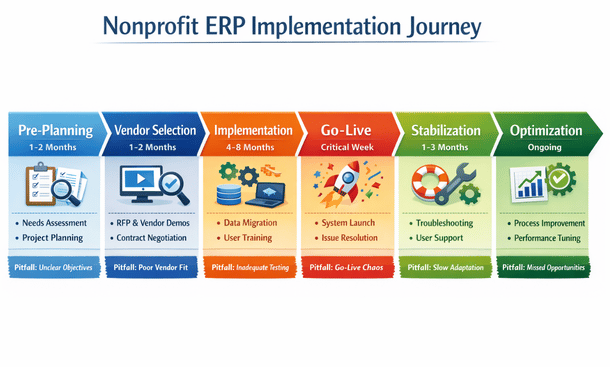
Budget realistically for total project costs, not just software licensing. Implementation services, data migration, configuration and customization, training, documentation, temporary backfill staff to cover people pulled into the project, consultant fees, and contingency reserves all need adequate funding. Most nonprofits underestimate true costs by 30 to 50 percent, then scramble desperately for additional resources mid-project when they’re too committed to stop but running out of money. Build comprehensive budgets with 20 percent contingency for unexpected challenges.
Secure active executive sponsorship before moving forward with vendor selection or contracting. Your executive director and board chair need to champion the project visibly and consistently, not just approve the budget and disappear. ERP implementation requires sustained organizational commitment over months. When competing priorities inevitably arise, your executive sponsor ensures the project stays appropriately resourced and on track despite operational pressures to defer or deprioritize.
Create realistic timelines based on your organizational capacity and project complexity. Small nonprofits with straightforward requirements, dedicated project resources, and limited customization might implement successfully in four to six months. Larger organizations with complex multi-entity structures, extensive grant portfolios, significant customization requirements, or limited staff availability easily need nine to twelve months or longer. Artificial deadline pressure leads to cut corners, poor configurations, inadequate testing, and frustrated users. Better to plan conservatively and finish early than overpromise and underdeliver.
Building the Right Implementation Team
The team you assemble determines implementation success more than the software platform you select. You need people with appropriate authority, relevant expertise, and sufficient availability.
Identify an internal project manager who owns day-to-day execution and accountability. This person coordinates between your organization and implementation vendors, manages detailed timelines and deliverables, removes obstacles blocking progress, escalates issues requiring executive decisions, and keeps everyone informed about status. They need solid project management skills, organizational credibility across departments, and enough seniority to make binding decisions. Plan on this role consuming 50 to 75 percent of their time for implementation duration. Half-hearted part-time project management guarantees delays and dysfunction.
Assemble department representatives with genuine decision-making authority, not junior staff without power to commit their departments. You need someone from finance who deeply understands your chart of accounts, fund structures, and reporting requirements. Someone from development who knows fundraising workflows, campaign attribution, and donor data complexities. A programs representative who can articulate case management needs and outcomes tracking requirements. These aren’t advisory roles—they’re core team members making configuration decisions that shape how the system works for years.
Consider hiring external expertise unless you have staff who’ve successfully implemented ERP systems previously. Bringing in experienced consultants who’ve done this dozens of times accelerates the project dramatically and helps you avoid costly mistakes that seem obvious in hindsight but aren’t apparent during initial implementation. This might be the vendor’s professional services team, an independent consultant specializing in your chosen platform, or a nonprofit technology firm with deep sector knowledge. Budget $50,000 to $150,000 for quality consulting support on typical implementations.
Define roles and decision rights with crystal clarity. Who makes final calls when core team members disagree about configuration approaches? Who approves customizations that add cost and complexity? Who signs off that testing is complete and the system is ready for launch? Ambiguity creates delays, conflict, and passive-aggressive dysfunction. Document decision authority in a project charter that everyone reviews, discusses, and formally accepts before implementation begins.
Establish governance structures that keep leadership engaged without micromanaging. Weekly core team meetings keep technical workstreams coordinated and surface blocking issues quickly. Bi-weekly steering committee meetings with executives ensure strategic alignment, maintain resource commitment, and provide venues for escalating decisions beyond the core team’s authority. Monthly board updates maintain leadership engagement and support while demonstrating progress justifying continued investment.
Plan for staff capacity constraints realistically. Your core team members have demanding day jobs that don’t disappear during implementation. Implementation tasks compete directly with ongoing operational responsibilities. Either provide backfill support so people can focus appropriately on the project, or extend timelines to accommodate limited availability. Pretending people can execute both roles at 100 percent simultaneously guarantees burnout, delays, and quality problems.
Data Migration Strategy Determines Quality
Data migration makes or breaks implementation more than any other single factor. Treat it as seriously as system configuration, not as an afterthought to handle during the final weeks before launch.
Inventory your current data sources comprehensively. You’re probably extracting data from accounting software, donor CRM, separate grants database, program management systems, HR platforms, spreadsheets maintained by individual staff, and legacy systems no longer actively used but containing historical data you need. List every system containing data requiring migration and assess data quality, completeness, and accessibility.
Assess data quality with unflinching honesty. Legacy systems inevitably accumulate years of inconsistencies, duplicate records, incomplete fields, and outright errors. Migrating dirty data into a pristine new system just moves your problems to a more expensive platform. Plan for significant data cleanup as deliberate work effort requiring staff time and subject matter expertise, not something that happens automatically during migration.
Define migration scope through careful cost-benefit analysis. Do you migrate ten years of transaction history or just the current fiscal year? Do you bring over closed grants from five years ago or only currently active awards? Do you import every donor interaction since 1995 or just relationships active in the past three years? More historical data provides continuity and trend analysis but dramatically increases migration complexity, cost, and timeline. Make conscious strategic tradeoffs rather than defaulting to “migrate everything” without considering implications.
Create detailed data mapping documentation showing exactly how fields and values in source systems translate to your new ERP structure. Your old chart of accounts doesn’t match your new one designed around best practices. Your current fund structure needs careful mapping to the new system’s dimensional tracking. Donor records from your legacy CRM need alignment with constituent records in your new platform. Document every mapping decision so everyone understands the transformation logic and you can troubleshoot when migrated data doesn’t look right.
Plan for multiple migration iterations, not a single perfect attempt. Your first migration run will reveal mapping errors, format issues, business logic problems, and data quality gaps you didn’t anticipate. Budget time and resources for two to three complete migration cycles before final go-live, with each iteration improving quality and completeness based on lessons learned. Testing with real migrated data uncovers issues that theoretical planning misses.
Validate migrated data meticulously through multiple verification methods. Run reconciliation reports comparing source system totals to migrated data totals—do total assets, liabilities, and net assets match? Do total contributions by fund reconcile? Spot-check individual records for accuracy by examining random samples of grants, donors, and transactions. Have subject matter experts review migrated data in their areas of expertise. Finding errors during testing is annoying but manageable. Discovering them after go-live creates catastrophic loss of trust in the new system.
Establish data freeze protocols defining exactly when you stop entering data in old systems and perform final migration. Understanding this cutover timing and how you handle transactions occurring during the transition period is absolutely critical. Some organizations run parallel systems for a period, entering transactions in both old and new platforms until confidence builds. Others do hard weekend cutovers where legacy systems close Friday evening and new systems open Monday morning. Both approaches work, but you need clear plans communicated to everyone affected.
Configuration and Customization Require Discipline
Configuring your ERP to match your nonprofit’s specific needs requires constant balancing between leveraging standard functionality and creating custom modifications.
Start with baseline configuration of foundational elements that drive everything else. Set up your chart of accounts reflecting your new structure, fund hierarchy, location codes, departments, programs, grants, and other organizational dimensions. These core elements flow through every transaction and report. Getting them right from the beginning prevents painful restructuring later when you discover your initial design doesn’t support critical reporting needs.
Configure security and user roles matching your team structure and internal control requirements. Finance staff need different access than program managers. Your executive director needs visibility across everything but shouldn’t be able to post journal entries. Development staff should see comprehensive donor data but not employee salaries. Build role-based permissions that enforce appropriate access while maintaining necessary segregation of duties for audit compliance.
Design approval workflows that automate policy enforcement. Configure the system to require approval for purchase orders exceeding specified thresholds, grant expense coding by authorized program managers, donation refunds by development directors, and budget adjustments by department heads. Workflow automation eliminates manual enforcement of policies and creates clear audit trails documenting who approved what and when.
Resist over-customization temptations that increase implementation costs and create long-term technical debt. Every custom modification adds implementation expense, complicates future upgrades, and creates ongoing maintenance requirements. When your existing process conflicts with the system’s standard approach, question critically whether your current process is genuinely better or just familiar. Sometimes adapting your workflow to best practices embedded in well-designed software actually improves your operations rather than compromising them.
Document configuration decisions thoroughly in writing. Six months after go-live when staff turnover happens or questions arise, someone will ask why a particular field was configured a certain way or why you chose a specific allocation methodology. Without documentation, institutional knowledge disappears when team members leave. Maintain a configuration workbook recording decisions, rationale, alternatives considered, and implications.
Build templates for commonly repeated processes. Create grant budget templates with standard categories, journal entry templates for monthly recurring transactions, and report templates for regular funder reporting. Configure these during implementation as part of system setup rather than having users create them ad hoc after launch when they’re already overwhelmed learning new workflows.
Design integrations with other systems thoughtfully during implementation. Your ERP probably needs connections with online donation platforms, banking systems for automatic transaction download, payroll providers, email marketing tools, and program-specific databases you’ll continue using. Architecting these integrations properly during implementation prevents painful bolt-on projects later when you’re trying to run operations simultaneously.
Testing Validates Everything Works Before Launch
Thorough testing represents your only opportunity to catch problems before they impact live operations and real organizational data. Skimping on testing to meet arbitrary deadlines creates disaster.
Develop comprehensive test scenarios covering all major processes end to end. Test complete workflows from initiation through final output. Enter a donation—does it create constituent records properly? Post to correct funds? Trigger appropriate acknowledgment workflows? Generate accurate donor receipts? Test every critical business process completely, not just individual functions in isolation.
Conduct unit testing progressively as configuration advances. Don’t wait until everything is built to start testing. Test modules and features as they’re completed so you identify issues early when they’re easier and cheaper to fix. Early testing also validates that foundational configuration is solid before you build dependent components on top.
Perform integration testing across modules verifying data flows correctly. Your finance module might work perfectly independently, but does grant data flow accurately into financial reports? Do constituent records sync properly between fundraising and accounting? Do program service entries connect to client billing? Test the critical connections between components that make ERP valuable.
Run parallel testing processing identical transactions in both old and new systems simultaneously. This validates that your new system produces accurate results matching legacy system outputs and builds confidence in migration and configuration quality. Parallel testing also helps staff become comfortable with new workflows while the safety net of old systems remains available.
Engage actual end users in formal user acceptance testing. The people who’ll use the system daily need to validate that it works for their real-world scenarios. Their testing often reveals usability issues and workflow problems that technical testing by implementation teams completely misses. Build user acceptance testing into your project plan as a formal milestone with clear success criteria.
Test reporting extensively because reports reveal configuration problems that transaction testing misses. Generate your most critical reports and verify accuracy against source data. Month-end financial statements, board packages, grant reports to funders, donor acknowledgments—if a report matters to your operations, test it thoroughly. Report formatting, data accuracy, calculation logic, and ability to modify parameters all need validation.
Document and track issues systematically using simple project management tools. Not every bug needs fixing before go-live. Categorize issues as critical (must fix before launch), high priority (fix within first month), or low priority (address later as enhancements). A spreadsheet tracking issue descriptions, priority, assigned owner, status, and resolution keeps testing organized and ensures nothing falls through cracks.
Implementing an ERP system successfully requires far more than technical configuration. The human elements—change management, communication, training, and organizational readiness—determine whether your new technology gets embraced or quietly ignored. After investing heavily in implementation, making the right long-term strategic choice between comprehensive ERP platforms and simpler fund accounting software ensures you’ve selected technology appropriately matched to your organizational complexity and growth trajectory. Our detailed comparison of ERP versus fund accounting software helps you understand whether you truly need enterprise capabilities or if focused financial tools better serve your mission.
ERP vs Fund Accounting Software: What California Nonprofits Should Choose
This question comes up in nearly every conversation I have with nonprofit leaders exploring technology upgrades: “Do we really need a full ERP system, or would fund accounting software be enough?”
It’s honestly one of the most consequential technology decisions your organization will make, and there’s no universal right answer. The choice depends entirely on your specific situation—organizational size, operational complexity, growth plans, and what problems you’re actually trying to solve.
Understanding What Makes Them Different
The confusion is understandable because these terms get used interchangeably when they describe fundamentally different categories of software.
Fund accounting software is specialized accounting designed specifically for nonprofits. It tracks financial transactions using fund-based structures instead of for-profit revenue models. You can manage restricted and unrestricted funds, generate nonprofit financial statements following FASB standards, handle grant budgets and compliance, and produce reports satisfying auditors and funders. Solutions like QuickBooks Nonprofit Edition, Aplos, Nonprofit Treasurer, and standalone versions of Abila MIP fall into this category—focused tools that do nonprofit accounting exceptionally well within a defined scope.
ERP systems are comprehensive platforms integrating accounting with every other operational function your organization performs. Finance, donor management, grant tracking, program delivery, human resources, inventory management, and reporting all operate within one connected system where data flows automatically between modules without manual intervention. Platforms like NetSuite for Nonprofits, Microsoft Dynamics 365, Sage Intacct, and Blackbaud Financial Edge NXT represent true ERP solutions.
The fundamental difference comes down to scope and integration. Fund accounting software handles your financial books with nonprofit-specific features. ERP systems manage your entire organization as an integrated operation. One isn’t inherently superior—they serve different organizational needs and maturity levels.
Think of it this way: fund accounting software is like having an excellent specialized calculator for nonprofit finances. ERP is like having a complete operating system running your entire organization. Both have legitimate use cases depending on what you’re trying to accomplish and how complex your operations have become.
When Fund Accounting Software Makes Perfect Sense
Fund accounting platforms offer genuine advantages that make them the absolutely right choice for many California nonprofits across different budget sizes and program areas.
Simplicity and approachability top the benefits list. These systems are designed specifically for nonprofit finance staff, not enterprise IT departments managing complex technical infrastructures. The learning curve is manageable and reasonable. Most finance team members become comfortable and productive within a few weeks of going live. You don’t need outside consultants or specialized technical expertise just to get started and handle routine operations.
Significantly lower costs make fund accounting accessible to organizations at all budget levels. Entry-level cloud solutions like Aplos or QuickBooks Nonprofit Edition run $50 to $200 monthly. Mid-tier platforms like Nonprofit Treasurer or specialized fund accounting cost $100 to $500 monthly. Even sophisticated fund accounting like Abila MIP rarely exceeds $3,000 monthly for licensing. Implementation often takes weeks rather than months, keeping consulting costs minimal and manageable within tight nonprofit budgets.
Focused functionality means these systems do core accounting genuinely well without feature bloat. Fund tracking across multiple restrictions, grant accounting with compliance monitoring, allocation of shared expenses across programs and funding sources, nonprofit financial statements in required formats, Form 990 preparation support—the essential accounting features you absolutely need are polished, reliable, and built around how nonprofits actually operate.
Quick implementation timelines get you operational fast without multi-month disruption. Small to mid-sized nonprofits can be fully operational on fund accounting software in two to eight weeks. You’re not embarking on a six-month organizational transformation project. You select software, migrate data, configure basic settings, train users, and launch. The minimal disruption to ongoing operations appeals strongly to organizations without capacity for extended implementation projects.
Accessible vendor support tends to be included or available at reasonable additional costs. Companies selling fund accounting software understand nonprofits operate on constrained budgets with limited technical resources. Support is typically responsive, knowledgeable about nonprofit accounting, and doesn’t require paying enterprise consulting rates just to get basic questions answered.
For organizations with relatively straightforward operations, fund accounting delivers everything required without unnecessary complexity or unjustifiable expense. A community foundation managing $3 million in donor-advised funds, a local food bank with $1.2 million in revenue from diverse sources, an arts nonprofit running two programs with modest development operations—these organizations probably don’t need full ERP capabilities and would waste resources implementing systems more sophisticated than their actual requirements.
When ERP Systems Become Necessary
As nonprofits grow in size, program diversity, and operational complexity, the limitations of disconnected systems become increasingly painful and costly.
Integration challenges emerge prominently when you’re juggling multiple disconnected platforms. Your fund accounting software handles finances. Your donor CRM manages constituent relationships and gift processing. Your grants database tracks compliance and reporting. Your program database records client services and outcomes. Spreadsheets maintained by individual staff fill gaps between systems. Moving data between these platforms creates enormous overhead, introduces frequent errors, and prevents real-time organizational visibility.
I’ve personally witnessed California nonprofits spending 20 to 30 hours weekly exporting data from their CRM, reformatting painfully in Excel, importing into accounting, reconciling inevitable discrepancies, then generating reports by manually pulling data from three separate systems and combining in PowerPoint or Word. This isn’t productive mission work—it’s system-induced waste directly reducing program impact.
Scalability limitations become apparent as organizations grow. Fund accounting software often has hard limits on transaction volumes it can process efficiently, number of grants or funds you can actively manage, or reporting complexity it can support. At some threshold, you simply outgrow the platform’s architectural capabilities and face painful migration to more robust systems anyway. Better to migrate proactively when you control timing than reactively during crisis.
Reporting across organizational functions becomes nearly impossible with disconnected systems. Your board reasonably wants integrated dashboards showing fundraising performance, program outcomes, and financial health in unified views. With separate systems, this requires extensive manual report assembly every single month. With integrated ERPs, it’s a single dashboard pulling live data automatically and updating continuously.
Multi-entity operations struggle significantly with standalone fund accounting. If you manage state chapters, local affiliates, fiscal sponsorships, or multiple related legal entities requiring financial consolidation, most fund accounting platforms simply cannot handle this complexity. You end up maintaining completely separate instances and building painful manual consolidation processes that consume days quarterly.
Workflow automation and sophisticated approvals remain limited in fund accounting platforms. ERPs enable complex approval workflows routing transactions based on amount thresholds, departmental ownership, grant restrictions, or custom business rules. Automated journal entries, scheduled reports, and business process automation eliminate repetitive manual tasks that consume staff capacity in organizations using simpler systems.
Advanced analytics and meaningful business intelligence require the data integration that only ERP platforms provide. When all organizational data lives in one connected system, you can analyze relationships between fundraising activities and donor retention patterns, program costs and measurable outcomes, or staff capacity and service delivery volumes in sophisticated ways that disconnected systems architecturally prevent.
Organizations experiencing these specific pain points benefit enormously from migrating to ERP capabilities. A homeless services organization managing $18 million across government contracts and foundation grants, operating five service locations, serving 3,000 clients annually, employing 95 staff, and coordinating with multiple partner agencies absolutely needs ERP-level capabilities, not just fund accounting with manual workarounds.
Calculating True Total Cost of Ownership
Budget constraints are absolutely real for every nonprofit, so let’s examine costs honestly beyond initial sticker prices.
Fund accounting software costs break down straightforwardly. Monthly subscriptions or annual licensing typically run $600 to $8,000 yearly for most small to mid-sized organizations. Implementation services might cost $2,000 to $20,000 depending on data complexity and customization requirements. Training needs are usually minimal given simpler interfaces. Total first-year investment typically lands between $5,000 and $30,000 for complete implementation.
ERP systems carry substantially higher upfront price tags. Annual licensing ranges from $20,000 to $150,000 depending on chosen platform, implemented modules, and user counts. Implementation professional services run $40,000 to $200,000 for configuration, data migration, integration development, and comprehensive training. First-year total investment typically reaches $60,000 to $350,000 for complete implementations.
Those numbers make fund accounting appear obviously preferable financially, but total cost of ownership over three to five years tells a more nuanced story.
With fund accounting as your financial core, you’re also paying separately for donor CRM ($2,000 to $15,000 annually), grants management software ($3,000 to $18,000), program-specific databases (costs vary enormously), integration middleware or custom connections ($1,000 to $12,000), and the massive opportunity cost of staff time managing disconnected systems and manually moving data between platforms.
When you calculate the complete ecosystem cost—all software subscriptions, integration expenses, consultant fees connecting disparate systems, and the very real opportunity cost of staff time wasted on data manipulation instead of mission work—the cost gap narrows considerably.
Return on investment analysis should include quantifiable efficiency gains. One environmental nonprofit in Oakland calculated they were spending 28 hours weekly on manual tasks that became fully automated after ERP implementation. At an average loaded hourly cost of $38 including benefits and overhead, that represented $55,300 in annual labor savings. Their ERP investment paid for itself completely through efficiency gains alone within 30 months, with ongoing savings every year afterward.
Better decision-making enabled by real-time integrated data has substantial value that’s harder to quantify but genuinely impacts outcomes. How much is it worth to know within hours instead of weeks that a program is running significantly over budget? What’s the value of identifying a major donor showing early lapsing signals while you can still intervene? How does data-driven strategic planning improve your organizational effectiveness and community impact?
For small nonprofits with budgets under $2 million, relatively simple structures, limited funding sources, and no aggressive growth plans, fund accounting almost always makes financial sense. For organizations with budgets exceeding $5 million, multiple complex programs, demanding compliance requirements, or ambitious growth trajectories, ERP return on investment becomes increasingly compelling despite higher upfront costs.
Making Your Decision Based on Real Organizational Factors
Here’s a practical decision framework based on factors that actually matter in real nonprofit operations.
Organization size and budget provide initial guidance but aren’t solely determinative. Under $1 million in annual revenue—fund accounting almost certainly makes sense. Between $1 million and $5 million—it depends heavily on operational complexity. Over $5 million—seriously consider ERP, especially if you’re experiencing growth or increasing complexity.
Number and diversity of funding sources matters enormously. Managing five straightforward foundation grants with similar reporting requirements works fine in fund accounting. Tracking 35 different grants with varying compliance rules, reporting schedules, budget structures, and audit requirements screams for ERP-level grant management capabilities.
Program complexity and service delivery models influence requirements significantly. Running one direct-service program from a single location with straightforward delivery is fundamentally different from operating six distinct programs across multiple sites with complex client tracking, outcomes measurement, and partner coordination.
Current staff capacity and available technical expertise affect implementation success probability. Do you have people internally who can manage complex systems effectively? Can you realistically dedicate staff time to multi-month implementation projects? Small teams already stretched impossibly thin often succeed better with simpler fund accounting than struggling with under-resourced ERP implementations that drag on indefinitely.
Growth trajectory and strategic plans look forward, not backward. If you’re planning to double organizational size over three years, add significant new programs, expand geographically into new markets, or dramatically increase funding complexity, choose systems capable of scaling with you rather than needing painful replacement during growth phases.
Reporting and compliance burden varies wildly across organizations. Nonprofits with extensive government funding, complex multi-funder reporting requirements, or annual single audits need robust systems with strong compliance features. Organizations with simpler donor bases and straightforward financial reporting have less demanding system requirements.
Current pain points reveal whether existing approaches are working. If your team constantly complains about manual data entry consuming their days, reconciliation challenges creating errors, or complete inability to get timely actionable reports, your current technology approach isn’t working regardless of organizational size. Pain points signal needed change.
Planning Migration Paths That Make Sense
Technology choices aren’t necessarily permanent decisions or all-or-nothing selections. Smart migration strategies let you evolve systematically as organizational needs change.
Starting with fund accounting and migrating later represents a common and completely viable path. Many California nonprofits begin with QuickBooks or similar platforms when small and operationally simple, then migrate deliberately to ERP when complexity or scale genuinely demands it. This approach works perfectly fine if you accept you’ll eventually undertake a data migration project and plan timing proactively.
Using mid-tier solutions as stepping stones provides growth runway. Platforms like Sage Intacct or Acumatica Cloud ERP offer genuine ERP capabilities at price points between basic fund accounting and full enterprise systems. They provide sophisticated functionality without massive upfront investment, allowing growth without immediate system replacement.
Implementing ERP in deliberate phases spreads costs and organizational disruption over time. Start with core financial management, add constituent relationship management next, then grants management, then program modules progressively over 18 to 24 months. This phased approach reduces initial investment, lets your team adapt gradually to new systems, and proves value incrementally before full commitment.
Maintaining quality fund accounting while integrating thoroughly with other best-of-breed specialized tools creates effective hybrid approaches. If your fund accounting software offers solid integration capabilities, building a connected ecosystem of specialized tools—excellent CRM, dedicated grants management, purpose-built program database—might serve you better than mediocre all-in-one ERP where no individual component excels.
The critical factor is honest self-assessment about your current situation combined with realistic projections about your organizational future. Don’t over-invest in sophisticated enterprise capabilities you’ll never fully utilize. But equally, don’t under-invest in necessary infrastructure that’s already actively limiting your mission impact and organizational effectiveness.
Plan migration timing strategically around natural organizational transitions. Fiscal year boundaries, leadership changes, major funding transitions, facility relocations, or significant program launches often provide logical windows for system changes. Deliberately avoid implementing new technology during your busiest program seasons, major fundraising campaigns, or audit periods when disruption creates maximum stress.
Choosing the right technology infrastructure for your nonprofit isn’t about finding objectively superior software. It’s about honestly assessing your current operational reality, understanding where you’re headed strategically, and selecting systems appropriately matched to your complexity level and growth trajectory.
The nonprofits that make these decisions well share common characteristics. They invest time in thorough needs assessment before evaluating vendors. They budget realistically for total cost of ownership including implementation, training, and ongoing support. They choose systems aligned with strategic plans rather than just solving immediate frustrations. They commit adequate resources to proper implementation instead of cutting corners. And they recognize that technology is a tool supporting mission, not a magic solution replacing sound strategy and capable people.
Whether you land on focused fund accounting software or comprehensive ERP platforms, the goal remains constant—reducing operational friction so more organizational energy flows directly to mission impact. Every hour your finance team spends reconciling disconnected systems is an hour not spent on strategic financial planning. Every day your development director can’t access integrated donor insights is a day of missed cultivation opportunities. Every week your executive director operates without real-time organizational visibility is a week of suboptimal decisions.
California nonprofits are creating extraordinary community impact across education, environment, health, arts, social services, and countless other sectors. Your technology should amplify that impact, not constrain it. Make informed choices. Implement thoughtfully. And keep your focus firmly on the communities you serve.
For nonprofits ready to move forward with ERP implementation, understanding the complete tactical roadmap from planning through go-live and beyond dramatically increases your success probability and helps you avoid the costly mistakes that derail projects. Our comprehensive guide on implementing ERP in nonprofit organizations provides the detailed playbook you need to execute successfully and realize the transformational value these systems can deliver.
About the Author

mike
Mike is a tech enthusiast passionate about SaaS innovation and digital growth. He explores emerging technologies and helps businesses scale through smart software solutions.
Did you find this helpful?
Your feedback helps us curate better content for the community.