
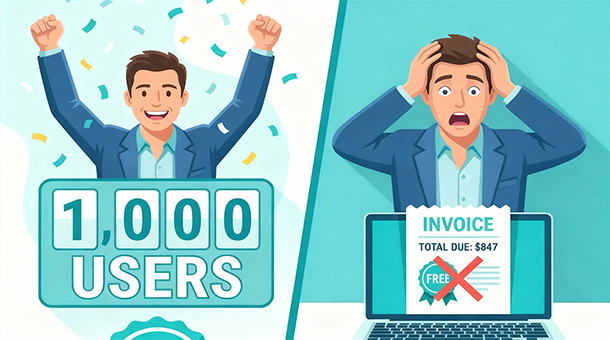
The promise is simple: start free, pay only when you grow. What they don’t mention is that “growth” often means jumping from $0 to $500 monthly with no warning when you hit 1,001 users instead of 1,000. Free tiers are marketing tools designed to get you committed before the real costs appear.
Why companies offer generous free tiers
Free tiers aren’t charity, they’re customer acquisition strategy. Tech platforms know that switching costs are high once you’ve built your app on their infrastructure. Your database schema is designed for their system, your code uses their APIs, and your users’ data lives in their servers.
Getting you to start for free means you’re invested before you understand the true costs. By the time you hit the limits and face your first bill, migrating to a competitor means weeks of development work, potential downtime, and risk of data loss. Most founders just pay the bill.
The free tier gives you enough resources to build something real but not enough to run a successful business. You can prototype, validate your idea, and get your first users without spending money. The moment your idea works and users start arriving, you hit the paywall.
This model works brilliantly for platforms because it filters out casual builders while capturing serious founders right when they’re most committed. You’ve spent months building, your users depend on your app, and walking away means abandoning everything. That’s when the pricing conversation gets interesting.
The three ways free tiers trick you
The first trick is usage-based limits that sound generous but evaporate quickly. A database with 500MB of storage feels infinite when you’re testing with fake data. Real users uploading profile photos, creating content, and generating activity logs fill 500MB in weeks, not months.
The second trick is the cliff, where exceeding limits doesn’t just cost a little extra, it forces you onto a completely different pricing tier. You hit 501MB of storage and suddenly you’re on a $25 monthly plan, even though you only needed 1MB more. There’s no gradual scaling, just a binary jump from free to paid.
The third trick is combining multiple limits so you hit one before you hit others, forcing an upgrade you don’t fully utilize. Maybe you’re nowhere near the storage limit but you exceeded the bandwidth limit because your app went viral for a day. You upgrade to a plan with 10x the storage you don’t need just to get the bandwidth you do need.
Learning how to predict your monthly tech costs as you scale reveals these patterns before they become budget surprises. Founders who understand the limits can optimize their usage or plan upgrades strategically instead of reactively.
Understanding the hidden multipliers
Free tiers advertise headline numbers that sound impressive until you understand what they actually measure. “500,000 function invocations monthly” sounds like more than you’ll ever need. Then you realize every user action triggers multiple functions: authentication, database queries, file uploads, and notifications.
A single user signing up might trigger five separate function invocations: account creation, welcome email, profile setup, database writes, and analytics tracking. Suddenly 500,000 invocations isn’t 500,000 users, it’s 100,000 users, and if your app has any complexity, it’s even fewer.
Free tier limits shape more than just your budget — they influence which security features you can actually access. Some platforms lock row-level security, audit logging, and advanced access controls behind paid tiers, meaning a cost decision can quietly become a security gap. The Entrepreneur’s Guide to App Security and Data Safety breaks down which protections matter most so you know exactly what you can’t afford to leave behind when choosing a tier.
Storage limits measure raw data, not useful capacity. If you’re storing user-uploaded images without compression, a 5MB photo counts as 5MB against your limit. Compress it first and it’s 800KB, giving you 6x more capacity from the same limit. Most founders don’t think about this until they’re already paying for extra storage they didn’t need.
Bandwidth limits measure data transfer in and out of your database. Every time a user loads their dashboard, you’re transferring data. Every image they view, every file they download, every API call your app makes counts against bandwidth. A viral day where 10,000 people check your app could exceed your monthly bandwidth limit in 24 hours.
Calculating your actual runway on free tiers
Take your current user count and divide the free tier limits by your usage per user. If you have 50 users and you’ve used 50MB of storage, that’s 1MB per user. Your 500MB limit supports 500 users theoretically, but real growth isn’t linear.
User activity increases as your community grows. Early adopters who love your product generate more data than casual users who signed up but never returned. Your first 100 users might average 1MB each, but your next 400 users might average 2MB each because they’re more engaged.
New features consume resources differently than core features. You launch with basic profiles and task lists, staying well within limits. You add file attachments, and suddenly storage consumption triples. You add real-time notifications, and function invocations double. Each feature compounds your resource usage in ways that aren’t obvious until they’re in production.
Your runway on a free tier is probably half of what the math suggests. If the numbers say you can support 1,000 users, plan for 500. If they say you have six months, plan for three. The buffer protects you from unexpected growth, feature additions, or usage spikes that push you over the edge prematurely.
The migration tax you pay for switching
Switching platforms after you’ve built on one isn’t technically impossible, it’s just expensive enough that most founders don’t do it. Your database schema was designed for PostgreSQL, and the new platform uses MongoDB. Every query needs rewriting, every relationship needs restructuring, and subtle differences in how data is stored create bugs you’ll spend weeks fixing.
Your authentication system is tied to the platform’s user management. Migrating means exporting user data, generating new password hashes, updating session management, and hoping nobody gets locked out during the transition. Testing this properly requires a staging environment and careful rollout plan.
Your file storage uses platform-specific URLs and access controls. Moving to a new provider means updating every reference to files in your database, changing how permissions work, and potentially breaking links that users have bookmarked or shared. Storing photos, videos, and documents for your users efficiently means choosing the right platform initially instead of migrating later.
The real cost isn’t the technical work, it’s the opportunity cost. Three weeks spent migrating is three weeks not building features, acquiring users, or generating revenue. Most founders do the math and realize paying the higher tier is cheaper than switching, even if they feel trapped.
How platforms use soft lock-in strategically
Platform-specific features are designed to make you dependent. You start with basic database queries that work anywhere, but then you discover their built-in authentication, real-time subscriptions, and edge functions. Each feature you adopt makes migrating harder.
The features are genuinely useful, which is why the strategy works. Business autopilot through edge functions that automate tasks saves you weeks of development time. Real-time subscriptions mean you don’t build your own websocket infrastructure. Built-in auth means you skip the complexity of managing passwords and sessions.
By the time you realize you’re locked in, you’ve built so much on their platform that leaving feels impossible. This isn’t evil, it’s business. Platforms invest in features that make them valuable, and that value comes from integration that’s hard to replicate elsewhere.
The counter-strategy is choosing platforms with open standards and export options. Knowing why being open source means you’ll never be locked in gives you flexibility even after you’re deeply integrated. If the platform’s data formats are standard and their code is inspectable, migration is painful but possible. If everything is proprietary, you’re truly trapped.
Reading the fine print before you commit
Pricing pages highlight the free tier limits but bury the overage charges. Read the documentation to find out what happens when you exceed limits. Some platforms throttle your app, making it slower but keeping it online. Others charge immediately at rates that can shock you.
Overage pricing is often significantly more expensive than upgrading proactively. You might pay $0.10 per GB over your storage limit, when upgrading to the next tier gives you 50GB more for $25 monthly. If you hit overages regularly, you’re paying premium rates for capacity you could have gotten cheaper with a plan upgrade.
Some platforms cap overages to prevent runaway bills, while others let them accumulate indefinitely. A spending cap that shuts down your service at $100 protects you from a $5,000 surprise, but it also means your app goes offline unexpectedly if you hit the cap during a busy period.
Support tiers often correlate with pricing tiers. Free tier users get community forums and documentation. Paid tier users get email support and faster response times. Enterprise tier users get dedicated account managers. When something breaks at 2am, knowing which support level you have matters.
Comparing true costs across platforms
Don’t compare pricing pages, compare what you’ll actually pay at your target scale. Platform A offers 1GB free storage and charges $10 per additional GB. Platform B offers 500MB free and charges $5 per additional GB. If you need 5GB, Platform A costs $40 monthly while Platform B costs $22.50, making the “less generous” free tier actually cheaper.
Feature parity matters more than price. A platform that’s $10 cheaper but missing critical features costs you development time to build those features yourself. If their free tier lacks real-time capabilities and you need them, you’re either paying for the next tier or spending weeks implementing websockets manually.
Hidden costs appear in unexpected places. Some platforms charge for database backups. Others charge for SSL certificates. Some include bandwidth in the base price while others charge per GB transferred. Add up the full stack of what you need, not just the database or hosting cost in isolation.
Geographic pricing differences can be significant. A platform with US and EU regions might charge the same for both, or might charge 20% more for EU hosting due to compliance and infrastructure costs. If most of your users are in one region, optimize for that region’s pricing.
Planning your upgrade path strategically
Know your trigger points before you hit them. Decide that when you reach 400 users or 400MB of storage, whichever comes first, you’ll upgrade to the paid tier. This gives you buffer room to handle unexpected spikes without emergency decisions.
Budget for the upgrade in your financial planning. If you’re bootstrapping and every dollar matters, factor in the $25 monthly cost before you hit the limit. If you’re funded and growth is the priority, plan to upgrade early to avoid any risk of hitting limits during a critical launch or campaign.
Time upgrades strategically around revenue. If you’re launching a paid tier for your product next month, upgrade your infrastructure now so you’re not doing both simultaneously. If you’re pre-revenue and cash-constrained, optimize aggressively to stay on the free tier until you have customers paying you.
Some platforms offer startup credits or extended free trials for early-stage companies. Supabase offers programs for accelerators and incubators. AWS has activate credits. Google Cloud has startup programs. These can give you six to twelve months of paid-tier resources while you’re finding product-market fit, removing the pressure to optimize prematurely.
Optimizing to extend your free tier runway
Compression is the fastest way to extend storage limits. Images uploaded at 5MB compress to under 1MB with no visible quality loss. Videos transcode to more efficient formats. Documents convert to PDFs that are smaller than the originals. This 5x reduction in storage means 5x more users on the same free tier.
Archive or delete inactive data. Users who haven’t logged in for six months probably don’t need their entire activity history immediately accessible. Move it to cheaper cold storage or delete it with proper notice. Most apps keep everything forever when 90% of data is never accessed again.
Lazy-load resources instead of fetching everything upfront. A user profile page doesn’t need to load their entire photo gallery, just the first few thumbnails. Load more only when they scroll down. This reduces bandwidth, speeds up the app, and keeps you under limits longer.
Avoiding “bill shock” by predicting your monthly tech costs becomes easier when you’re actively monitoring and optimizing. Set up weekly reviews of your usage metrics, not just alerts when you hit limits. Proactive optimization beats reactive crisis management.
When free tier limitations are actually healthy
Constraints force better architecture decisions. If you have unlimited resources, you write inefficient code because it doesn’t matter. If you’re working within tight limits, you learn to write efficient queries, compress data properly, and eliminate waste.
Free tier limits filter out bad ideas quickly. If your app can’t get traction with 500 users on a free tier, it probably won’t get traction with 5,000 users on a paid tier. The limit forces you to validate the idea before spending money on infrastructure.
Some founders artificially constrain themselves even after upgrading. They set internal limits below the paid tier maximums to maintain the discipline that made their app efficient. This keeps costs low as they scale and prevents the bloat that comes from unlimited resources.
The real trap isn’t the free tier itself, it’s not understanding what you’re signing up for. Platforms that clearly communicate limits, provide monitoring tools, and offer reasonable upgrade paths aren’t trapping you, they’re offering a fair deal. The trap is blindly assuming “free forever” means “unlimited forever” and getting surprised when reality arrives.
Understanding free tier traps is one thing — knowing whether to build on managed platforms or hire a developer to build something custom is the decision that really determines your long-term costs. Build vs. Buy makes the case for why most founders are better off starting with managed services before ever writing a custom line of backend code.
About the Author

AISalah
Bridges linguistics and technology at PointOfSaaS, exploring AI applications in business software. English Studies BA with hands-on back-end and ERP development experience.
Did you find this helpful?
Your feedback helps us curate better content for the community.