

Once a startup gains traction, basic task management isn’t enough. Teams need structure, automation, and visibility to stay productive without burning out. Todoist offers advanced features that help founders scale without losing control. These tools let you manage complexity while keeping the interface simple and approachable, complete Todoist guide for entrepreneurs.
Filters: See What Matters Most
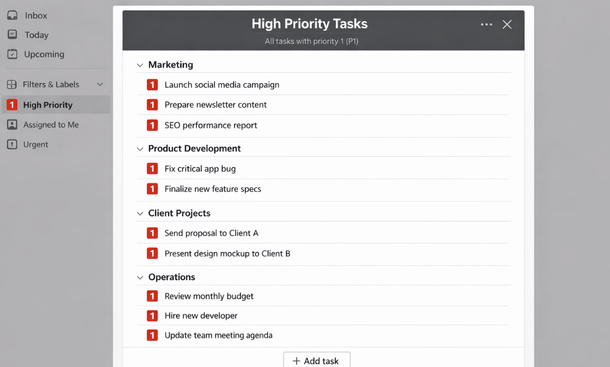
Filters let you create dynamic task views based on conditions like priority, project, or label. Instead of scrolling through endless tasks, you can pull up a filtered list of high-priority tasks due this week or all tasks labeled “urgent.”
Filters are flexible. You can combine multiple criteria to match your workflow. For example, you can see every task for marketing due today that hasn’t been started yet. This keeps focus on execution instead of planning endlessly.
Automations: Reduce Repetitive Work
Recurring tasks are a start, but Todoist also offers automation through rules and integrations. You can set tasks to auto-create from emails, assign labels automatically, or push completed tasks to Slack.
Automation reduces friction and mental overhead. Instead of worrying about remembering routine tasks, founders can focus on strategic work. Small teams benefit the most since every saved minute counts.
Integrations: Connect Everything
Todoist integrates with tools like Google Calendar, Slack, Zapier, and Notion. These connections turn Todoist into a central hub. For example, an email can become a task automatically, or calendar events can sync directly with projects.
Integration ensures all work is visible and accounted for. Teams don’t need to switch apps constantly, and founders maintain a clear overview of what’s happening in every department.
Labels and Advanced Sorting
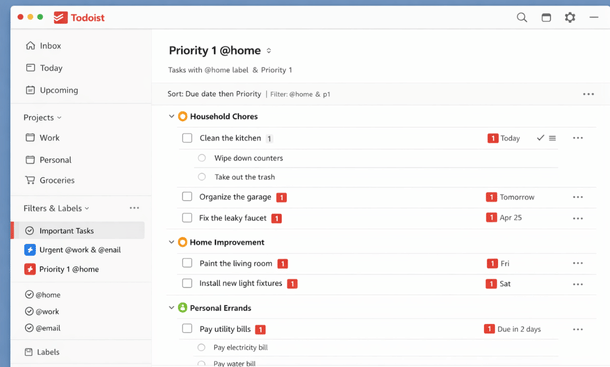
Labels combined with advanced sorting allow founders to structure work by context, urgency, or type. You can quickly pull a list of tasks that require client follow-ups or tasks for a specific product launch.
Advanced sorting reduces mental clutter and supports execution-focused workflows. Teams can focus on critical work without feeling overwhelmed by long lists or ambiguous priorities.
Enhanced Task Management
Collaborating Effectively
Advanced features improve collaboration. Shared projects with assigned tasks, comments, and activity logs keep everyone on the same page. Teams see progress in real time, reducing confusion and unnecessary meetings.
Even small startups can benefit. Structured workflows allow each member to take ownership of tasks while founders maintain visibility. Productivity scales with minimal overhead.
Advanced Todoist features help startup teams streamline workflows, reduce repetitive work, and stay organized as the business grows. Filters, automations, integrations, and advanced sorting make task management simple yet powerful.
For workflow setups and practical step-by-step tips, check out Todoist Workflows That Actually Work for Founders. This will guide you to build actionable systems tailored to your startup’s needs.
About the Author

Pamela
Pamela is a dynamic professional with a deep passion for SaaS and emerging technologies. She provides valuable insights into software trends, digital innovation, and cutting-edge tools that empower businesses to thrive and expand.
Did you find this helpful?
Your feedback helps us curate better content for the community.