
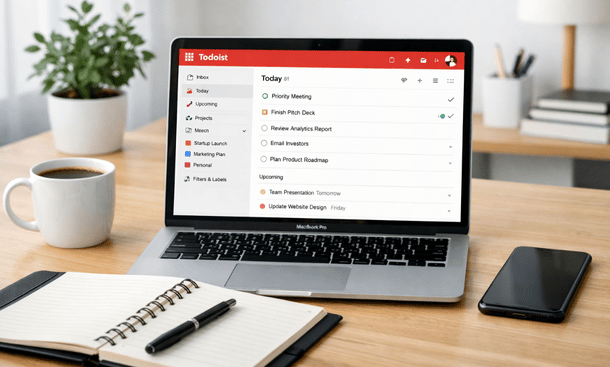
Entrepreneurs and early-stage startups face constant pressure. There are endless tasks, tight deadlines, and decisions that can impact the growth of the business. Without a system to organize work, it’s easy to feel overwhelmed or let critical tasks slip through the cracks. Todoist is a task management tool that helps founders structure their day, prioritize work, and maintain focus.
Its strength lies in simplicity and flexibility. You can create projects for every part of your business, break them into manageable tasks, and track progress without getting lost in menus or dashboards. Using Todoist effectively allows entrepreneurs to free mental bandwidth, improve execution, and scale without chaos.
Why Todoist Is a Game-Changer for Entrepreneurs
Todoist isn’t just a list of tasks. It’s a tool that adapts to the workflow of entrepreneurs. Founders often juggle product development, marketing, customer support, and strategy simultaneously. Todoist helps organize these responsibilities into clear, actionable projects. Each project can include sub-tasks, priorities, and labels to keep work structured.
One key advantage is the balance between simplicity and power. For solo founders, Todoist is light enough to adopt quickly, while for small teams, it provides enough structure to collaborate effectively. You can assign tasks to team members, track deadlines, and follow progress without heavy project management systems.
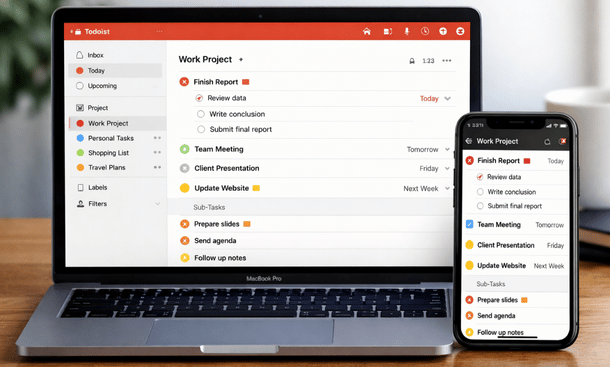
The mobile app is a big part of why founders rely on Todoist. Tasks sync across devices, so whether you’re traveling, in meetings, or working remotely, you can capture ideas and update tasks in real time. This reduces the risk of forgetting critical steps or losing momentum on projects.
Visual clarity is another reason Todoist stands out. Projects can be color-coded, tasks prioritized, and filters applied to focus on what matters most. Entrepreneurs benefit from seeing what needs attention now and what can wait, without feeling overwhelmed.
For founders interested in a deeper dive into productivity setup, Todoist integrates well with other tools and workflows. Practical guidance for structuring projects, priorities, and labels can be explored further in the Todoist Productivity Setup for Startups satellite page, which provides step-by-step instructions tailored to early-stage teams.
How to Use Todoist for Startup Productivity (Step-by-Step)
Getting the most from Todoist requires more than creating a few tasks. Setting up projects, priorities, and labels correctly turns it into a productivity engine for startups. Projects should represent key areas of your business—marketing, product development, sales, or operations. Inside each project, break work into sub-tasks that are specific and actionable.
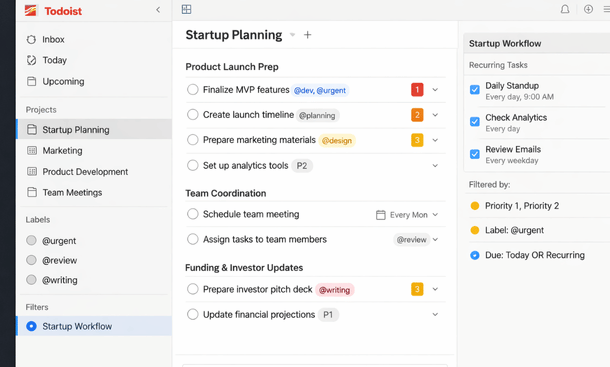
Prioritization is essential. Todoist lets you assign priorities from P1 (critical) to P4 (low). This visual hierarchy ensures that the most important tasks get attention first, even when your list grows long. Labels add context, like “calls,” “emails,” or “follow-ups,” making it easier to filter and review tasks based on what you’re doing at the moment.
Recurring tasks help with routine responsibilities. Weekly check-ins, reporting, or social media posts can automatically appear at set intervals. Templates allow you to replicate projects or task sequences quickly, which is especially useful for repeated campaigns or product launches.
Filters and views enhance focus. With filters, you can see all high-priority tasks due this week, or every task labeled “client follow-up.” Views like Today or Upcoming provide a clear snapshot of your workload, helping prevent tasks from slipping through the cracks.
Teams benefit as well. Shared projects, task assignments, and comments keep everyone aligned. Todoist scales from solo founders to small teams without adding complexity. Team members can see what’s expected, track progress, and communicate without constant meetings.
For a practical, step-by-step guide to setting up projects, priorities, labels, and filters that work for startups, check the Todoist Productivity Setup for Startups satellite page. It explains exactly how to structure Todoist for maximum daily efficiency.
Todoist vs Other Task Management Tools (Founder Perspective)
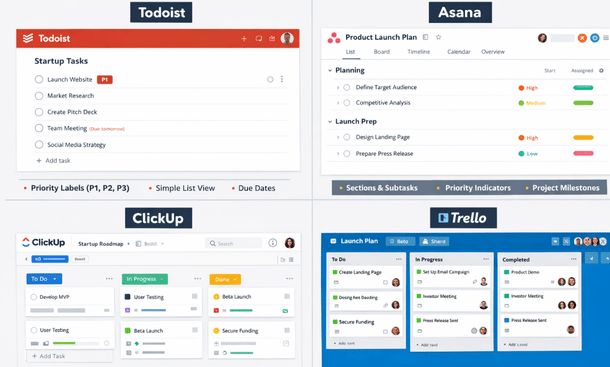
Choosing the right task management tool can define how efficiently a startup operates. While Todoist is popular, other platforms like Asana, ClickUp, and Trello offer different strengths. Understanding these differences helps founders select the tool that matches their workflow.
Todoist stands out for simplicity and speed. Its interface is clean, tasks are easy to create, and projects remain structured without overwhelming menus. For solo founders or small teams, this lightness means faster adoption and fewer barriers to consistent use. Recurring tasks, priorities, and labels allow founders to focus on execution rather than managing the tool itself.
Asana provides more detailed project management. Timelines, task dependencies, and multiple views like boards and lists are valuable for larger teams or complex workflows. However, its setup can be time-consuming, and smaller teams may find the system cumbersome compared to Todoist.
ClickUp offers extreme customization, including dashboards, automation, and multiple task views. While powerful, the learning curve can be steep. Solo founders or teams without dedicated project managers might spend more time configuring ClickUp than actually completing tasks.
Trello emphasizes visual task management. Boards, lists, and cards appeal to creative teams and simple workflows. It lacks some native features like priorities and recurring tasks, often requiring additional plugins. For execution-focused startups, Todoist provides built-in functionality with less setup.
For founders looking for a practical comparison to decide which platform fits their team, the Todoist vs Other Task Management Tools satellite page offers detailed insights on features, pros, and trade-offs. This helps entrepreneurs choose the right tool while aligning with their productivity goals.
Advanced Todoist Features for Startup Teams
As startups grow, simple task lists aren’t enough. Advanced features in Todoist help teams manage complexity while maintaining clarity and focus. Filters, automations, integrations, and labels allow founders to scale their workflow without adding unnecessary overhead.
Filters create dynamic views of tasks. For example, you can display all high-priority tasks due this week or every task labeled “client follow-up.” Combining multiple conditions ensures the most relevant work is always visible. This reduces overwhelm and keeps focus on execution.
Automations save time on repetitive tasks. Recurring tasks, email-to-task conversion, and Slack notifications can be set up to happen automatically. This frees mental bandwidth for strategic work instead of routine follow-ups.
Integrations turn Todoist into a central hub. Google Calendar, Slack, Zapier, and Notion connections ensure all work is captured and tracked in one place. Teams can collaborate across tools without losing sight of priorities.
Labels and advanced sorting further improve efficiency. Tasks can be grouped by context, urgency, or project. A simple filter can display everything that requires immediate attention, while subtasks keep larger projects manageable.
For founders wanting to implement these advanced features, the Advanced Todoist Features for Startup Teams satellite page explains step-by-step how to set up filters, automations, integrations, and labels for maximum productivity.
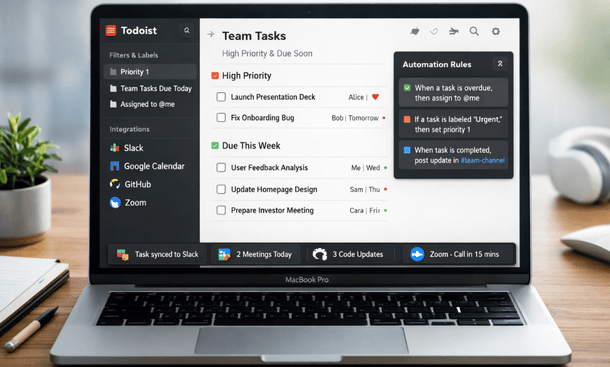
Todoist Workflows That Actually Work for Founders
Workflows turn Todoist from a task manager into an execution engine. For founders, structured workflows help reduce mental clutter, maintain focus, and ensure consistency in both solo and small team environments.
A daily workflow begins with reviewing tasks due today. Using the “Today” view, combined with priorities and labels, founders can quickly see what requires immediate attention. Recurring tasks and filters help prevent routine work from being forgotten, while subtasks break larger projects into manageable steps.
Weekly workflows involve reviewing upcoming tasks, adjusting priorities, and planning the next steps. Filters can show all high-priority tasks due this week or all client-related activities. This habit allows proactive planning and ensures alignment with larger goals.
Project-based workflows organize complex initiatives into clear actionable steps. For example, a product launch project can include design review, marketing campaigns, team syncs, and a launch checklist. Assigning deadlines, priorities, and labels ensures accountability and progress tracking.
Automation workflows reduce repetitive work. Tasks can be created from emails, templates, or integrations like Slack and Google Calendar. This saves time and keeps founders focused on high-value work.
For team collaboration, shared projects, task assignments, and comments provide visibility. Team members know what’s done, what’s pending, and where help is needed. Even solo founders benefit by establishing scalable processes for future team growth.
For practical examples of these workflows, visit the Todoist Workflows That Actually Work for Founders satellite page, which offers actionable guidance to implement daily, weekly, project, automation, and team workflows effectively.
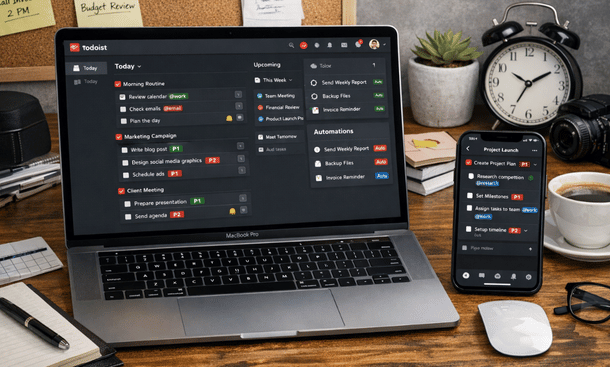
Organized Entrepreneur’s Workspace
Todoist provides entrepreneurs with a structured way to manage tasks, prioritize work, and scale productivity. From solo founders to small teams, its combination of projects, priorities, labels, filters, automations, and integrations creates a flexible system that grows with your startup.
Implementing Todoist effectively allows you to reduce mental clutter, maintain focus, and ensure consistent execution. Whether you are setting up your workflow, comparing tools, or leveraging advanced features, Todoist can become the backbone of your productivity system.
For founders looking to start organizing tasks immediately, the Todoist Productivity Setup for Startups satellite page offers step-by-step guidance to structure projects, priorities, and filters for maximum efficiency.
About the Author

Pamela
Pamela is a dynamic professional with a deep passion for SaaS and emerging technologies. She provides valuable insights into software trends, digital innovation, and cutting-edge tools that empower businesses to thrive and expand.
Did you find this helpful?
Your feedback helps us curate better content for the community.