
Table of contents
- Structured data: the foundation that prevents operational chaos
- The connection between frontend and backend: why communication quality determines user experience
- API integrations: how backends connect to the business tools that drive revenue
- Multi-tenant architecture: how to serve multiple companies without multiplying costs
- Progressive web apps: why mobile access doesn’t require native app budgets
- Social login: why one-click authentication directly impacts revenue
A founder launches a SaaS product. Ten users sign up in the first week. Then fifty. Then two hundred.
Revenue climbs from $500 to $5,000 to $20,000 per month. The product works. Customers pay. Growth accelerates.
Then the backend breaks.
Pages load slowly. Features stop working under heavy traffic. The database runs out of space. Adding new features takes twice as long because the infrastructure was never designed to handle this scale.
The founder realizes too late that the backend was built for a weekend project, not a real business.
This scenario plays out constantly with first-time founders who focus on features and design while treating backend architecture as an afterthought. The app looks great and solves a real problem, but the foundation crumbles the moment traction arrives.
Choosing the right backend is not about picking the newest technology or the most popular framework. It’s about selecting infrastructure that aligns with how subscription businesses actually grow: slowly at first, then rapidly, with unpredictable spikes in traffic and constantly evolving feature requirements.
The backend either supports this growth or it sabotages it. There’s no middle ground.
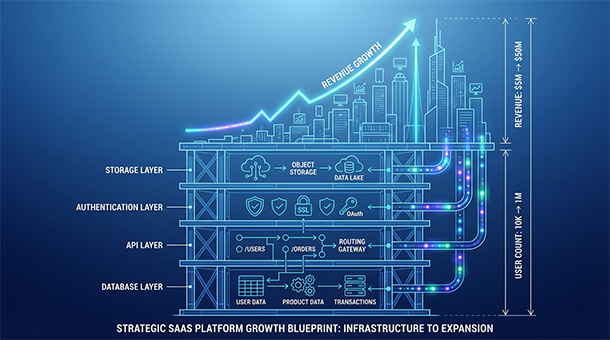
This guide walks through the six critical factors that determine whether a backend can scale with subscription revenue or whether it becomes the bottleneck that kills momentum exactly when the business needs infrastructure to be a competitive advantage instead of a liability.
Structured data: the foundation that prevents operational chaos
Every subscription business runs on data. Customer information. Payment history. Usage analytics. Feature preferences. Billing cycles. Support tickets.
When a business has ten customers, this data can live anywhere. A spreadsheet works. A notes app works. Random text files scattered across three tools somehow work.
When a business has a thousand customers generating hundreds of interactions daily, chaos becomes the default state unless data is structured from day one.
Structured data means information is stored in predictable, organized formats that software can read, search, and update automatically. It means every customer record has the same fields. It means dates are stored as actual dates, not random text strings. It means relationships between data, like connecting customers to their orders, are explicit and enforceable.
The alternative is unstructured data, where information lives in whatever format seemed convenient at the time. Email addresses in one field, sometimes with extra spaces. Dates written as “March 3” or “3/3/24” or “next Tuesday” depending on who entered them. Customer names spelled three different ways across three different systems.
Unstructured data feels easier early on because there are no rules to follow. This flexibility becomes catastrophic as the business grows.
Why messy data multiplies operational costs
A customer emails asking why they were charged twice. With unstructured data, answering this question requires checking Stripe, then the customer spreadsheet, then email history, then trying to reconcile three sources that don’t match.
Thirty minutes later, the answer emerges: it was a test charge that was never refunded. The customer is frustrated. The founder wasted time that could have been spent on growth. The issue could have been prevented entirely with structured data.
When payment data and customer data live in the same structured database, the backend automatically connects them. A single query shows every transaction for that customer, when it happened, what it was for, and whether it succeeded or failed. The answer takes five seconds instead of thirty minutes.
This efficiency gap compounds with every customer added. At ten customers, manual data reconciliation is annoying. At a thousand customers, it’s a full-time job. At ten thousand customers, it’s impossible without structured systems.
How structure enables the features customers expect
Subscription businesses need to display payment history. Calculate prorated charges when customers upgrade mid-month. Send automated emails when subscriptions are about to renew. Generate revenue reports by month, quarter, and year.
None of these features work reliably with unstructured data.
Showing a customer their payment history requires querying transactions where customer_id matches their account and sorting by date. This is trivial with structured data stored in proper date fields. It’s nearly impossible when dates are stored as random text and customer IDs sometimes match and sometimes don’t because someone manually entered data incorrectly.
Structured data makes complex features simple. Unstructured data makes simple features complex.
This is why backends like Supabase, built on PostgreSQL with strict data typing and relationship enforcement, structure data by default. The platform assumes the founder is building something serious that needs accurate records, not a weekend project that can tolerate chaos.
When to structure data and when it’s too late
The time to implement structured data is at the very beginning, before the first customer signs up.
Once a business has customers and revenue flowing through unstructured systems, migrating to structured data becomes a major project. Every existing record needs to be cleaned, validated, and reformatted. Duplicate entries need to be merged. Relationships between data need to be established retroactively. The entire process takes weeks and risks breaking existing workflows.
Founders who skip structure early spend their second year cleaning up the mess instead of building features. Founders who implement structure from day one never face this problem.
Modern backends make structured data easy to implement without technical expertise. Tables can be created through visual interfaces. Field types can be selected from dropdowns. Relationships can be defined with a few clicks. The backend enforces the rules automatically, preventing the data from becoming messy in the first place.
The decision to prioritize structured data is not technical. It’s strategic. It determines whether the business can scale operations efficiently or whether growth creates exponentially increasing manual workload.
For subscription businesses, structured data is the foundation everything else builds on. Without it, every feature is harder to build, every report takes longer to generate, and every customer interaction requires more manual intervention.
It’s not optional. It’s the difference between running a professional operation and running a disaster waiting to scale.
Got it. Single H1 for the article. All sections as H2s.
The connection between frontend and backend: why communication quality determines user experience
A website displays beautiful interfaces. Clean layouts. Smooth animations. Every pixel is perfect.
Then a user clicks “save” and waits ten seconds. Or clicks “load data” and sees an error message. Or updates their profile and the changes disappear on refresh.
The website looks professional. The experience feels broken.
This disconnect happens when the frontend, the part users see and interact with, and the backend, the server and database that process and store everything, don’t communicate properly.
For subscription businesses, this relationship determines whether the product feels fast and reliable or slow and frustrating. It determines whether data syncs correctly or gets lost. It determines whether users trust the product enough to pay for it month after month.
What happens when websites and backends communicate
Every user interaction triggers a conversation between frontend and backend.
A user updates their payment method. The frontend sends a message to the backend: “update this user’s payment information with these new card details.” The backend validates the request, confirms the user has permission to make changes, sends the new payment method to Stripe through an API, updates the database, and sends a confirmation back to the frontend.
The frontend receives the confirmation and updates the interface to show the new card on file.
This entire exchange happens in under a second when the architecture is solid. It takes ten seconds or fails completely when the connection is poorly designed.
The technical mechanism enabling this conversation is an API, application programming interface, which defines how the frontend asks questions and how the backend answers them. Clear APIs mean reliable communication. Messy APIs mean constant errors and failed updates.
Why poor integration creates expensive business problems
When frontend and backend communication breaks down, users don’t just see error messages. They lose trust in the product.
A customer upgrades from a basic plan to a premium plan. The payment processes successfully on the backend. But the frontend never receives confirmation, so it still shows them on the basic plan. They contact support asking why they were charged but didn’t get upgraded.
Support investigates and finds the backend recorded the upgrade correctly. The frontend just never checked for the update. The customer gets frustrated. Support spends twenty minutes explaining a technical failure that should never have happened.
This pattern repeats across hundreds of interactions. Failed data syncs. Slow loading times. Inconsistent state between what the frontend shows and what the backend stores. Each failure chips away at customer confidence.
Poor integration doesn’t just create support tickets. It creates churn. When users can’t trust that their actions will be saved correctly, they stop using the product.
How real-time sync separates modern products from legacy tools
The worst products require users to refresh the page to see updates. The best products update instantly without any user action.
This difference comes down to how tightly the frontend and backend are integrated.
In a basic setup, the frontend asks the backend for data only when the user explicitly requests it. A user loads a page. The frontend fetches data. The user sees it. If someone else changes that data, the first user won’t know unless they manually refresh.
In a modern setup, the backend pushes updates to the frontend automatically. A team member marks a task complete. Every other team member sees the update instantly without refreshing. The backend notifies all connected clients that data changed and they should update their displays.
This is called real-time synchronization, and it requires infrastructure that supports persistent connections between frontend and backend. Not every backend offers this. The ones that do, like Supabase with built-in real-time subscriptions, enable features that feel professional and responsive.
For subscription businesses, real-time updates matter in dashboards, collaborative tools, and anywhere multiple users interact with the same data. The infrastructure either supports this or it doesn’t. Retrofitting real-time capabilities into a backend that wasn’t designed for it takes months of custom development.
Why frontend-backend integration gets harder as features multiply
Early on, the communication between frontend and backend is simple. A few API endpoints. A handful of database queries. Everything works.
Then the business adds features. Payment processing. Email notifications. Usage analytics. Team collaboration. Export functionality. Third-party integrations.
Each new feature adds more communication paths between frontend and backend. Without clean architecture, this complexity becomes unmaintainable.
A user upgrades their subscription. This action needs to update their account status, charge their card through Stripe, send a confirmation email through SendGrid, log the event in analytics, notify their team members, and update their usage limits.
If each of these actions is handled through separate, inconsistent communication patterns, the system becomes fragile. One failure cascades into others. Debugging takes hours because there’s no standard way to trace what happened.
Clean backend architecture establishes patterns. All communication follows the same structure. All errors are handled the same way. All success responses look identical. When a problem occurs, debugging is straightforward because the communication patterns are predictable.
This consistency is what separates backends that scale from backends that collapse under their own complexity.
How modern backends eliminate integration complexity
Traditional backend development required writing custom API endpoints for every feature. Connecting the frontend meant writing authentication logic, request validation, error handling, and response formatting for each endpoint.
Modern backends abstract this complexity away.
Supabase generates APIs automatically from database schema. A founder creates a table for subscriptions. The backend immediately provides API endpoints to create, read, update, and delete subscription records. Authentication is built in. Authorization rules are defined once and enforced everywhere. Real-time subscriptions work by default.
The frontend just makes standard database queries. The backend handles security, validation, and data formatting automatically.
This eliminates weeks of custom development and ongoing maintenance. The frontend and backend communicate through a clean, well-documented interface that works consistently across every feature.
For first-time founders without backend expertise, this difference is transformative. The frontend-backend integration that would normally require a full-time developer becomes a configuration task that takes an afternoon.
The product launches faster. Features ship more reliably. The architecture scales without becoming a maintenance nightmare.
API integrations: how backends connect to the business tools that drive revenue
A subscription business is not a standalone product. It’s the center of an ecosystem that includes payment processors, email services, analytics platforms, customer support tools, and dozens of other specialized systems.
Stripe processes payments. SendGrid delivers transactional emails. Google Analytics tracks user behavior. Intercom handles customer support. Zapier connects workflows across tools.
None of these services live inside the core product. They all communicate with the backend through APIs, application programming interfaces that let different software systems exchange information automatically.
For founders building subscription businesses, APIs are not technical curiosities. They’re the infrastructure that determines whether adding new capabilities takes weeks of custom development or minutes of configuration.
The backend’s ability to integrate cleanly with other tools directly impacts how quickly the business can add features, automate workflows, and scale operations without multiplying headcount.
What APIs enable that custom development cannot match
Building a payment processor from scratch would take a team of developers years and millions of dollars. It would require PCI compliance, fraud detection systems, international currency support, and relationships with banks and card networks.
Or a founder can integrate Stripe’s API in an afternoon and get all of those capabilities immediately.
This is the fundamental value proposition of APIs. They let businesses rent best-in-class infrastructure instead of building it themselves.
The same pattern applies across every business function. Email delivery requires managing IP reputation, spam filtering, bounce handling, and deliverability monitoring. SendGrid’s API provides all of this. SMS delivery requires carrier relationships and international routing. Twilio’s API handles it. Analytics requires data processing pipelines and visualization tools. Google Analytics provides both.
APIs transform specialized expertise into commodities that any founder can access. The competitive advantage shifts from who can build the best infrastructure to who can integrate the right tools most effectively.
How API integrations eliminate manual operational work
Without integrations, business operations require constant manual intervention.
A customer subscribes. Someone manually logs into Stripe to confirm the payment. Someone updates the customer’s status in a spreadsheet. Someone sends a welcome email through Mailchimp. Someone adds the customer to a Slack channel. Someone logs the revenue in accounting software.
Five manual steps. Five opportunities for human error. Five tasks that take time away from growth activities.
With proper API integrations, this entire workflow executes automatically.
The customer clicks subscribe. Stripe processes the payment and sends a webhook to the backend. The backend receives the webhook, updates the customer’s status in the database, triggers a welcome email through SendGrid’s API, posts a notification to Slack via webhook, and logs the transaction in QuickBooks through their API.
Zero manual intervention. Zero errors. Instant execution.
This automation scales infinitely. The workflow that handles one customer per week handles a thousand customers per week identically. Operational workload stays constant while revenue grows exponentially.
Founders who manually copy data between systems spend their time on repetitive tasks. Founders who automate through APIs spend their time acquiring customers and building features.
Why choosing a backend with strong integration support matters from day one
Not all backends make integrations easy. Some require extensive custom development for every tool connection. Others provide built-in support for common services and standardized patterns for everything else.
The difference determines how expensive and time-consuming each integration becomes.
A founder wants to add Stripe payments. With a backend that lacks integration support, this means researching Stripe’s API documentation, writing code to handle webhook authentication, building error handling for failed payments, implementing retry logic for network failures, and testing edge cases.
With a backend like Supabase that includes authentication systems and webhook handling, the same integration means enabling the Stripe extension, pasting in API keys, and defining what should happen when payments succeed or fail.
The feature takes two hours instead of two weeks.
This efficiency gap compounds across every integration. Payment processing. Email delivery. SMS notifications. Analytics tracking. Customer support. File storage. Each integration either takes days of development or minutes of configuration depending on backend architecture.
How webhooks enable event-driven architecture without custom infrastructure
APIs work in two directions. The backend can request information from external services, but external services can also notify the backend when events occur.
A customer’s payment fails. Stripe doesn’t wait for the backend to ask about it. Stripe immediately sends a webhook, an HTTP notification delivered to a specific URL, telling the backend the payment failed.
The backend receives this webhook, checks which customer it relates to, sends them an email asking them to update their payment method, and flags their account as needing attention.
This event-driven pattern is how modern backends stay synchronized with external services without constantly polling for updates.
Without webhook support, the backend would need to ask Stripe every few minutes “did any payments fail?” This wastes API calls, introduces delays, and misses time-sensitive events.
With webhooks, the backend learns about failures instantly and responds immediately.
Setting up webhook handling used to require configuring servers, managing SSL certificates, and writing authentication logic. Modern backends handle all of this automatically. The founder just defines what should happen when specific webhooks arrive.
Why standardized integration patterns reduce long-term maintenance costs
Early-stage products typically integrate with five to ten external services. Growth-stage products integrate with thirty to fifty. Each integration is a potential point of failure that requires ongoing maintenance.
When integrations follow inconsistent patterns, maintenance becomes overwhelming. Each service uses different authentication methods, different error handling approaches, different retry strategies. Debugging issues requires understanding the unique quirks of each integration.
Backends that enforce standardized patterns eliminate this complexity.
All integrations use the same authentication system. All webhooks are validated the same way. All errors are logged identically. All retry logic follows the same rules.
When something breaks, debugging follows a standard process. When a new service needs integration, existing patterns apply. The cognitive load of maintaining integrations stays constant even as the number of connected services grows.
This standardization is what separates backends that scale from backends that become unmaintainable as complexity increases.
How modern backends make advanced integrations accessible to non-technical founders
Traditional API integration required understanding HTTP methods, authentication schemes, request formatting, error codes, rate limiting, and retry strategies.
Modern backends abstract most of this complexity.
Supabase provides pre-built integrations for common services. Enabling Stripe means clicking a button and entering API credentials. The backend handles authentication, webhook validation, and error handling automatically.
For services without pre-built integrations, modern backends provide tools that make custom connections manageable. API request builders with visual interfaces. Webhook receivers that authenticate automatically. Error logging that captures failures for investigation.
A founder can connect their backend to a new service without writing code or understanding the technical details of how HTTP APIs work.
This accessibility transforms what’s possible for bootstrapped founders without technical teams. Features that would previously require hiring a backend developer become self-service configuration tasks.
The business moves faster. Features ship sooner. Revenue grows without operational complexity multiplying proportionally.
Multi-tenant architecture: how to serve multiple companies without multiplying costs
A founder closes their first corporate deal. Then their second. Then their fifth.
Suddenly the app serves ten different companies, each with their own users, billing cycles, permission structures, and data privacy requirements.
This is where most early-stage SaaS products hit an architectural wall. The app was designed for individual users or small teams, not for organizations with complex hierarchies and strict data isolation needs.
The founder realizes they need multi-tenancy, the backend architecture that lets one application serve multiple customers while keeping their data completely separate.
Without multi-tenancy, serving each company requires deploying a separate instance of the entire application. Separate servers. Separate databases. Separate maintenance. Separate costs.
The economics don’t work. If infrastructure costs $200 per month per customer, serving fifty companies means $10,000 in monthly hosting fees before generating any profit.
Multi-tenancy solves this by sharing infrastructure across all customers while enforcing strict data isolation. Fifty companies share the same servers and databases. Hosting costs might total $800. Gross margins jump from negative to 85%+.
For subscription businesses targeting companies instead of individuals, multi-tenancy is not optional. It’s the architectural foundation that determines whether the business model is financially viable.
How data isolation works without separate databases
The core challenge of multi-tenancy is keeping each customer’s data completely private while storing everything in the same database.
The solution is row-level security, a database feature that automatically filters every query to return only the data belonging to the tenant making the request.
Every table includes a tenant_id column identifying which customer owns each row. When a user from Company A queries the projects table, the database doesn’t return all projects. It returns only projects where tenant_id matches Company A’s identifier.
This filtering happens automatically at the database level, not in application code. Even if application code has a bug that tries to fetch the wrong tenant’s data, the database blocks it.
Modern backends like Supabase implement row-level security as a core feature. Policies are written once and enforced on every database operation. A founder defines “users can only see rows where tenant_id matches their organization” and the database guarantees this rule is never violated.
Security doesn’t depend on perfect application code. It’s enforced by the infrastructure.
Why single-tenant architecture kills B2B SaaS economics
Some founders initially consider single-tenant deployments where each customer gets their own isolated instance of the application.
This approach sounds appealing from a security perspective. Each customer has their own database, their own servers, their own environment. Data isolation is guaranteed because there’s physical separation.
The economics are catastrophic.
Every customer requires dedicated infrastructure. If base hosting costs $200 monthly, serving ten customers costs $2,000. Serving a hundred customers costs $20,000.
Operational complexity multiplies too. Each customer runs a different version of the application because updates must be deployed individually. Debugging issues requires accessing separate environments. Adding features means testing across dozens of instances.
The team spends more time on infrastructure maintenance than feature development. The business can’t scale profitably because costs grow linearly with revenue.
Multi-tenancy eliminates these problems. Infrastructure costs stay nearly flat as customer count grows. Updates deploy once and affect all customers simultaneously. Debugging happens in one environment.
The business achieves the gross margins that make SaaS attractive: 80%+ once infrastructure is established.
How to implement permissions and roles within multi-tenant systems
B2B customers don’t just need data isolation from other companies. They need role-based access control within their own organization.
The account owner can manage billing and invite users. Administrators can create projects and assign tasks. Regular users can view and edit their assigned work but can’t access company settings.
These permission structures must work within the multi-tenant architecture without adding complexity.
Modern multi-tenant backends handle this through role-based security policies that combine tenant isolation with permission checks.
A query asks: “show this user’s projects.” The database checks two conditions: does the tenant_id match the user’s organization? Does the user’s role allow access to projects? Both conditions must pass before returning data.
This double-layer security ensures users only see data from their organization and only the data their role permits.
Supabase implements this through PostgreSQL’s row-level security combined with custom functions that check user roles. Policies are defined once. The database enforces them automatically on every query.
Founders don’t write permission logic in application code. They define rules in the database and the infrastructure ensures they’re never bypassed.
Why multi-tenancy must be implemented before launching B2B
The worst time to add multi-tenancy is after signing the first ten corporate customers.
At that point, the database already contains mixed data with no tenant boundaries. Application code assumes single-user or small-team usage. Features like billing and user management aren’t designed for organizational hierarchies.
Retrofitting multi-tenancy means rewriting the entire data model. Every table needs a tenant_id column. Every query needs tenant filtering. Every feature needs testing to ensure data doesn’t leak between tenants.
The migration takes months. Existing customers experience bugs and downtime during the transition. New customer acquisition pauses because the product can’t safely onboard more tenants until the architecture is fixed.
Founders who implement multi-tenancy from day one avoid this entirely. The architecture supports both individual users and large organizations from launch. The first corporate customer onboards as easily as the first individual user.
The backend either supports multi-tenancy or it doesn’t. There’s no easy middle ground. The decision happens at the beginning or it becomes an expensive, risky project later.
How modern backends make multi-tenancy accessible to first-time founders
Traditional multi-tenant architecture required deep database expertise. Understanding PostgreSQL schemas. Writing complex SQL policies. Implementing authentication that identifies both the user and their tenant. Testing security policies across thousands of scenarios.
Modern backends have abstracted most of this complexity.
Supabase provides row-level security through a visual policy builder. A founder selects a table, defines who can access it, and specifies the conditions that must be met. The backend generates the SQL policy automatically and enforces it at the database level.
Authentication includes tenant identification by default. When a user logs in, their tenant_id is automatically available in security policies. Queries filter by tenant automatically. The infrastructure handles the complexity that used to require custom development.
A founder can implement production-ready multi-tenancy in an afternoon instead of spending months building and testing custom infrastructure.
This accessibility is what makes B2B SaaS viable for bootstrapped startups. The architectural foundation that used to require venture funding and engineering teams is now available as a configuration option in modern backends.
The business model works. The economics scale. The infrastructure supports growth without breaking.
Progressive web apps: why mobile access doesn’t require native app budgets
A founder realizes customers want mobile access. The immediate assumption is building native apps for iOS and Android.
That means hiring specialists in Swift and Kotlin. That means developing the same features twice, once for each platform. That means paying Apple and Google their platform fees. That means waiting days for app store approval every time a bug needs fixing.
For most early-stage subscription businesses, this path consumes six months and $100,000+ before delivering any mobile revenue.
Progressive web apps offer a different approach. They’re websites built with modern standards that behave like native apps. Users add them to their home screen. They work offline. They send push notifications. They look and feel identical to native apps for most use cases.
One codebase. One development team. One deployment process. Universal compatibility across iOS, Android, and desktop.
For founders building subscription businesses, PWAs eliminate the mobile access barrier without the traditional costs and complexity of native app development.
What PWAs deliver that traditional websites cannot
A progressive web app is not just a mobile-responsive website. It’s a website enhanced with capabilities that blur the line between web and native apps.
Users visit the website on their phone. The browser detects it’s a PWA and prompts “Add to Home Screen.” The user taps yes. An icon appears next to their other apps. When they tap it, the PWA launches in full-screen mode with no browser chrome visible.
The experience is indistinguishable from a native app. No URL bar. No browser navigation buttons. Just the app interface.
Behind the scenes, service workers cache essential files so the app works offline. Users can open the app without internet, view their data, make changes, and those changes sync automatically when connectivity returns.
PWAs also support push notifications. A customer’s subscription is about to renew. The backend sends a push notification. It appears on the user’s lock screen exactly like notifications from native apps.
The technology has matured to where most users cannot tell they’re using a web app instead of a native app. The distinction only matters to developers who understand the underlying implementation.
Why PWA development costs 70% less than native apps
Native app development means building everything twice. An iOS developer writes features in Swift. An Android developer writes the same features in Kotlin. The web team maintains a separate version for desktop.
Three platforms. Three codebases. Three sets of bugs to fix. Three testing cycles for every feature.
If a feature takes two weeks on iOS, delivering it across all three platforms takes six weeks minimum. If a critical bug appears, it must be fixed three times.
PWAs eliminate this duplication entirely. Features are built once in standard web technologies like React or Vue. They work immediately on iOS, Android, desktop, and tablet.
The same developer who builds the desktop version builds the mobile version because they’re the same codebase. When a bug is fixed, it’s fixed everywhere simultaneously. When a feature ships, it ships to all users at once.
Development velocity increases. Maintenance burden decreases. The cost savings compound over time as the product grows more complex.
For bootstrapped founders, this difference often determines whether mobile access is financially feasible at all.
How PWAs bypass app store friction and approval delays
Apple and Google control native app distribution through their app stores. This creates friction at every stage.
Want to launch? Submit for review. Wait five to seven days. If rejected for guideline violations, fix the issues and wait another week.
Want to deploy a critical bug fix? Submit an update. Wait for approval. Hope users actually download it instead of continuing to use the broken version.
Want to test new features with a subset of users? Not possible. App stores don’t support gradual rollouts or A/B testing that changes app behavior dynamically.
PWAs eliminate all of this friction. Updates deploy instantly to the web server. Every user gets the new version within minutes without downloading anything. There’s no review process. There’s no approval delay. There’s no fragmentation of users running different versions.
For early-stage products that need to iterate rapidly based on user feedback, this difference is transformative. Shipping daily updates is normal for PWAs. It’s impossible for native apps.
The lack of platform fees matters too. Apple takes 30% of subscription revenue for the first year, 15% afterward. For a founder trying to reach profitability, that margin hit can be the difference between viability and failure.
PWAs process payments directly through services like Stripe with no platform middleman taking a cut.
When native apps still matter and when PWAs suffice
PWAs cannot replicate every native app capability. Some use cases genuinely require native development.
Apps needing deep hardware integration, like accessing raw camera data for augmented reality or connecting to Bluetooth medical devices, require native code. Apps running intensive background processes, like fitness tracking that monitors steps continuously, work better as native apps. High-performance 3D games need native development to access full GPU capabilities.
But for the majority of business applications, particularly SaaS tools focused on productivity, data management, or communication, PWAs deliver everything users need.
A project management tool. A CRM. An invoicing system. A team communication platform. A content management system. An analytics dashboard. All of these work perfectly as PWAs without sacrificing user experience.
Founders should default to PWAs unless there’s a specific technical requirement that demands native development. Starting with a PWA and adding native apps later if truly needed is far easier than starting with native apps and trying to maintain web parity.
How backend architecture enables PWA performance that rivals native apps
The biggest historical criticism of web apps was performance. They felt slower than native apps. Interactions lagged. Data took too long to load.
Modern PWAs eliminate these problems through aggressive caching and optimistic updates.
When a user marks a task complete, the PWA updates the interface immediately before confirming anything with the backend. The UI shows the checkmark instantly. Meanwhile, the service worker sends the update to the backend. If it succeeds, nothing changes. If it fails, the PWA reverts the change and shows an error.
This pattern makes PWAs feel just as responsive as native apps even on slow connections.
Backends like Supabase enhance this with real-time subscriptions. When one user updates data, all other users see the change instantly through WebSocket connections. This works seamlessly with PWAs because modern browsers support persistent connections just like native apps.
Service workers cache static assets aggressively. The app shell, the basic interface structure, loads instantly even on slow networks because it’s stored locally. Only dynamic data needs to be fetched.
The combination of aggressive caching, optimistic updates, and real-time sync creates experiences that feel native to users who don’t understand the technical differences.
Why PWAs are the default choice for subscription businesses targeting speed and efficiency
Progressive web apps are not a compromise. They’re a strategic choice that prioritizes iteration speed, cost efficiency, and universal access over marginal technical capabilities that most users never need.
For founders building subscription businesses, PWAs offer the fastest path to mobile access without the overhead of maintaining multiple codebases, navigating app store politics, or paying platform fees that erode margins.
The technology has matured to where PWAs can deliver professional, responsive, feature-rich experiences that users willingly pay for. The question is not whether PWAs are “good enough.” The question is whether spending 3x more on native development delivers 3x more value.
For most early-stage SaaS products, the answer is no. The investment is better spent on customer acquisition, feature development, or simply maintaining runway to reach profitability.
Social login: why one-click authentication directly impacts revenue
A subscription business launches with a traditional signup form. Email field. Password field. Confirm password field. Terms checkbox. Maybe additional fields for name and company.
Six fields stand between a visitor and using the product.
The competitor launches with one button: “Continue with Google.”
One click. No typing. No password to invent and forget. No email confirmation waiting in a spam folder.
The competitor converts 40% more signups from the same traffic.
Social login, the feature that lets users authenticate with existing Google, Apple, Microsoft, or Facebook accounts, eliminates the primary friction point in user acquisition. Research consistently shows that reducing signup steps increases conversion rates by 30% to 50%.
For founders building subscription businesses, social login is not optional. It’s foundational infrastructure that determines how many visitors become paying customers.
Every percentage point of conversion improvement directly translates to revenue. A product converting at 3% with traditional signup could convert at 4.2% with social login. That’s 40% more customers from identical marketing spend.
What social login eliminates and why users prefer it
The average person maintains accounts across dozens of services. Remembering unique passwords for each one is cognitively impossible, which is why password reuse is epidemic and password managers are necessary.
Social login eliminates this burden entirely. Users authenticate once with Google, Apple, or Microsoft. Those companies manage the security. The user never creates or remembers a password for the individual service.
From a user perspective, social login offers three concrete advantages: convenience, security, and trust.
Convenience is immediate. One click beats typing and confirming a password every time. No forms to fill. No email confirmation to wait for. Instant access.
Security improves because users aren’t reusing weak passwords across services. Google and Apple invest billions in authentication security. They implement multi-factor authentication, anomaly detection, and account recovery systems that individual SaaS products cannot match.
When a user authenticates through Google, they benefit from Google’s security infrastructure automatically. The SaaS product never sees or stores their password.
Trust matters especially for early-stage products without established reputations. Users recognize Google and Apple as trustworthy brands. When a new app offers social login, users trust that their information is being handled securely because they’re not giving credentials directly to an unknown startup.
This psychological factor significantly impacts conversion for products in their first year when brand recognition is minimal.
How social login reduces support burden and operational costs
Password-related support tickets consume disproportionate time for early-stage startups operating with lean teams.
Users forget passwords. They type them incorrectly multiple times and get locked out. They use the wrong email address and can’t recover access. They claim they never received confirmation emails. Each issue requires back-and-forth communication that costs time and delays activation.
Social login eliminates 80%+ of these tickets immediately. Users can’t forget their Google password because Google handles password recovery. They can’t type it wrong because they’re not typing it. Confirmation emails aren’t necessary because Google already verified their email address.
The security benefits extend beyond convenience. Storing passwords, even properly hashed and salted, creates liability. If a database is compromised, password hashes become targets for cracking attempts.
Social login removes this liability entirely. The backend never receives or stores passwords. It receives a secure token from Google or Apple confirming the user’s identity. If the database is compromised, there are no passwords to crack.
This architectural decision shifts security responsibility to companies with dedicated teams and massive budgets. For a bootstrapped startup, this represents enormous operational risk reduction.
Why supporting multiple social providers maximizes conversion
Different users prefer different authentication providers based on their device ecosystems and existing habits.
iPhone users often prefer “Sign in with Apple” because it’s integrated into iOS and offers privacy features like email masking. Android users lean toward Google because it’s already connected to their device. Enterprise users might prefer Microsoft because their company uses Office 365.
Offering multiple options captures more users than offering just one.
Data consistently shows that supporting three major providers, Google, Apple, and Microsoft, covers approximately 85% of users’ preferred authentication methods. Adding Facebook captures most remaining users who don’t use the big three.
The implementation cost is minimal with modern backends. Each provider is enabled through a simple configuration. Users see multiple options. Each chooses their preferred method.
Supporting multiple providers can increase signup completion by an additional 15% to 20% compared to offering only one social login option, simply because more users find their preferred authentication method available.
How poor authentication architecture creates hidden revenue leaks
Authentication problems don’t just frustrate users. They directly reduce revenue in ways that aren’t immediately visible in analytics.
A user signs up with email and password. They use the product for a week. They close the browser. Three days later they want to use it again but can’t remember their password. They try resetting it but the email goes to spam. They give up and never return.
This user appears as a signup in analytics. They’re counted as activated. But they never became a paying customer because a password issue created enough friction to cause abandonment.
Social login prevents this entirely. Users authenticate through Google. Three days later they click “Continue with Google” again. They’re instantly logged in without remembering anything. The friction that would have caused abandonment never existed.
The revenue impact compounds over time. A 5% improvement in return-user authentication success translates directly to 5% more trial-to-paid conversions over the product’s lifetime.
This is why authentication architecture is not a technical detail. It’s a revenue optimization system that impacts every stage of the customer lifecycle.
How modern backends make social login implementation trivial
Social login used to require deep understanding of OAuth protocols, token management, security best practices, and provider-specific quirks. Implementation took weeks and required ongoing maintenance as providers updated their APIs.
Modern backends have abstracted this complexity completely.
Supabase includes social login as a built-in feature. A founder navigates to authentication settings, enables Google, copies credentials from Google’s developer console, and pastes them into Supabase. Google login is live in five minutes.
The same process applies to Apple, Microsoft, Facebook, or any other major provider. Enable the provider. Add credentials. The authentication flow works automatically.
The backend handles token exchange, session management, security validation, and all the complex OAuth logic that used to require custom development. The frontend just displays authentication buttons. The infrastructure orchestrates everything else.
For first-time founders without authentication expertise, this difference is transformative. What would have been a multi-week project with security risks becomes a configuration task completed in an afternoon.
Why social login should be implemented on day one, not later
Some founders plan to add social login “eventually” after validating the core product with traditional email and password signup.
This approach costs conversions from day one. Every visitor who would have signed up with Google but abandons the email/password form is a lost customer that can never be recovered.
The implementation effort is minimal with modern backends. The conversion impact is substantial. There’s no rational reason to delay.
Early-stage products need every advantage in converting visitors to users. Social login is one of the highest-leverage improvements available, requiring minimal effort while delivering measurable revenue impact.
Products that launch with social login convert better from day one. Products that add it later see immediate conversion improvements but have already lost months of potential customers to unnecessary friction.
Conclusion
Choosing a backend for a subscription business is not about picking the newest technology or the most popular framework. It’s about selecting infrastructure that aligns with how SaaS companies actually grow and generate revenue.
The backend either enables growth or it sabotages it. There’s no middle ground.
Structured data determines whether operations scale efficiently or collapse into manual chaos. The connection between frontend and backend determines whether users experience a professional product or a frustrating one. API integrations determine whether new capabilities take weeks of custom development or minutes of configuration.
Multi-tenant architecture determines whether serving corporate customers is financially viable or economically impossible. Progressive web apps determine whether mobile access requires massive investment or works from a single codebase. Social login determines whether visitors convert at competitive rates or abandon before reaching the product.
These six factors compound. A backend that handles all of them well creates a foundation where adding customers, adding features, and adding revenue happens smoothly. A backend that handles them poorly creates constant friction that slows growth and multiplies costs at every stage.
For first-time founders, the overwhelming temptation is to focus on features and design while treating infrastructure as something to figure out later. This approach guarantees painful architectural rewrites exactly when the business needs stability to capitalize on traction.
The alternative is choosing a modern backend platform that handles these architectural concerns as built-in features rather than custom development projects. Platforms like Supabase provide structured databases, clean APIs, multi-tenant security, real-time sync, and authentication systems as configuration options instead of months-long implementation efforts.
This accessibility transforms what’s possible for bootstrapped founders. Infrastructure that used to require venture funding and engineering teams is now available to solo founders building their first product.
The backend is not a commodity. It’s the foundation that determines whether a subscription business can scale profitably or whether growth creates operational chaos and declining margins.
Choose infrastructure that grows with revenue. Build on platforms that make best practices the default. Focus on customers and features while the backend handles the complexity that used to require specialists.
The business will move faster, cost less to operate, and scale further than products built on architectures designed for a different era.
About the Author

AISalah
Bridges linguistics and technology at PointOfSaaS, exploring AI applications in business software. English Studies BA with hands-on back-end and ERP development experience.
Did you find this helpful?
Your feedback helps us curate better content for the community.