
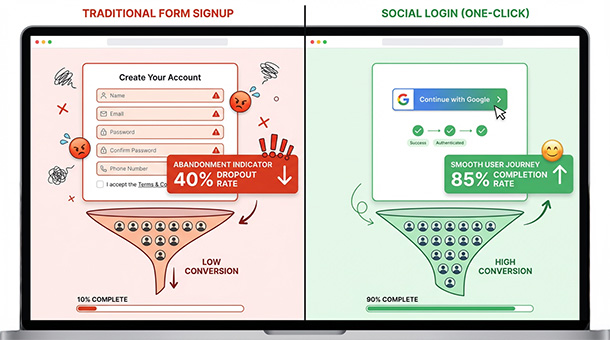
A founder builds a signup form. Email field. Password field. Confirm password field. Terms and conditions checkbox. Maybe a name field. Maybe a phone number.
Six fields stand between a potential customer and using the product.
The competitor’s signup flow has one button: “Continue with Google.”
One click. No typing. No password to remember. No email confirmation to fish out of a spam folder.
Guess which product gets more customers.
Social login, the feature that lets users sign in with their existing Google, Apple, Microsoft, or Facebook accounts, eliminates the biggest source of signup friction in modern web applications. Users don’t create yet another password they’ll forget. Founders don’t store sensitive authentication data they’d rather not be responsible for.
Research consistently shows that reducing signup steps boosts conversion rates by 30% to 50%. For subscription businesses where every percentage point of conversion directly impacts revenue, social login is not a nice-to-have feature. It’s table stakes.
When building a subscription business, getting users through the door quickly matters just as much as what happens after they’re inside.
What social login does for conversion rates
Every field in a signup form is a decision point where users can abandon the process.
Traditional signup requires users to invent a password that meets arbitrary complexity requirements, type it twice without making mistakes, remember what email address they used, and then switch to their email app to click a confirmation link that may or may not have arrived.
Each of these steps introduces friction. Each point of friction increases abandonment.
Social login collapses this entire process into one click. The user taps “Continue with Google.” Google confirms their identity. The app receives their email address and basic profile information. The user is signed in and using the product within five seconds.
No password to create. No email to confirm. No cognitive load. No friction.
Studies from companies like Auth0 and Okta show that social login can increase signup completion rates by 40% or more compared to traditional email and password forms. For a SaaS product converting at 3% without social login, adding it could push conversion to 4.2%, which is a 40% increase in paying customers from the same amount of traffic.
The math is simple. Fewer steps equals fewer dropouts equals more revenue.
Why users prefer social login over creating passwords
The average person maintains accounts on dozens of websites and apps. Remembering unique passwords for each one is cognitively impossible, which is why most people reuse the same password everywhere or write them down in insecure places.
Social login eliminates this problem entirely. Users don’t manage passwords for individual services. They authenticate once with Google or Apple, and those companies handle the security.
From a user’s perspective, social login offers three major benefits: convenience, security, and trust.
Convenience is obvious. One click beats typing and confirming a password every time.
Security improves because users aren’t reusing weak passwords across multiple services. Google and Apple invest billions in authentication security. A startup’s homegrown authentication system cannot compete with that level of investment.
Trust matters too. Users recognize Google and Apple as established, trustworthy brands. When a new app offers social login, users trust that their information is being handled securely because they’re not giving their credentials directly to an unknown startup.
This psychological factor is particularly important for early-stage products without established reputations. Social login borrows trust from Google and Apple, making users more comfortable completing signup.
How social login reduces support tickets and security risks
Password-related support tickets consume a disproportionate amount of customer support time for early-stage startups.
Users forget passwords. They type them incorrectly. They use the wrong email address. They claim they never received the confirmation email. Each issue requires back-and-forth support conversations that cost time and money.
Social login eliminates most of these tickets entirely. Users can’t forget their Google password because Google handles password recovery. They can’t type it wrong because they’re not typing it. Confirmation emails aren’t necessary because Google already verified their email address.
The security benefits extend beyond user convenience. Storing passwords, even hashed and salted ones, creates liability. If a database is ever compromised, password hashes can be targeted for cracking. Even with strong security practices, the risk exists.
Social login removes this liability entirely. The backend never receives or stores passwords. It receives a secure token from Google or Apple confirming the user’s identity. If the database is compromised, there are no passwords to crack.
This architectural decision shifts security responsibility to companies with dedicated security teams and billion-dollar budgets. For a bootstrapped startup, this is a massive operational and security advantage.
Why offering multiple social login options maximizes reach
Different users prefer different authentication providers based on their existing habits and device ecosystems.
iPhone users often prefer “Sign in with Apple” because it’s integrated into iOS and offers privacy features like email masking. Android users lean toward Google because it’s already connected to their device. Enterprise users might prefer Microsoft because their company uses Office 365.
Offering multiple options captures more users than offering just one.
Data shows that supporting three major providers, Google, Apple, and Microsoft, covers approximately 80% of users’ preferred authentication methods. Adding Facebook captures most of the remaining users who don’t use the big three.
The implementation cost is minimal with modern backends. Most authentication services support multiple providers through a single interface. A founder enables Google, Apple, and Microsoft with a few clicks in their backend dashboard. Users see three buttons on the login screen. Each user picks their preferred option.
This small implementation effort can increase signup completion by an additional 10-15% compared to offering only one social login option, simply because more users find their preferred method available.
Social login is a high-leverage conversion decision, but it’s one of six interconnected factors that determine whether a subscription backend can grow with your revenue. The platform you choose to handle Google and Apple authentication is the same one managing your data structure, API integrations, frontend communication, multi-tenant security, and PWA performance. If you’re still evaluating which backend fits your overall business model, How to Pick a Backend That Grows With Your Revenue walks through all six of these factors together — so you can evaluate your authentication strategy alongside every other infrastructure decision your subscription business depends on.
How modern backends make social login trivial to implement
Social login used to require complex OAuth implementations, security audits, and weeks of development time. Modern backends have abstracted all of this complexity away.
Supabase includes social login as a built-in feature. A founder goes to the authentication settings, enables Google login, copies the client ID and secret from Google’s developer console, and pastes them into Supabase. Google login is now live.
The same process takes five minutes for Apple, Microsoft, Facebook, or any other major provider.
The backend handles token exchange, session management, user profile creation, and all the security complexity that used to require custom development. The frontend just displays a “Sign in with Google” button. When clicked, the backend orchestrates the entire authentication flow automatically.
This is the core advantage of building on a BaaS platform. Features that used to take weeks of development time become configuration tasks that take minutes.
The bottom line
Social login is not a luxury feature for established companies. It’s a conversion optimization tool that directly impacts how many visitors become paying customers.
Every additional field in a signup form reduces conversion. Every password requirement adds friction. Every email confirmation step creates an opportunity for users to abandon the process.
Social login removes these barriers. It makes signup instant. It increases trust. It reduces support burden. It improves security.
For founders building subscription businesses, the decision to implement social login should happen on day one, not as an afterthought after noticing poor conversion rates. The cost of implementation is minimal. The impact on revenue is substantial.
When users can start using a product within five seconds of discovering it, more of them become customers. When users have to navigate a six-field signup form, more of them leave and never come back.
For more on how authentication and user management fit into the broader architecture of a subscription business, check out how backends handle structured data to keep user accounts organized as the business scales.
About the Author

AISalah
Bridges linguistics and technology at PointOfSaaS, exploring AI applications in business software. English Studies BA with hands-on back-end and ERP development experience.
Did you find this helpful?
Your feedback helps us curate better content for the community.