

You made it through vendor selection, survived data migration, managed the change management chaos, and successfully went live with your new ERP system. Everyone celebrated. The implementation team moved on to other projects. Your executives declared victory and shifted focus to the next big initiative.
Then three months later, the system that seemed so promising is barely functional. Users are finding workarounds instead of using standard processes. Reports generate wrong data. Integrations break randomly. Nobody remembers how to configure new workflows. The help desk is overwhelmed with tickets that never get resolved.
This post-implementation decline happens to more California companies than anyone admits. The initial success fades because nobody planned for what happens after go-live. ERP systems aren’t set-it-and-forget-it solutions. They’re living platforms that require ongoing attention, optimization, and support to deliver sustained value.
The companies that get long-term ROI from their ERP investments understand that implementation is just the beginning. Post-implementation support determines whether your system becomes a competitive advantage or an expensive regret.
Let me show you how to maintain and optimize your ERP so it keeps delivering value years after go-live.
Why ERP systems degrade after initial implementation
The decline isn’t mysterious. Specific, predictable factors cause post-implementation degradation.
Knowledge loss starts immediately. Your implementation consultants leave after go-live, taking deep system expertise with them. The internal champions who drove adoption move to other roles or leave the company. New employees join without proper training. Within six months, institutional knowledge about why things work certain ways has evaporated.
Nobody documented configuration decisions during implementation. You can see what’s configured, but you don’t know why those choices were made or what alternatives were considered. When you need to change something, you’re guessing instead of working from documented rationale.

Users revert to old habits when support isn’t immediately available. During implementation, champions and consultants answered questions within minutes. Now users submit tickets that take days to resolve. Instead of waiting, they build spreadsheet workarounds that bypass the ERP entirely.
System optimization stops after go-live. During implementation, you continuously refined workflows and configurations. After launch, everyone assumes the system is “done” and nobody proactively looks for improvements. Performance degrades, inefficiencies persist, and opportunities for optimization go unnoticed.
Business requirements evolve but the system doesn’t adapt. You add new products, enter new markets, change pricing strategies, or acquire other companies. Your ERP configuration reflects business processes from go-live day, not current reality.
Technical debt accumulates. Temporary workarounds become permanent. Quick fixes create long-term problems. Integration errors get ignored instead of resolved. Data quality degrades as validation rules go unenforced.
Vendor updates create unexpected issues. The ERP vendor releases new versions with bug fixes and features. But updates sometimes introduce new problems or change behavior your users depend on. Without proper testing and communication, updates cause disruptions.
Building effective internal support capabilities
Relying entirely on vendor support or external consultants creates dependencies that limit your agility and increase costs.
Develop internal ERP expertise across multiple employees. Don’t create single points of failure where one person holds all knowledge. If your only ERP expert quits, you’re in crisis mode.
Identify potential ERP administrators from different departments who show technical aptitude and business process understanding. Send them to vendor training courses that go beyond basic user skills into system administration and configuration.
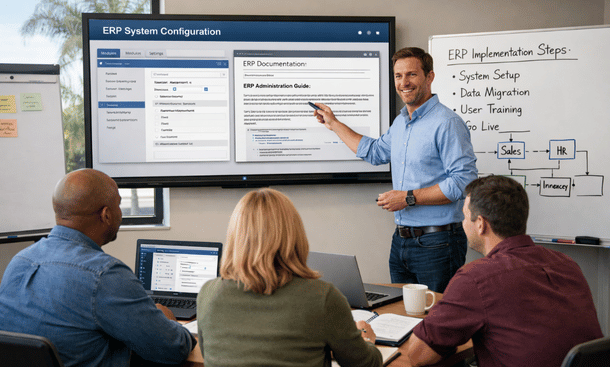
Create tiered support structure. Level 1 support handles common questions and basic troubleshooting. Level 2 addresses complex configuration issues and system problems. Level 3 involves vendor support or specialized consultants for deep technical issues.
Train your level 1 support team extensively on common user issues. They should handle 70 to 80 percent of tickets without escalation. This keeps users productive and reserves expensive specialized support for problems that genuinely require it.
Document everything your support team learns. Every ticket resolution should update your knowledge base. Over time, you’re building institutional knowledge that persists even as people come and go.
Establish regular office hours where users can get live help instead of submitting tickets. A 30-minute weekly session where the ERP administrator answers questions in person solves problems faster than asynchronous ticket systems.
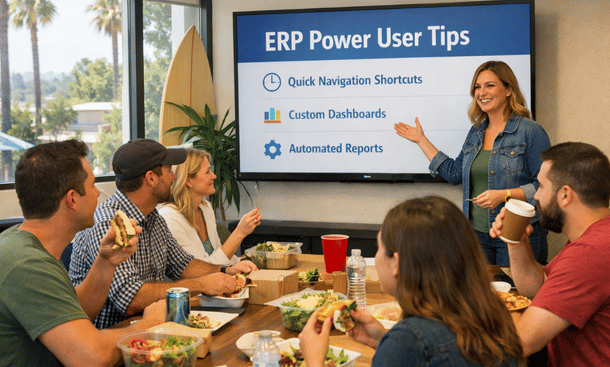
Build a user community through Slack channels, Teams groups, or internal forums where people can ask questions and share tips. Your power users become informal support resources, reducing burden on formal support staff.
Ongoing training and user enablement
Initial go-live training covers basics. Ongoing training develops mastery and adapts to evolving system usage.
Schedule regular refresher training sessions. Users forget functionality they don’t use frequently. Quarterly refreshers on key processes keep skills sharp and remind people of capabilities they’ve forgotten.
Develop role-specific advanced training. Once users master basics, show them advanced features that improve efficiency. Your warehouse team might benefit from mobile app capabilities. Your accounting staff might need training on advanced reporting features.
Create video tutorials for common tasks. Short screencasts showing exactly how to complete specific processes help users when they need quick refreshers. Build a video library covering every major function.
Offer optional training on underutilized features. Your ERP probably includes capabilities nobody uses because they weren’t covered in initial training. Monthly sessions highlighting different features expose users to functionality that could improve their work.
Train new employees properly. Don’t assume they’ll figure things out by watching coworkers. Structured onboarding training for new hires ensures everyone starts with solid foundational knowledge.
Identify and train power users who can become departmental resources. These super-users get advanced training and act as first-line support for their teams, reducing tickets and improving response times.
Measure training effectiveness through usage analytics. If you train people on a feature but nobody uses it, either the training wasn’t effective or the feature doesn’t address real needs. Adjust your approach based on actual adoption.
Performance monitoring and optimization
You can’t improve what you don’t measure. Systematic performance monitoring identifies problems and optimization opportunities.
Track system usage patterns. How many users log in daily? Which modules get used most? What features remain largely untouched? Usage analytics show you where the system delivers value and where adoption lags.
Monitor transaction volumes and processing times. Are orders being entered? Are invoices being generated? How long do key processes take? Declining transaction volumes might indicate users abandoning the system for workarounds.
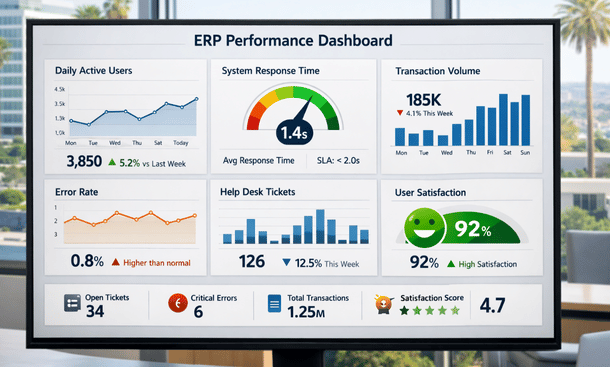
Review error logs and system alerts regularly. Recurring errors indicate problems that need fixing. Ignored error logs let small issues grow into major failures.
Analyze help desk tickets for patterns. If you’re getting 20 tickets weekly about the same process, that process needs improvement. Ticket patterns reveal usability issues and training gaps.
Conduct user satisfaction surveys quarterly. Ask specific questions about what works well, what frustrates them, and what would improve their experience. User feedback guides optimization priorities.
Benchmark key metrics over time. Compare current performance against baseline measurements from go-live and against industry standards if available. Are you getting faster or slower? More efficient or less?
Review system performance metrics like response times, database query speeds, and report generation times. Technical performance degradation impacts user experience and might indicate need for infrastructure optimization or database tuning.
Set up automated alerts for critical issues. If system response time exceeds thresholds, if error rates spike, or if integrations fail, you want immediate notification instead of discovering problems when users complain.
Continuous improvement processes
Your business evolves constantly. Your ERP must evolve with it through structured continuous improvement.
Schedule quarterly ERP review meetings with stakeholders from all departments. Discuss what’s working, what needs improvement, and what new requirements have emerged.
Collect improvement suggestions systematically. Create channels where users can submit enhancement requests. Not every suggestion gets implemented, but you need visibility into what users want.

Agile Team Collaboration
Prioritize improvements based on business impact and implementation effort. Quick wins that deliver high value get done first. Major projects require business case justification and proper planning.
Implement improvements in manageable batches. Rolling out 20 changes simultaneously overwhelms users. Instead, deliver 3-5 improvements quarterly with proper communication and training.
Test all improvements thoroughly before production deployment. Even minor configuration changes can have unexpected consequences. Testing in non-production environments prevents disruptions.
Document every improvement including what changed, why, who requested it, and how it impacts users. This creates a change history that helps you understand system evolution.
Measure results after implementing improvements. Did the change deliver expected benefits? Did users adopt it? Would you make the same decision again? Learning from past improvements guides future decisions.
Celebrate optimization wins. When improvements save time, reduce errors, or enable new capabilities, share those successes. Recognition motivates continued engagement with system optimization.
Managing vendor relationships long-term
Your relationship with your ERP vendor doesn’t end at go-live. Effective vendor management ensures you get value from ongoing support contracts.
Understand exactly what your support contract includes. What response times are guaranteed? What channels can you use for support? Are upgrades included? What costs extra?
Maintain regular contact with your vendor account manager. Quarterly business reviews keep your vendor informed about your evolving needs and give you visibility into their product roadmap.

Escalate support issues appropriately when standard channels aren’t resolving problems. Most vendors have escalation paths for critical issues. Use them when justified, but don’t abuse them for routine requests.
Participate in vendor user communities and conferences. You’ll learn how other companies use the system, discover best practices, and influence vendor product direction through user feedback.
Provide constructive feedback about product issues and desired features. Vendors who hear the same requests from multiple customers prioritize those enhancements. Your voice matters in shaping future releases.
Stay current on vendor updates and new releases. Review release notes, understand what’s changing, and plan upgrade timing that minimizes disruption to your business.
Negotiate support contract renewals strategically. As your relationship matures, you might qualify for better pricing or enhanced services. Don’t just auto-renew without exploring improvements.
Consider escalating to vendor executives when persistent problems aren’t being addressed. Most vendor executives want to resolve customer issues and have authority to allocate resources that support teams don’t.
Handling system updates and upgrades
Vendors release updates constantly. Managing them properly prevents disruptions while ensuring you benefit from improvements.
Establish a change management process for ERP updates. Don’t apply updates immediately when released. Test them first in non-production environments.
Subscribe to vendor release notes and review them thoroughly. Understand what’s changing, what bugs are fixed, and what new features are available. Assess impact on your specific configuration and customizations.
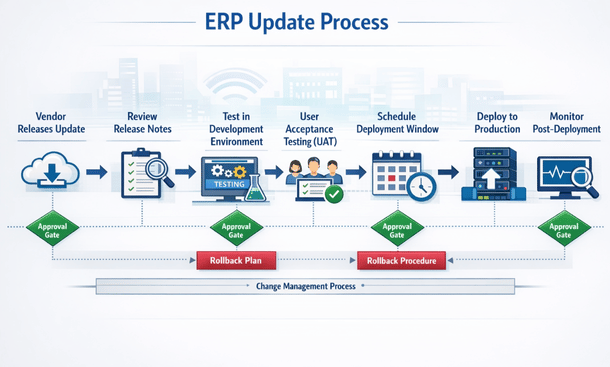
Test updates in your development environment before staging. Verify that customizations still work, integrations function correctly, and key business processes operate as expected.
Conduct user acceptance testing in staging environment. Have actual users test critical workflows with the update applied. Their testing catches issues automated tests miss.
Schedule update deployment during low-activity periods. Weekend or evening deployments minimize business impact if issues arise.
Communicate updates to users before deployment. Let them know what’s changing, when, and what to expect. Surprise updates create confusion and frustration.
Monitor system closely after update deployment. Watch for unusual errors, performance issues, or user reports of problems. Early detection enables quick response.
Have rollback plans ready if major updates create critical problems. Being able to revert to previous versions minimizes downtime when updates go wrong.
Major version upgrades require more extensive planning. Treat them like mini-implementation projects with proper project management, testing, and training.
Building for long-term sustainability
ERP success isn’t about the first year. It’s about delivering value for five, ten, fifteen years.
Invest in proper documentation from day one. Document configurations, customizations, business processes, integration architecture, and administrative procedures. Future teams will thank you.
Rotate ERP responsibilities among team members. Don’t let critical knowledge concentrate in one person. Cross-training ensures resilience when people change roles or leave.
Budget adequately for ongoing ERP costs. Support contracts, maintenance, training, optimization projects, and periodic consulting all require funding. Don’t starve your ERP investment after go-live.
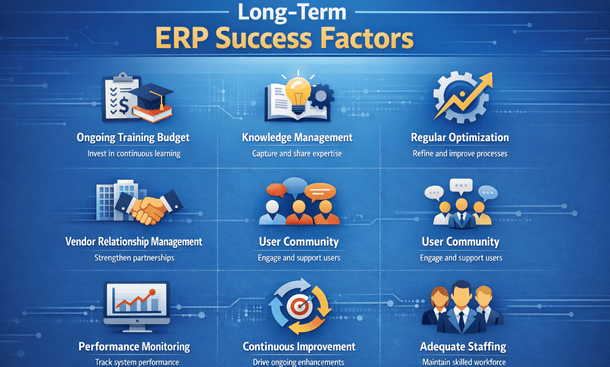
Plan for team turnover. When key ERP people leave, have transition plans that transfer knowledge to remaining staff. Exit interviews should document critical information before people depart.
Keep executives engaged with ERP performance. Regular reports showing system ROI, usage metrics, and improvement initiatives maintain leadership support for ongoing investment.
Align ERP evolution with business strategy. As your company’s strategic direction changes, assess whether ERP capabilities support new initiatives. Proactive alignment prevents the system from becoming a limitation.
Consider expanding ERP capabilities over time. You might start with core financial and inventory modules, then add manufacturing, CRM, or advanced analytics as you grow. Phased expansion matches investment to business maturity.
Now that you understand post-implementation support, it’s worth revisiting how initial system selection impacts your long-term success and how careful vendor evaluation prevents many post-launch problems.
Going back to fundamentals about small business ERP selection helps you understand how early decisions shape your entire post-implementation experience.
Post-implementation degradation represents one of the most overlooked ERP implementation mistakes that transforms initially successful projects into long-term disappointments.
About the Author

mike
Mike is a tech enthusiast passionate about SaaS innovation and digital growth. He explores emerging technologies and helps businesses scale through smart software solutions.
Did you find this helpful?
Your feedback helps us curate better content for the community.