

California’s innovation culture is both a blessing and a curse when it comes to ERP implementation. We love customizing everything to match our unique vision of how business should operate. We see standard processes as limitations rather than best practices. We believe our company is special and deserves software tailored exactly to our needs.
This mindset creates some of the most innovative companies in the world. It also creates some of the most expensive, fragile, and unmaintainable ERP implementations imaginable.
I’ve watched entrepreneurs spend $200,000 customizing an ERP system that would have worked fine with $20,000 in configuration. Then they spend another $50,000 annually maintaining those customizations. Then they can’t upgrade to new versions because their custom code breaks with each release. Then they’re stuck on outdated software that becomes a competitive disadvantage.
ERP customization isn’t inherently bad. Strategic customization that delivers real business value makes total sense. The problem is distinguishing between customization that matters and customization that just feeds our ego or perpetuates inefficient processes.
Let me show you how to make smart customization decisions that enhance your ERP investment instead of turning it into a technical debt nightmare.
Understanding the difference between configuration and customization
These terms get used interchangeably, but the distinction matters enormously for cost, risk, and maintenance.
Configuration uses the system’s built-in settings and options to adapt how it works. You’re flipping switches, choosing from dropdown menus, setting up workflows using the vendor’s tools, and activating optional features. No custom code required.
Modern ERP systems offer extensive configuration capabilities. You can define custom fields, create approval workflows, build reports using drag-and-drop tools, set up automated notifications, and establish business rules without writing a single line of code.
Configuration is relatively low-risk. The vendor tests these options, supports them, and ensures they work correctly when you upgrade. Configuration changes typically don’t break during version updates.
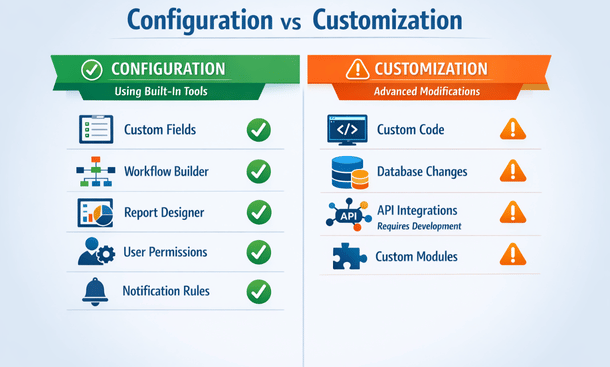
Customization involves writing custom code, modifying database structures, creating custom modules, or fundamentally changing how the system operates beyond what configuration allows. You’re going beyond the vendor’s intended functionality.
Customization requires developers with specific technical skills. It creates code that only your team understands and maintains. When you upgrade the base system, custom code often breaks and needs rewriting.
The cost difference is dramatic. Configuration might cost $5,000 to $20,000 depending on complexity. Equivalent customization could cost $50,000 to $100,000 plus ongoing maintenance.
Always exhaust configuration options before considering customization. Most businesses can meet 80 to 90 percent of requirements through configuration alone.
Evaluating whether customization is actually necessary
Before you commission custom development, challenge whether you really need it.
Start by questioning why you can’t use the standard process. Often the answer is “that’s not how we do things here.” That’s not a good reason. How you do things today might be inefficient, and adopting better processes through standard ERP functionality could improve operations.
California businesses sometimes confuse “unique” with “better.” Your workflow might be unique, but that doesn’t mean it’s optimal. Standard ERP processes represent best practices refined across thousands of implementations.
Ask what business outcome the customization enables. If it’s just preserving familiar processes, that’s weak justification. If it enables competitive differentiation, serves regulatory requirements, or delivers measurable financial benefits, it might be worth it.
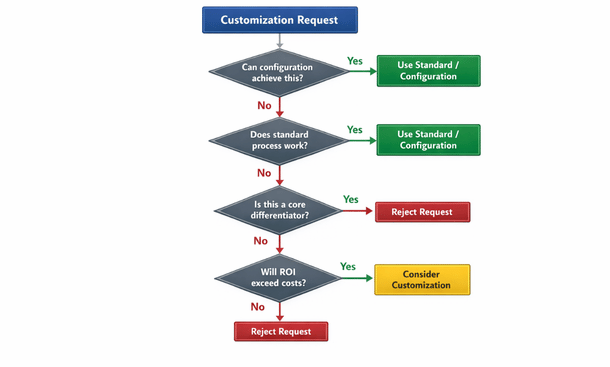
Calculate the return on investment for proposed customizations. What will it cost to build, test, and deploy? What are the annual maintenance costs? What quantifiable benefits will it deliver? If you can’t articulate clear ROI, don’t build it.
Consider change management implications. Customization that makes the system dramatically different from standard functionality creates training challenges. Every new employee needs to learn your special version instead of portable skills they could use at other companies.
Look for alternative solutions that don’t require customization. Maybe a different module provides the functionality you need. Maybe a third-party add-on solves your problem. Maybe an integration with external software is cleaner than customizing the ERP.
Test the standard process thoroughly before declaring it inadequate. Sometimes what seems impossible in a demo actually works fine once you understand the full functionality.
Strategic customization that delivers value
Some customizations genuinely improve your competitive position or operational efficiency. These are worth the investment.
Industry-specific regulatory requirements often justify customization. If you’re in cannabis, pharmaceuticals, food production, or other heavily regulated California industries, compliance might demand functionality the standard system doesn’t provide.
Core business processes that differentiate you from competitors are customization candidates. If your unique fulfillment process or custom pricing algorithms give you competitive advantage, preserving them through customization makes business sense.
Integration with proprietary systems or legacy applications might require custom development. If you’ve built custom tools that deliver real value and need to connect them to your ERP, that’s legitimate customization.
Customer-facing processes that impact experience might warrant customization. If standard order management doesn’t support the unique service model your customers love, customization could be strategic.
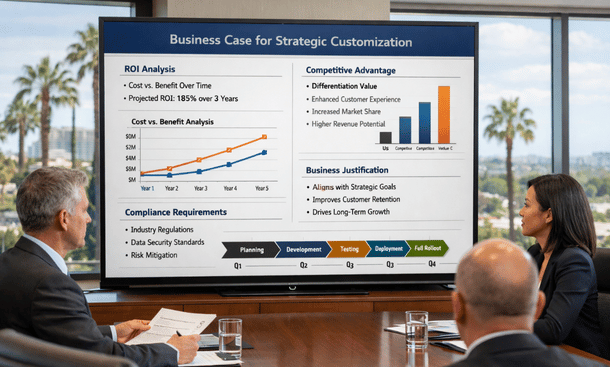
Strategic Business Case Presentation
High-volume processes with inefficiencies create ROI opportunities. If a standard process requires 10 manual steps per transaction and you process 10,000 transactions monthly, automation through customization could save hundreds of hours and justify development costs.
Reporting and analytics customization often delivers disproportionate value. Building custom dashboards and reports that surface exactly the insights executives need costs relatively little but dramatically improves decision-making.
The key is ensuring customization delivers value that exceeds its total cost over time, not just initial development but ongoing maintenance and upgrade complexity.
The hidden costs of customization nobody mentions
Vendors quote development costs for customization, but those figures represent maybe half the true expense.
Testing custom code takes significant time. You can’t just deploy customization to production and hope it works. It needs thorough testing in development environments, user acceptance testing, regression testing to ensure it doesn’t break other functionality, and performance testing under load.
Budget 30 to 50 percent of development time for testing. If custom development costs $40,000, add another $12,000 to $20,000 for proper testing.
Documentation is another hidden cost. Custom code needs documentation explaining what it does, how it works, dependencies, and maintenance procedures. Without documentation, you’re dependent on the developer who built it. When they leave, institutional knowledge walks out the door.
Training employees on customized processes costs more than training on standard functionality. You can’t send people to vendor training courses that cover your custom code. You’re building and delivering custom training materials.
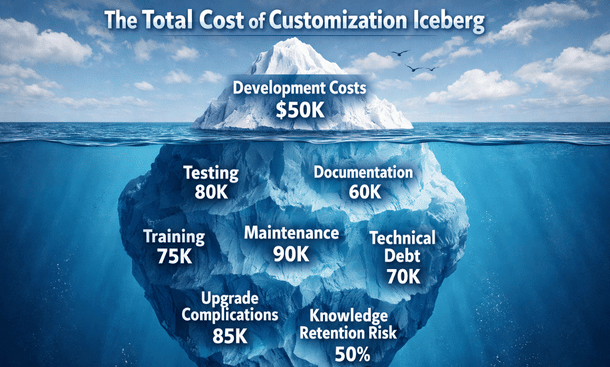
Maintenance is the killer. Custom code needs ongoing updates as business requirements evolve, as you find bugs, and as the underlying ERP platform changes. Budget at least 15 to 20 percent of initial development costs annually for maintenance.
That $50,000 customization costs another $7,500 to $10,000 per year to maintain. Over five years, you’re looking at $87,500 to $100,000 total cost, not $50,000.
Upgrade complications create massive costs. When the vendor releases new versions, your custom code might break. You’re testing everything, fixing incompatibilities, and potentially rewriting portions. Major version upgrades that take non-customized systems one weekend could take customized systems one month.
Some companies get so trapped by customization debt they can’t upgrade at all. They’re stuck on ancient versions, missing security patches and new features, increasingly vulnerable and uncompetitive.
Technical debt accumulates when you build customizations quickly without proper design. Rushed custom code works initially but becomes harder to maintain over time. Eventually you’re spending more maintaining bad customizations than they deliver in value.
Smart alternatives to heavy customization
Before commissioning custom development, explore these alternatives that deliver similar benefits with less risk and cost.
Workflow configuration using the vendor’s workflow tools often achieves what you think requires customization. Modern ERPs include powerful workflow engines that handle complex approval routing, conditional logic, and automated actions without code.
Spend time learning the workflow capabilities thoroughly. Many companies commission custom development for functionality that workflow configuration already provides.
Third-party applications designed for your industry might solve problems better than customizing your ERP. California’s SaaS ecosystem includes specialized tools for almost every business function. An add-on subscription might cost less than custom development and comes with vendor support.
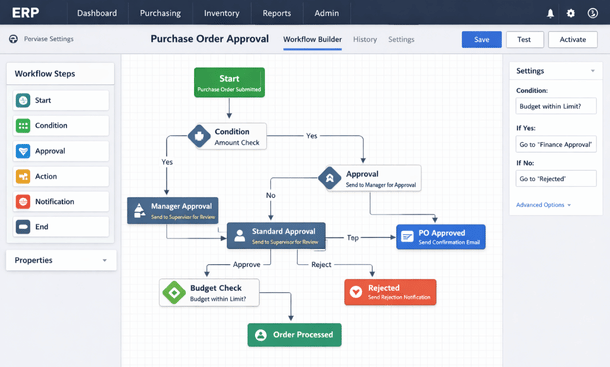
Integration platforms connect your ERP to other systems without custom coding. Tools like Zapier, Workato, or native integration marketplaces provide pre-built connectors and templates for common integration scenarios.
These platforms cost monthly subscriptions but eliminate custom integration development. They also provide monitoring, error handling, and support that custom integrations lack.
Changing your business process to match standard ERP functionality is often the smartest choice. If adopting the standard process delivers 90 percent of the value at 10 percent of the cost, that’s the rational decision even if it requires change management.
Business process reengineering during ERP implementation presents an opportunity to eliminate inefficiencies. Many companies discover that processes they assumed were necessary actually exist because “we’ve always done it that way.”
Phased implementation approaches let you start with standard functionality and add customization only after you’ve used the system and identified genuine gaps. Early assumptions about customization needs often prove wrong after you’ve worked with the actual software.
Low-code development tools included with modern ERPs let business users build solutions without traditional programming. You’re still creating custom functionality, but using vendor-supported tools that upgrade more cleanly than custom code.
Governance and decision-making frameworks
Left ungoverned, customization requests multiply until your ERP becomes an unmaintainable mess. You need structured processes for evaluating and approving customization.
Establish a customization review board with representation from IT, finance, operations, and executive leadership. Every customization request goes through this board for evaluation.
Create standardized request forms that force requesters to articulate business justification, quantify expected benefits, identify alternatives considered, and estimate costs. This documentation prevents casual customization requests driven by preference rather than necessity.
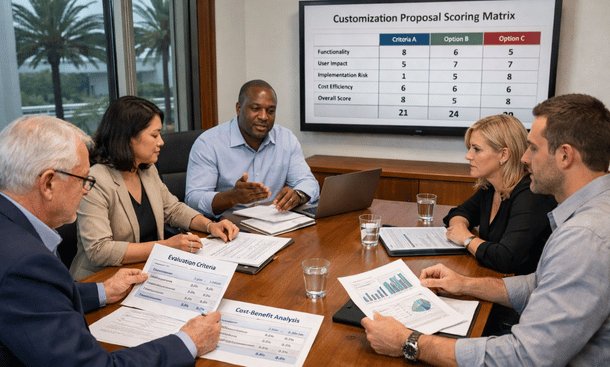
Customization Review Meeting
Develop approval criteria that requests must meet. Require minimum ROI thresholds, strategic alignment, executive sponsorship for major customizations, and proof that configuration alternatives were explored.
Track all customizations in a central registry documenting what was built, why, who sponsored it, costs, and maintenance requirements. This visibility prevents redundant development and helps you understand technical debt accumulation.
Conduct annual reviews of existing customizations. Which ones still deliver value? Which have become obsolete as business needs evolved? Retire customizations that no longer justify their maintenance costs.
Implement sunset provisions for new customizations. Approve custom development for defined periods, requiring re-justification to continue. This prevents perpetual maintenance of functionality that lost relevance.
Consider assigning maintenance budgets to business units that request customization. When operations knows they’re paying $15,000 annually to maintain their custom workflow, they might decide the standard process works fine after all.
Managing and maintaining customized systems
If you’ve built customization, manage it properly to minimize long-term pain.
Maintain comprehensive documentation for all custom code. Include functional specifications explaining what it does, technical documentation covering how it works, and operational procedures for monitoring and maintaining it.
Store documentation in accessible locations where multiple people can find it. Documentation locked in a single developer’s laptop is worthless when that person leaves.
Implement version control for all customization code. Use Git or similar systems to track changes, enable rollback if problems emerge, and maintain history of what changed and why.
Establish development, testing, and production environments. Never develop or modify code directly in production. This seems obvious, but I’ve seen small companies skip proper environments and create disasters.
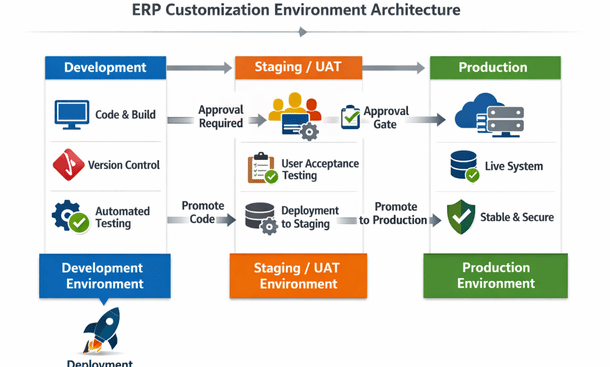
Create automated testing for critical customizations. When you upgrade the base system or modify custom code, automated tests verify everything still works. This catches breaking changes before they impact users.
Schedule regular code reviews where developers examine customization code for quality, security vulnerabilities, and technical debt. Address problems proactively before they create emergencies.
Monitor customization performance. Custom code that runs slowly impacts user experience and system performance. Identify and optimize performance bottlenecks.
Budget adequately for customization maintenance. Don’t build custom functionality then claim you can’t afford to maintain it. If you can’t commit to ongoing maintenance costs, don’t build it.
Plan upgrade strategies that account for customization. When the vendor announces new versions, immediately assess impact on custom code. Budget time and resources for testing and fixing customizations during upgrades.
Learning from customization mistakes
Let me share the most common customization disasters so you can avoid them.
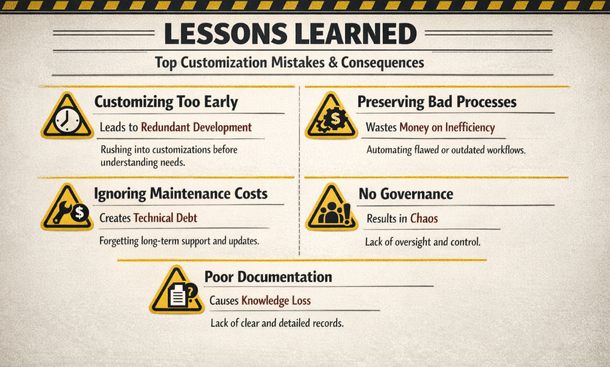
Over-customizing early in implementation before understanding what the system can do. Companies build custom solutions for problems standard functionality already solves because they didn’t explore thoroughly enough.
Customizing to preserve bad processes instead of improving operations. You’re spending money to perpetuate inefficiency instead of using ERP implementation as an opportunity to optimize.
Building customizations without considering long-term maintenance. The initial development cost seems reasonable, but perpetual maintenance costs eventually exceed the value delivered.
Allowing individual departments to commission customizations without enterprise oversight. You end up with redundant solutions, conflicting functionality, and no coherent architecture.
Creating complex customizations when simple solutions would work. Engineers love elegant complexity, but business systems need sustainable simplicity.
Failing to document customizations adequately. Six months later, nobody remembers how it works or why decisions were made.
Not involving end users in customization design. Developers build what they think users need instead of what users actually need.
Skipping proper testing because you’re in a hurry. Custom code that works in development breaks spectacularly in production under real usage.
The pattern in all these mistakes is choosing short-term convenience over long-term sustainability. Every customization decision should consider five-year implications, not just immediate needs.
After you’ve built and deployed your customized ERP system, the real work begins – ensuring it continues delivering value through ongoing support and optimization.
Understanding ERP post-implementation support prevents your system from degrading into an expensive liability after the excitement of go-live fades.
Customization decisions represent critical ERP implementation mistakes that impact your system’s long-term cost, flexibility, and competitive value.
About the Author

mike
Mike is a tech enthusiast passionate about SaaS innovation and digital growth. He explores emerging technologies and helps businesses scale through smart software solutions.
Did you find this helpful?
Your feedback helps us curate better content for the community.