

The cloud versus on-premise debate used to be complicated. Companies spent months weighing pros and cons, building spreadsheets comparing total cost of ownership, and arguing about security and control.
Today, for most California businesses, that debate is pretty much over. Cloud ERP wins in almost every scenario that matters to growing companies. But understanding why helps you make the right call for your specific situation, and there are still legitimate cases where on-premise makes sense.
Let me walk you through the real differences between these deployment models and how they impact your business operations, costs, and growth trajectory.
Understanding what cloud and on-premise actually mean
Before we compare anything, let’s get clear on what we’re talking about because marketing teams love to blur these definitions.
Cloud ERP means your software runs on servers owned and managed by the vendor or a hosting provider. You access the system through a web browser or mobile app. Your data lives in data centers you never see, maintained by people you never meet. You pay monthly or annually for access.
On-premise ERP means you buy licenses for software that runs on servers you own or lease. Those servers sit in your office, a co-location facility, or a data center you’re renting space in. Your IT team manages everything – servers, databases, backups, security, updates. You pay upfront for licenses plus ongoing maintenance fees.
There’s also hybrid deployment where core ERP runs in the cloud but certain modules or data stay on-premise. And private cloud where you get dedicated cloud infrastructure instead of sharing resources with other customers. These variations exist mostly for enterprises with complex compliance requirements.
For small to medium California businesses, the real choice is between true cloud and traditional on-premise deployment.
Capital expenses versus operational expenses
The financial model difference hits you immediately.
On-premise ERP requires significant upfront capital expenditure. You’re buying server hardware, network equipment, backup systems, software licenses, and probably hiring additional IT staff. That initial investment easily runs $50,000 to $200,000 before you’ve entered a single transaction.
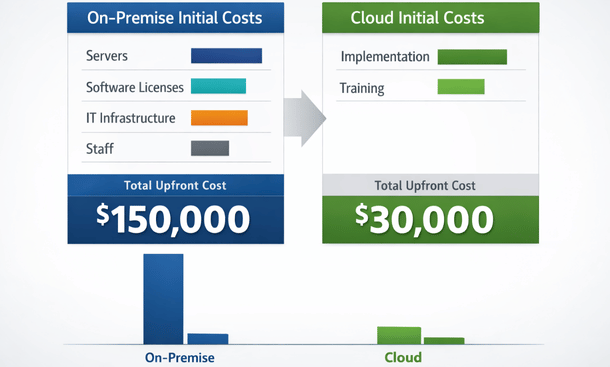
Cloud ERP flips that model. Minimal upfront costs beyond implementation and training. You’re paying monthly subscriptions that scale with usage. Small businesses might spend $3,000 to $10,000 monthly depending on user count and features.
From a cash flow perspective, cloud deployment is way easier for growing companies. You’re not dropping six figures before you see any value. You’re spreading costs over time as you generate revenue from improved operations.
The accounting treatment differs too. Capital expenses get depreciated over years while operational expenses hit your P&L immediately. Depending on your tax situation and investor expectations, one model might look better on your books than the other.
Over five years, total cost of ownership might favor on-premise if you’ve got stable requirements and can amortize that infrastructure investment. But most California companies don’t have five-year visibility into their needs, and cloud’s flexibility usually wins despite potentially higher cumulative costs.
IT resource requirements and expertise
On-premise ERP demands significant internal IT capabilities.
You need people who understand server management, database administration, network security, backup procedures, disaster recovery, and system updates. For small businesses, that’s at least one dedicated IT person, probably two or three as you grow. Each one costs $80,000 to $150,000 annually in California’s competitive tech market.
Your IT team spends time on infrastructure maintenance instead of strategic projects that drive business value. They’re patching servers, monitoring backups, troubleshooting network issues, and managing security updates. That’s important work, but it’s not helping you grow revenue or improve operations.
When something breaks at 2am, your IT person gets called. When you want to upgrade to a new version, your team manages the entire process. When security vulnerabilities emerge, you’re responsible for fixing them quickly.
Cloud ERP outsources all that infrastructure management to the vendor. They handle servers, databases, backups, security, and updates. Your IT requirements drop dramatically – maybe one person managing integrations and user support instead of three maintaining infrastructure.

Your remaining IT staff can focus on business-enabling projects – building integrations, creating custom reports, optimizing workflows, and supporting users. That’s where technology investment actually returns value.
Scalability and flexibility differences
California businesses don’t grow in predictable straight lines. You might add 10 employees in a quarter, open a new location, acquire another company, or pivot your entire business model.
On-premise ERP makes scaling complicated and expensive.
Adding users requires buying additional licenses, which often come in blocks of 5 or 10. You’re paying for capacity you don’t need yet. Server capacity needs planning months in advance. Running out of storage or processing power means emergency hardware purchases and installation projects.
Opening new locations requires replicating infrastructure or managing network connections back to your main server. Either way, you’re looking at significant costs and IT complexity.
Cloud ERP scales instantly. Need 5 more users? Add them in the admin panel and they’re active within minutes. Need less capacity? Reduce your subscription. Opening a new location? Your team just needs internet access to use the same system.
This flexibility matters enormously for companies chasing growth opportunities. When you can move fast without worrying about IT infrastructure constraints, you can focus on the business opportunity instead of the technical requirements.
Seasonal businesses benefit hugely from cloud scaling. If you need 30 users during peak season but only 15 the rest of the year, you’re paying for 15 users most of the time with cloud deployment. On-premise, you bought capacity for 30 users whether you’re using it or not.
Security and control considerations
This is where the debate gets emotional because security concerns feel more serious than cost discussions.
On-premise advocates argue that keeping data in-house provides better security and control. You know exactly where your servers are, who has physical access, and what security measures protect them. For businesses handling sensitive data or operating in heavily regulated industries, this certainty feels important.
The reality is more nuanced. Yes, you control on-premise security, but you’re also responsible for implementing it correctly. Small business IT teams typically lack the security expertise, tools, and resources that enterprise-grade data centers provide.

Cloud vendors operate data centers with physical security, redundant systems, 24/7 monitoring, dedicated security teams, and compliance certifications that would cost millions for a small business to replicate.
Cloud security breaches make headlines. What doesn’t make headlines are the thousands of small businesses running on-premise systems with weak passwords, unpatched vulnerabilities, inadequate backups, and no disaster recovery plan.
Both models can be secure or insecure depending on implementation. The difference is that cloud security is handled by professionals whose entire job is protecting data, while on-premise security is handled by your overstretched IT person who also needs to fix the printer.
Data sovereignty matters for certain industries or companies with specific compliance requirements. If regulations require data to stay in specific geographic locations or prohibit certain cloud deployments, on-premise or private cloud might be necessary.
For most California businesses, cloud vendors’ security capabilities exceed what you could build yourself at reasonable cost.
Performance and reliability factors
On-premise performance depends entirely on your infrastructure investment and IT team capabilities.
Buy powerful servers, implement robust networks, and maintain everything properly, and performance can be excellent. Cheap out on infrastructure or let maintenance slide, and performance degrades quickly.
You control when updates happen and can optimize performance for your specific usage patterns. Power users love this control because they can tune systems for maximum efficiency.
But reliability is on you. If your server crashes, your ERP is down until you fix it. If your internet connection drops, remote workers can’t access the system. If power fails and your backup generator doesn’t kick in, you’re offline.
Cloud ERP reliability depends on the vendor’s infrastructure. Major cloud providers operate multiple data centers with redundancy and failover systems. If one server fails, another takes over automatically. If an entire data center goes offline, traffic routes to another location.
Industry-leading cloud vendors deliver 99.9 percent uptime, which means less than 9 hours of downtime annually. Most on-premise systems maintained by small IT teams can’t match that reliability.
Performance can vary with cloud systems during peak usage times if you’re on shared infrastructure. Private cloud or dedicated resources eliminate this issue at higher cost.
Internet connectivity becomes critical with cloud ERP. If your connection goes down, you can’t access your system. This pushes California businesses toward redundant internet with cellular backup, which adds cost but provides better overall reliability than on-premise deployment.
Update and maintenance management
Software vendors release updates constantly – new features, bug fixes, security patches, and version upgrades.
With on-premise ERP, updates are your responsibility. Minor patches might be straightforward, but major version upgrades become significant projects. Your IT team needs to test updates in a development environment, verify compatibility with customizations, plan downtime, execute the upgrade, and troubleshoot problems.
Many small businesses delay updates because they’re disruptive and resource-intensive. They fall behind on versions, miss security patches, and can’t access new features. Eventually they’re running software so outdated that upgrading becomes nearly impossible without starting over.
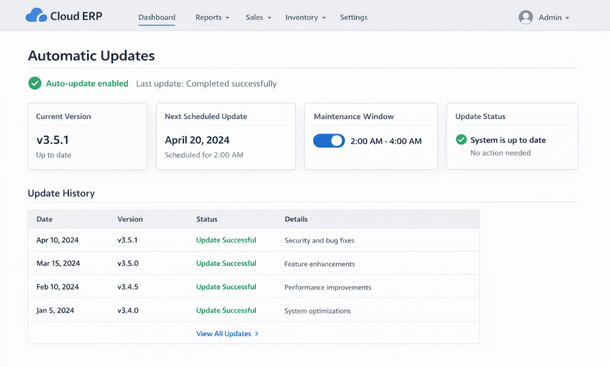
Cloud ERP handles updates automatically. The vendor tests new releases, schedules updates during low-usage windows, and applies them without requiring action from you. You wake up Monday morning with new features and security patches already installed.
Some businesses hate losing control over update timing. If a quarterly update introduces a bug that affects your workflows, you’re stuck with it until the vendor fixes it. With on-premise deployment, you could delay that update until the bug is resolved.
For most companies, automatic updates are a massive advantage. You’re always running current software with the latest security patches and features. Your IT team doesn’t waste time managing updates.
Disaster recovery and business continuity
What happens when something goes catastrophically wrong?
On-premise disaster recovery requires planning and investment. You need offsite backups, documented recovery procedures, and ideally redundant infrastructure in a separate location. Building proper disaster recovery capabilities costs $20,000 to $100,000 and requires ongoing testing and maintenance.
Most small businesses skip this investment. They run backups to local drives or maybe tape systems stored in the same building. When disaster strikes – fire, flood, theft, major system failure – they discover their backups are corrupted, incomplete, or inaccessible.
Cloud ERP includes disaster recovery as a core feature. Your data replicates across multiple data centers automatically. If one location goes offline, another takes over. Recovery point objectives measured in minutes instead of hours or days.
This business continuity advantage is massive for California companies facing earthquake risks, wildfires, and other potential disasters. Your ERP stays accessible even when your physical office is inaccessible.
Making the right choice for your business
After reviewing all these factors, cloud deployment wins for the vast majority of California small and medium businesses. Lower upfront costs, reduced IT requirements, automatic scaling, better security, and superior reliability make cloud the obvious choice for most scenarios.
On-premise still makes sense in specific situations:
You operate in a heavily regulated industry with data sovereignty requirements that prohibit standard cloud deployment. Even then, private cloud often satisfies these requirements.
You have unusual performance requirements that demand customized infrastructure optimization. This is rare for typical business operations.
You already own infrastructure from previous systems and can repurpose it cost-effectively. Even then, maintenance costs usually outweigh cloud subscription fees within a couple years.
You operate in locations with unreliable internet connectivity where cloud access isn’t feasible. This is increasingly rare in California.
For everyone else, cloud ERP provides better economics, flexibility, and capabilities than on-premise deployment. The question isn’t whether to go cloud, but which cloud vendor offers the best fit for your specific requirements.
After nailing down your deployment model, the next critical challenge is actually moving your existing data into the new system without losing anything important or disrupting operations.
Getting ERP data migration right from the start prevents the painful data loss scenarios that derail otherwise solid implementations.
These deployment decisions connect directly to understanding common ERP implementation mistakes that limit your system’s long-term value and flexibility.
About the Author

mike
Mike is a tech enthusiast passionate about SaaS innovation and digital growth. He explores emerging technologies and helps businesses scale through smart software solutions.
Did you find this helpful?
Your feedback helps us curate better content for the community.