

You’re ready to transform your business with an ERP system. The demos looked incredible. Your competitors are already running these platforms. Your team is excited about automation and better data. Everything points to this being the right move.
Then implementation starts and reality hits hard.
The system that seemed so intuitive during sales presentations confuses your employees. Data migration takes three times longer than projected and costs twice the budget. Customizations you thought were simple turn into six-month development projects. Training that was supposed to prepare everyone barely scratches the surface. Six months after go-live, half your team is still using spreadsheet workarounds because the ERP is too complicated or doesn’t work the way they need it to.
I’ve watched this scenario play out dozens of times across California businesses over the past decade. Companies invest $200,000 to $500,000 in ERP implementations expecting transformation and instead get frustration, cost overruns, and systems that underdeliver on every promise.
The brutal truth is that most ERP failures aren’t caused by bad software. The technology works fine. The failures happen because companies make predictable, avoidable mistakes during selection, implementation, and ongoing management.
California entrepreneurs face unique challenges that make these mistakes even more costly. We operate in highly competitive markets where agility matters. We’re scaling fast and can’t afford systems that limit growth. We embrace innovation but sometimes that means customizing everything when standard processes would work better. Our tight labor market means we can’t waste people’s time with poorly implemented systems or they’ll just leave for better opportunities.
Understanding the most common ERP mistakes and how to avoid them gives you a massive advantage. You’re not figuring this out through expensive trial and error. You’re learning from everyone else’s failures and implementing your system the smart way from day one.
Why small businesses fail at ERP selection and what actually works
Most entrepreneurs start their ERP journey completely backward. You schedule demos with three vendors based on Google searches or recommendations from other business owners. You sit through presentations where sales reps show impressive features. You pick whoever had the best pitch or lowest price. Then you discover the system doesn’t actually fit your business.
The problem starts with not understanding your own requirements before talking to vendors. You can’t evaluate whether a system meets your needs if you haven’t documented what those needs are. Skipping requirements discovery means you’re choosing based on sales presentation quality instead of functional fit.
Smart ERP selection starts internally. Spend two to three weeks documenting your current business processes, identifying pain points, and defining what success looks like. Talk to every department that will use the system. Ask them what breaks, what takes too long, and what keeps them working late. Write down every painful process and every manual workaround your team has created because current systems don’t work properly.
This documentation becomes your evaluation filter. When vendors demonstrate features you didn’t ask about, you’ll know whether they solve actual problems or just look impressive. When sales reps claim their system does everything, you can test those claims against your specific requirements.
California businesses need particular capabilities that generic ERP systems might not provide. Multi-location support matters if you’re operating across the state or planning expansion. Mobile access is essential when team members work remotely or in the field. Integration with California-specific compliance requirements for labor laws, sales tax, or industry regulations can’t be afterthoughts.
Industry-specific functionality requires careful evaluation. Some entrepreneurs assume they need specialized software because their business is unique. Others avoid industry-specific solutions thinking they’re too limited. Both approaches can be wrong depending on your situation.
Choose industry-specific ERP when regulations or operational workflows in your field differ dramatically from standard business processes. Cannabis businesses face tracking requirements that generic systems can’t handle. Food manufacturers need lot tracking and expiration management built into core functionality. Construction companies require job costing and project management integrated with financial systems.
But industry-specific software costs more, offers fewer integrations, and locks you into smaller vendors with limited resources. If 80 percent of your operations match standard business processes, generic ERP with good configuration options probably fits better and costs less.
The deployment model decision happens during selection. Cloud versus on-premise isn’t really a debate anymore for small businesses. Cloud wins almost every time because you avoid infrastructure costs, get automatic updates, and scale instantly. On-premise only makes sense for unusual security requirements or locations with unreliable internet.
Vendor stability matters more than most entrepreneurs realize. Choosing a vendor who goes out of business or gets acquired leaves you stranded. Research financial health, customer growth trends, and leadership stability before committing to a long-term relationship.
Contract terms protect or hurt you for years. Auto-renewal clauses, price increase provisions, termination penalties, and data ownership rights all impact your flexibility and costs. Read contracts carefully and negotiate terms that protect your interests.
Getting selection right from the beginning prevents years of regret. Understanding how small business ERP selection mistakes derail implementations before they start helps you avoid the most common traps entrepreneurs fall into when choosing their first system.
The real cost of ERP implementation and hidden expenses California companies overlook
The proposal from your ERP vendor shows $75,000 for software licenses and $50,000 for implementation services. You budget $125,000 and feel confident about the investment. Then the real bills start arriving.
Data migration consultants bill another $30,000 because your legacy data needed more cleanup than anyone anticipated. Custom integrations with your e-commerce platform and shipping software add $25,000. Additional training beyond the standard package costs $15,000. Premium support contract runs $12,000 annually. Suddenly your $125,000 budget has blown past $200,000 and you haven’t even finished implementation.
This scenario plays out constantly because vendors quote core costs while minimizing everything else. They’re not technically lying, but they’re not volunteering information about expenses that will definitely hit your budget.
Software licensing sounds straightforward until you dig into the details. Subscription pricing charges per user per month, but vendors define “user” differently. Some count everyone who might occasionally log in. Others only charge for daily active users. That difference doubles your licensing costs.
Tiered pricing complicates budgeting further. Basic users who view reports cost less than power users who create transactions. Administrative users with full access cost even more. During planning, most companies underestimate how many power users they actually need. Budget for the higher tier counts to avoid surprises.
Module-based pricing creates the biggest sticker shock. The core system looks affordable at $30,000 annually. Then you discover inventory management is an add-on module for $15,000. Multi-location support costs another $10,000. Advanced reporting requires the premium tier at $8,000 extra. CRM integration is a separate module at $12,000. You’re building à la carte and the bill explodes.
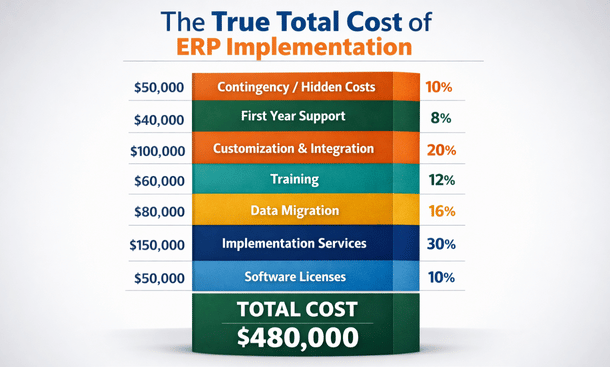
Implementation services represent the biggest expense most entrepreneurs underestimate. Professional services typically cost one to three times your annual software fees. For a $50,000 annual subscription, budget $50,000 to $150,000 for implementation labor.
California consultant rates run $150 to $300 per hour. A typical small business implementation requires 200 to 500 hours of professional services. That’s $30,000 to $150,000 in consulting fees alone before you’ve entered your first transaction.
Fixed-price implementation packages exist but only work if your business processes match vendor templates perfectly. Any customization or complex workflows push you into time-and-materials billing at premium rates.
Project management is another cost vendors don’t emphasize. Someone needs to coordinate between your team and consultants, make decisions, resolve issues, and keep everything on track. Effective project management requires 20 to 40 hours weekly during implementation. Either you’re paying consultants for project management or pulling a valuable employee away from their regular job for three to six months.
Data migration deserves its own budget line because it always costs more than projected. Moving data from old systems, spreadsheets, and various sources into your new ERP requires extensive cleanup work. Customer names need standardization. Duplicate records need consolidation. Inventory counts need verification. Historical transactions need validation.
Technical migration work requires specialized skills most small businesses don’t have internally. Extracting data, transforming formats, and loading correctly into the new system means hiring migration specialists. Budget $10,000 to $30,000 for straightforward migrations. Complex scenarios with multiple source systems or messy data easily hit $50,000 or more.
Training costs scale with your team size and complexity. Standard training packages might include 20 hours of instruction. If you’ve got 15 employees who need training, that’s barely over an hour per person. Quality training requires 40 to 80 hours across your organization at $150 to $250 per hour. You’re looking at $6,000 to $20,000 in training costs beyond what’s included in implementation.
Productivity loss during the learning curve is a hidden cost that doesn’t appear on invoices but definitely impacts your bottom line. For the first month after go-live, expect your team to operate at 60 percent efficiency while they figure out the new system.
Customization and integration expenses add up fast. Custom reports cost $500 to $5,000 each depending on complexity. Workflow customizations require developer time at $150 to $250 per hour. Even straightforward workflows take 10 to 20 hours to build and test. Custom API integrations with other systems run $5,000 to $15,000 per integration for professional development and testing.
Ongoing support contracts typically cost 15 to 25 percent of annual software fees. Premium support with phone access and guaranteed response times costs more than basic email support. As your business changes, you’ll need ongoing system adjustments budgeting $500 to $2,000 monthly for optimization work.
Building a realistic three-year budget that includes software, implementation, training, customization, support, and a 15 percent contingency gives you honest numbers instead of pleasant surprises turning into budget disasters. The financial reality of ERP implementation costs helps you plan adequately and avoid the cash flow crises that derail projects halfway through.
Getting your team on board without the drama through effective change management
You can buy the best ERP system in the world, but if your team refuses to use it properly, you’ve bought an expensive failure.
Technology problems rarely kill ERP implementations. People problems do. Employees who resist change, circumvent new processes, or actively sabotage systems they don’t like turn solid software into useless investments. The difference between successful and failed implementations usually comes down to how well you managed the human side of change.
California’s tight labor market makes change management even more critical. Your talented employees have options. Push them too hard without bringing them along and they’ll just leave for companies with better work environments. Lose key people during implementation and you lose institutional knowledge about both your business and the new system.
Resistance isn’t about stubbornness or fear of technology. Your team has legitimate concerns that need addressing. They’re comfortable with current systems even when those systems are terrible. They’ve built workflows and workarounds that help them succeed despite bad tools. A new ERP throws away all that hard-won knowledge.
Change creates uncertainty about job security. When you announce automation and process improvements, employees immediately wonder if you’re planning layoffs. Even if that’s not your intention, people start updating resumes because they’re nervous about their futures.
Previous technology disasters shape expectations. Most companies have implemented tools that were supposed to make life easier but actually created more work. Your team remembers those failures and assumes this ERP will be more of the same frustration.
Nobody asked for employee input before making the decision. Executives picked the system and now they’re telling everyone to use it. That top-down approach breeds resentment even when the new system is genuinely better than what you’re replacing.

Effective change management starts before vendor selection. Include employees from different departments in evaluating systems. When your warehouse manager, accounting supervisor, and customer service lead all contribute to choosing the ERP, they develop ownership over the decision instead of feeling like victims of executive mandates.
Form a cross-functional selection committee with real responsibilities reviewing demos, testing systems, and providing feedback on which features matter most. This takes more time upfront but builds a coalition of internal champions who will advocate for the new system instead of fighting it.
Communication about the ERP needs to be honest, frequent, and two-way. Corporate announcements about strategic initiatives and digital transformation mean nothing to employees. Talk about how the current system forces them to work late fixing errors, how they can’t get data they need to do their jobs, and how manual processes waste time on repetitive tasks.
Frame the new ERP as solving their problems, not as a corporate mandate they need to tolerate. Hold regular town halls where people can ask questions and voice concerns. Actually answer those questions honestly instead of giving sanitized corporate responses.
Building an internal champion network amplifies your change management efforts. Identify natural influencers in each department – the people others listen to and trust. These aren’t necessarily managers. They’re employees everyone asks for help, team members who know all the shortcuts, colleagues who’ve been around long enough to have credibility.
Recruit champions early and give them advanced access to the new system. Involve them in configuration decisions. Ask them to identify training needs for their teams. Make them partners in implementation instead of subjects who need to comply.
Train champions more extensively than general staff so they become power users who can answer questions, troubleshoot problems, and demonstrate best practices after go-live. Give them visible recognition through special titles, early access to features, or highlighted roles in company communications.
Training quality determines whether employees feel prepared or abandoned. Standard training shows PowerPoint slides for two hours then does a quick demo. Employees nod along, pretend to understand, then panic when they actually need to use the software.
Effective training is hands-on, role-specific, and spaced over time. Employees practice in sandbox environments using scenarios from their actual jobs. Your warehouse staff practices receiving inventory and picking orders. Your accounting team practices journal entries and financial reporting. Your sales staff practices quote creation and order entry.
Role-specific training means you don’t waste warehouse workers’ time teaching them financial close procedures they’ll never use. Each team gets training focused on their responsibilities in the new system.
Spaced training delivers multiple sessions over weeks instead of cramming everything into one marathon. Initial overview training introduces the system. Follow-up sessions dive deeper into specific functions. Refresher training happens right before go-live. Post-implementation training addresses questions that only emerge through actual use.
Go-live day is where change management becomes absolutely critical. Run parallel operations for at least two weeks if possible, keeping the old system running while employees start using the new ERP. This safety net reduces anxiety and catches problems before they become disasters.
Provide extensive support during the first month. Have consultants, champions, and managers available to answer questions immediately. When someone gets stuck, they need help within minutes, not hours or days later.
Celebrate early wins. When the new system helps someone solve a problem faster, share that story. When a process that used to take hours now takes minutes, make sure everyone hears about it. Positive reinforcement accelerates adoption.
Change management doesn’t end after the first month. Schedule regular check-ins with departments to discuss what’s working and what needs improvement. Actually implement the improvements they suggest because nothing kills momentum faster than asking for feedback and then ignoring it.
Successfully managing the people side of implementation often determines whether your investment pays off or becomes an expensive disaster. The strategies for ERP change management transform potential resistance into enthusiastic adoption that makes your system deliver real value.
Cloud versus on-premise deployment and which solution fits California’s fast-growing companies
Ten years ago, the cloud versus on-premise debate had legitimate arguments on both sides. Today, for California small and medium businesses, that debate is essentially over. Cloud wins in almost every scenario that matters to growing companies.
Understanding why helps you make the right deployment decision for your specific situation, and there are still a few legitimate cases where on-premise makes sense.
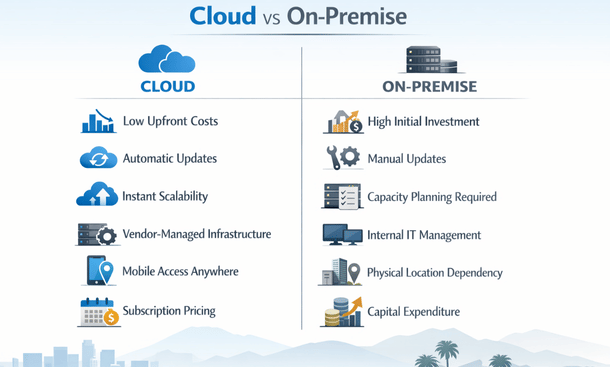
On-premise ERP means you buy software licenses that run on servers you own or lease. Those servers sit in your office, a co-location facility, or a data center you’re renting space in. Your IT team manages everything including servers, databases, backups, security updates, and system maintenance. You pay large upfront costs for licenses plus ongoing maintenance fees.
Cloud ERP means your software runs on servers owned and managed by the vendor or a hosting provider. You access the system through web browsers or mobile apps. Your data lives in data centers you never see, maintained by professionals whose entire job is managing that infrastructure. You pay monthly or annual subscriptions that scale with usage.
The financial model difference hits immediately. On-premise requires significant upfront capital expenditure. You’re buying server hardware, network equipment, backup systems, software licenses, and probably hiring additional IT staff. That initial investment easily runs $50,000 to $200,000 before you’ve entered a single transaction.
Cloud deployment flips that model completely. Minimal upfront costs beyond implementation and training. You’re paying monthly subscriptions that scale with your user count and feature needs. Small businesses might spend $3,000 to $10,000 monthly depending on size and requirements.
From a cash flow perspective, cloud is dramatically easier for growing companies. You’re not dropping six figures before seeing any value. You’re spreading costs over time as you generate revenue from improved operations.
IT resource requirements differ drastically between deployment models. On-premise ERP demands significant internal capabilities. You need people who understand server management, database administration, network security, backup procedures, disaster recovery, and system updates. For small businesses, that’s at least one dedicated IT person, probably two or three as you grow. Each one costs $80,000 to $150,000 annually in California’s expensive tech labor market.
Your IT team spends time maintaining infrastructure instead of working on strategic projects that drive business value. They’re patching servers, monitoring backups, troubleshooting network issues, and managing security updates. When something breaks at 2am, your IT person gets called. When you want to upgrade versions, your team manages the entire process.
Cloud ERP outsources all that infrastructure management to the vendor. They handle servers, databases, backups, security, and updates. Your IT requirements drop dramatically. Maybe one person manages integrations and user support instead of three maintaining infrastructure.
Scalability is where cloud deployment really shines for California businesses. We don’t grow in predictable straight lines. You might add 10 employees in a quarter, open a new location, acquire another company, or pivot your entire business model.
On-premise makes scaling complicated and expensive. Adding users requires buying additional licenses, often in blocks of five or ten. You’re paying for capacity you don’t need yet. Server capacity needs planning months in advance. Running out of storage or processing power means emergency hardware purchases and installation projects.
Cloud scales instantly. Need five more users? Add them in the admin panel and they’re active within minutes. Need less capacity? Reduce your subscription. Opening new locations just requires internet access to use the same system everyone else uses.
This flexibility matters enormously for companies chasing growth opportunities. When you can move fast without worrying about IT infrastructure constraints, you focus on the business opportunity instead of technical requirements.
Security conversations get emotional because protecting data feels more serious than discussing costs. On-premise advocates argue that keeping data in-house provides better security and control. You know exactly where servers are, who has physical access, and what security measures protect them.
The reality is more nuanced. Yes, you control on-premise security, but you’re also responsible for implementing it correctly. Small business IT teams typically lack the security expertise, tools, and resources that enterprise-grade data centers provide.
Cloud vendors operate facilities with physical security, redundant systems, 24/7 monitoring, dedicated security teams, and compliance certifications that would cost millions for a small business to replicate. Both deployment models can be secure or insecure depending on implementation. The difference is cloud security is handled by professionals whose entire job is protecting data, while on-premise security is handled by your overstretched IT person who also needs to fix the printer.
Reliability depends on infrastructure quality and management. On-premise performance can be excellent if you buy powerful servers, implement robust networks, and maintain everything properly. But reliability is entirely on you. If your server crashes, your ERP is down until you fix it. If internet drops and remote workers can’t access the system, that’s your problem to solve.
Cloud reliability depends on vendor infrastructure. Major providers operate multiple data centers with redundancy and automatic failover. If one server fails, another takes over automatically. Industry-leading vendors deliver 99.9 percent uptime, meaning less than nine hours of downtime annually. Most on-premise systems maintained by small IT teams can’t match that reliability.
Updates and maintenance represent another massive difference. With on-premise ERP, updates are your responsibility. Minor patches might be straightforward, but major version upgrades become significant projects requiring testing, planning downtime, execution, and troubleshooting.
Many small businesses delay updates because they’re disruptive and resource-intensive. They fall behind on versions, miss security patches, and can’t access new features. Eventually they’re running software so outdated that upgrading becomes nearly impossible.
Cloud handles updates automatically. The vendor tests releases, schedules updates during low-usage windows, and applies them without requiring action from you. You wake up Monday morning with new features and security patches already installed. You’re always running current software with the latest capabilities.
Making the right deployment choice for your business comes down to honest assessment of your situation. Cloud wins for the vast majority of California small and medium businesses because of lower costs, reduced IT requirements, instant scaling, better security, and superior reliability.
On-premise still makes sense in specific situations. Heavily regulated industries with data sovereignty requirements that prohibit standard cloud deployment might need on-premise or private cloud. Unusual performance requirements demanding customized infrastructure optimization are rare but legitimate. Companies with existing infrastructure they can repurpose cost-effectively might justify on-premise, though maintenance costs usually outweigh cloud subscriptions within a couple years.
For everyone else, cloud provides better economics, flexibility, and capabilities than on-premise deployment. The question isn’t whether to go cloud, but which cloud vendor offers the best fit for your requirements. Understanding how cloud ERP versus on-premise impacts everything from team adoption to long-term flexibility helps you make deployment decisions that support your growth trajectory.
Data migration failures and how to move your data without losing anything
Data migration is where implementations go to die. The vendor showed you clean dashboards filled with perfectly formatted information during demos. Your test data looked flawless. Everything worked beautifully. Then reality hits when you try moving your actual business data into the new system.
Your customer records have duplicates and inconsistent formatting. Your inventory data lives in three different spreadsheets that don’t match each other. Your financial history includes transactions from a system you retired five years ago that nobody knows how to access anymore. Your product catalog has evolved organically over a decade and contains contradictions that somehow worked in the old system but break the new one.
Data migration isn’t just a technical challenge. It’s an archeological expedition through years of business history, documenting how your company actually operates versus how you think it operates. Get this wrong and you’ll spend months cleaning up errors, lose critical information, or worst case, roll back the entire implementation and start over.
Software vendors minimize migration complexity during sales conversations because acknowledging the real challenge would scare prospects away. They say things like “our migration tools handle everything automatically” or “we’ve done hundreds of migrations just like yours.” Neither statement is technically false, but both are deeply misleading.
Migration tools can automatically extract data from source systems and load it into new databases. What they absolutely cannot do is fix the data quality issues you’ve accumulated over years of operations, reconcile inconsistencies between systems, or make judgment calls about handling edge cases that don’t fit standard patterns.
Every business has unique data problems that only emerge when you try moving everything to a new system. You’ve got customers entered multiple times with slightly different spellings. You’ve got inventory items that exist in your warehouse system but not your accounting software. You’ve got transactions from temporary employees whose user accounts no longer exist.
Your old system tolerated these issues because it evolved alongside your business. Workarounds became institutionalized. People knew which data was reliable and which required manual verification. The new ERP doesn’t have that context and won’t accept messy data without breaking.
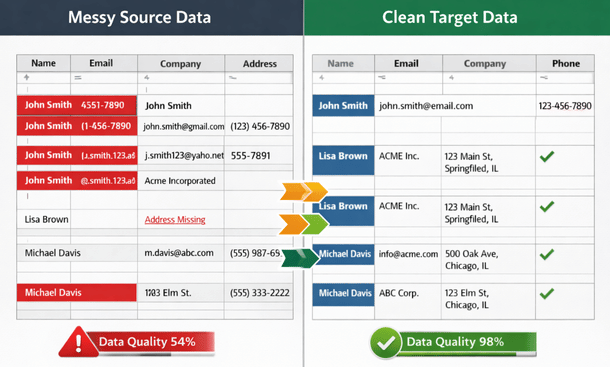
The biggest mistake companies make is trying to migrate everything. Years of historical transactions, archived orders, deleted customers, obsolete products, and outdated pricing records all get dumped into migration scope. This approach triples your effort and imports garbage you’ll never reference again.
Start by identifying what data is actually necessary for operations. You need active customers, current inventory, open orders, valid vendors, and recent transaction history. You probably don’t need every order from eight years ago or products you discontinued five years back.
Financial data requires the most careful consideration. Your accountants need enough history to run comparative reports and satisfy audit requirements. That might mean three years of detailed transactions or just opening balances and summary records depending on your industry and regulatory requirements.
Historical data that doesn’t need migration can be archived. Export it from the old system, store it securely, and keep the old system accessible in read-only mode for a transition period. This gives you access to historical records when needed without burdening your migration project.
Before migrating anything, you need brutal honesty about data condition. Run quality reports on everything you plan to move. Look for duplicates, missing required fields, invalid formats, orphaned records, and logical inconsistencies. Every source system has unique problems and you need visibility into all of them.
Customer data typically has the most quality issues. People get entered multiple times with slight name variations. Addresses are incomplete or formatted inconsistently. Contact information is outdated. Companies change names but records don’t get updated.
Create matching rules to identify duplicates. Exact name matches are easy, but you need fuzzy matching to catch variations like “ABC Company” and “ABC Co.” and “ABC Corporation” as the same customer. This requires either specialized software or significant manual effort reviewing potential matches.
Inventory data quality impacts operations immediately. Missing product descriptions, incorrect quantities, invalid SKUs, or wrong unit of measure values will break your warehouse operations on day one. Audit inventory data thoroughly before migration. Verify physical counts match system records. Ensure product attributes are complete and correct.
Financial data must be perfectly accurate because even small errors create accounting nightmares that take months to untangle. Reconcile all financial data before migration. Ensure trial balances are correct, aged receivables and payables match actual obligations, and all accounts balance properly.
Don’t assume you’ll clean things up after migration. That almost never happens because you lose access to the old system and institutional knowledge about what the data should look like. Address quality issues before you move data, when your team still has both systems available for reference and correction.
Data mapping defines how information from your old system translates to your new ERP. This documentation becomes the blueprint for your entire migration. Document all fields in your source systems including every database table, every field, what data it contains, and what format it uses.
Then document the target ERP structure. What tables and fields exist? What formats do they require? What are the validation rules? Where are the required fields that must have values?
Now map source to target. For each field in your source system, identify which field in the new ERP should receive that data. Some mappings are straightforward like customer name to customer name. Others require transformation when your old system uses a single address field while the new system separates street, city, state, and zip.
Document every transformation rule. If phone numbers in your old system include extensions in the same field but the new system has separate fields, you need a rule for parsing them. If your old product codes don’t match the new ERP’s SKU format requirements, you need a transformation formula.
Testing migration processes thoroughly prevents disasters. Never run your migration against production data without extensive testing first. Set up a complete test environment that mirrors your production systems. Copy a representative sample of data from all sources including normal records, edge cases, and examples of every data quality issue you’ve identified.
Run your migration process against test data and verify results meticulously. Check record counts to ensure everything migrated. Verify data accuracy by comparing random samples. Test transformations to confirm mapping rules worked correctly. Validate relationships to ensure orders still link to customers and transactions still link to accounts.
Document every issue you find during testing. Don’t just fix individual records. Identify the root cause and update your migration process to handle similar cases correctly. Run multiple test migrations, fixing issues each time until a complete test runs without errors and produces accurate results.
The actual migration event requires careful execution. Schedule it during minimal business activity like weekends or planned shutdowns. Create a detailed runbook documenting every step including who does what, in what order, with validation at each stage.
Freeze your source systems before migration starts so nothing changes while you’re extracting and moving information. Extract all data and verify extract files are complete before starting transformation. Run transformation processes and monitor for errors. Load transformed data into your new ERP while watching for loading failures.
Verify loaded data immediately using the same validation checks from testing. Compare record counts, spot-check accuracy, verify relationships, and confirm that critical business processes work with real data. Don’t declare victory until business users verify their data looks correct. Your accounting team needs to confirm opening balances. Your warehouse manager needs to verify inventory records. Their validation catches problems technical checks might miss.
Post-migration validation continues for weeks. Run parallel operations if possible, keeping the old system running in read-only mode while employees start using the new ERP. Create reconciliation reports comparing old to new system data. Discrepancies will emerge and you need someone tracking and resolving every one.
Monitor user reports of data problems closely during the first month. When employees say something looks wrong, investigate immediately because they know your business data intimately and often spot issues that technical validation missed.
The challenges of getting ERP data migration right from the start prevent the painful data loss scenarios that derail otherwise solid implementations and force companies to start over after wasting months of effort and hundreds of thousands of dollars.
Choosing the wrong ERP vendor and red flags every California entrepreneur should know
Picking an ERP vendor is like getting married. You’re committing to a long-term relationship that impacts almost every aspect of your business operations. The vendor you choose determines whether your implementation succeeds or fails, whether you get support when things break, and whether your system grows with you or becomes an expensive limitation.
Every vendor looks amazing during courtship. Slick demos, enthusiastic sales reps, impressive client lists, and promises that everything you need is absolutely achievable. Then you sign the contract and discover reality doesn’t match the sales pitch.
The costs of choosing wrong go way beyond money. You’re looking at failed implementations, operational disruptions, frustrated employees, and potentially starting over with a different system after burning through hundreds of thousands of dollars.
The vendor’s sales behavior tells you everything about how they’ll treat you after the contract is signed. High-pressure sales tactics are the biggest red flag. When reps push you to sign quickly, offer special pricing that expires this week, or discourage you from doing thorough due diligence, they’re showing you exactly how they operate.
Companies confident in their product don’t need artificial urgency to close deals. California’s business culture values transparency and collaboration. Vendors using aggressive tactics are revealing a fundamental mismatch with how you want to operate.
Vague or incomplete pricing is another major warning. If the vendor won’t provide detailed cost breakdowns including implementation, training, support, and potential additional fees, they’re hiding something. Legitimate vendors provide transparent pricing because they know surprises after contract signing destroy trust.
Watch for reluctance to provide customer references. Every vendor claims hundreds of happy clients. Ask for references from companies similar to yours in size, industry, and location. If they make excuses about confidentiality or can’t produce relevant references, that’s a massive red flag indicating their customer base doesn’t include successful implementations like what you’re attempting.

Dismissing your concerns or questions indicates they don’t respect your input. When you ask about specific functionality and the rep waves it off with “that’s easy, we handle that all the time” without actually showing you, they’re not taking your requirements seriously. Good vendors ask tons of questions about how you operate before suggesting solutions.
A vendor’s implementation capability matters as much as their product quality. Ask about their implementation methodology. Do they follow a structured process with defined phases, deliverables, and checkpoints? Or do they wing it based on whoever gets assigned to your project?
Request details about who will actually work on your implementation. You want names, resumes, and experience levels. If the sales rep promises their best consultants but won’t commit to specific people, you’re probably getting whoever’s available when your project starts regardless of qualifications.
Check implementation team experience with businesses like yours. A consultant who specializes in manufacturing might struggle with retail operations. Industry expertise matters because business processes differ significantly across sectors.
Beware of vendors who outsource implementation to third-party partners they don’t directly control. The vendor might build great software, but if implementation is handled by an independent consulting firm with no accountability to the vendor, you’re stuck in the middle when problems arise with no clear path to resolution.
Product capability verification requires going beyond sales demos that show carefully scripted scenarios using clean sample data. Demand to test the system with your actual data and workflows. Upload sample customer records, products, and transactions. Try to complete real business processes you run daily. This reveals whether the system actually handles your requirements or just looks like it might during polished presentations.
Ask pointed questions about edge cases and exceptions. Every business has unusual situations that don’t fit standard processes. How does the system handle returns of discontinued products? What happens when customers have multiple ship-to addresses? Can you process orders with partial backorders? Generic answers like “the system is very flexible” don’t count. You need specific demonstrations of functionality.
Test integrations with tools you currently use. If the vendor claims seamless integration with your e-commerce platform, CRM, or shipping software, make them prove it. Set up test integrations and verify data flows correctly in both directions without manual intervention.
Customer reference conversations give you unfiltered insight into what working with this vendor is really like. Don’t just call the references the vendor provides because those are their happiest customers. Search LinkedIn for people at other companies using the same ERP and reach out cold. You’ll get more honest feedback from people who weren’t hand-selected.
Ask specific questions that bypass generic positive responses. Instead of “are you happy with the system,” ask “what do you wish you knew before signing the contract?” or “if you could change one thing about working with this vendor, what would it be?” These questions elicit real information instead of polite platitudes.
Find out about post-implementation support quality. How long do tickets take to resolve? Do they actually fix bugs or just provide workarounds? When you need help with complex problems, do you get knowledgeable assistance or template responses that don’t address your actual issue?
Ask about hidden costs that emerged after go-live. Did they get surprised by fees for additional users, premium support, extra integrations, or functionality they assumed was included in base pricing? These surprise costs add up quickly and dramatically impact your total cost of ownership.
Your relationship with the vendor really begins after go-live when you need ongoing support. Review support service level agreements carefully. What response times are guaranteed for different priority levels? What happens if they miss those commitments? Weak SLAs with no consequences mean support quality depends on vendor goodwill, not contractual obligations.
Understand what’s included in base support versus premium tiers. Can you call with questions or only submit tickets? Do you get a dedicated support contact or work with whoever answers? Is support available during your business hours or only during the vendor’s preferred time zone?
Test their support process during evaluation. Submit a question through their support portal and see how long it takes to get a useful response. The treatment you get as a prospect is better than what you’ll get as a customer, so poor responsiveness during sales should terrify you about post-sale support.
Financial stability and longevity matter because choosing a vendor who goes out of business or gets acquired leaves you stranded with an orphaned system. Research the vendor’s financial situation. Are they profitable or burning through venture capital? How long have they been in business? What’s their funding situation and runway?
Check for signs of financial distress like aggressive discounting, staff departures, reduced marketing presence, or delayed product updates. Struggling vendors cut support staff first, which directly impacts your experience and ability to get help when you need it.
Contract terms govern everything for years. Watch for auto-renewal clauses with short cancellation windows. Some contracts automatically renew for another year if you don’t cancel 90 days in advance. You can get locked into bad vendor relationships for years through these provisions that you didn’t notice during initial signing excitement.
Understand price increase terms. Can the vendor raise prices annually? By how much? Price protection clauses limit your exposure to unexpected cost increases that blow up your operating budget.
Review termination clauses carefully. Can you terminate for cause if they fail to deliver? What are the penalties for early termination? Some contracts make leaving so expensive you’re essentially trapped even when the vendor relationship has become toxic.
Check data ownership and portability provisions. You need clear rights to export your data in usable formats if you switch vendors. Contracts that make data extraction difficult or expensive create vendor lock-in that prevents you from ever leaving regardless of how bad service becomes.
Making the final vendor decision requires removing emotion and scoring objectively. Create a weighted scoring system for factors that matter most including implementation quality, support capabilities, product fit, pricing, references, and financial stability. Score each vendor across all criteria to get defensible rationale for your choice.
Trust your gut about relationship fit. You’ll work with this vendor for years. If something feels off during sales conversations, it won’t magically get better after signing. The partnerships that succeed are built on mutual respect and honest communication from day one.
Knowing the ERP vendor selection red flags helps you avoid partnerships that doom your project before implementation even begins, saving you from the expensive mistakes of choosing vendors who can’t deliver on their promises.
ERP customization decisions and when to stick with standard functionality
California’s innovation culture is both a blessing and a curse when implementing ERP systems. We love customizing everything to match our unique vision of how business should operate. We see standard processes as limitations rather than best practices. We believe our company is special and deserves software tailored exactly to our needs.
This mindset creates some of the most innovative companies in the world. It also creates some of the most expensive, fragile, and unmaintainable ERP implementations imaginable.
Entrepreneurs spend $200,000 customizing systems that would have worked fine with $20,000 in configuration. Then they spend another $50,000 annually maintaining those customizations. Then they can’t upgrade to new versions because custom code breaks with each release. Then they’re stuck on outdated software that becomes a competitive disadvantage instead of an asset.
Customization isn’t inherently bad. Strategic customization that delivers real business value makes total sense. The problem is distinguishing between customization that matters and customization that just feeds ego or perpetuates inefficient processes.
Understanding the difference between configuration and customization matters enormously for cost, risk, and long-term maintenance. Configuration uses the system’s built-in settings and options to adapt how it works. You’re flipping switches, choosing from dropdown menus, setting up workflows using the vendor’s tools, and activating optional features. No custom code required.
Modern ERP systems offer extensive configuration capabilities. You can define custom fields, create approval workflows, build reports using drag-and-drop tools, set up automated notifications, and establish business rules without writing a single line of code.
Configuration is relatively low-risk. The vendor tests these options, supports them, and ensures they work correctly when you upgrade. Configuration changes typically don’t break during version updates because they’re part of the supported functionality the vendor maintains.
Customization involves writing custom code, modifying database structures, creating custom modules, or fundamentally changing how the system operates beyond what configuration allows. You’re going beyond the vendor’s intended functionality into territory they don’t test or support.
Customization requires developers with specific technical skills. It creates code that only your team understands and maintains. When you upgrade the base system, custom code often breaks and needs rewriting. The cost difference is dramatic. Configuration might cost $5,000 to $20,000 depending on complexity. Equivalent customization could cost $50,000 to $100,000 plus ongoing maintenance that consumes resources perpetually.
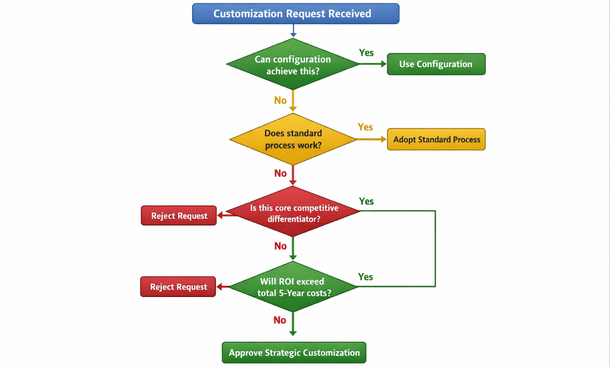
Before commissioning custom development, challenge whether you really need it. Start by questioning why you can’t use the standard process. Often the answer is “that’s not how we do things here.” That’s not a good reason for expensive customization. How you do things today might be inefficient, and adopting better processes through standard ERP functionality could improve operations dramatically.
California businesses sometimes confuse “unique” with “better.” Your workflow might be unique, but that doesn’t automatically mean it’s optimal. Standard ERP processes represent best practices refined across thousands of implementations in companies similar to yours.
Ask what business outcome the customization enables. If it’s just preserving familiar processes, that’s weak justification for major investment. If it enables competitive differentiation, serves regulatory requirements, or delivers measurable financial benefits, it might be worth the cost and complexity.
Calculate return on investment for proposed customizations. What will it cost to build, test, and deploy? What are the annual maintenance costs over five years? What quantifiable benefits will it deliver? If you can’t articulate clear ROI that exceeds total costs, don’t build it.
Some customizations genuinely improve your competitive position or operational efficiency. Industry-specific regulatory requirements often justify customization. If you’re in cannabis, pharmaceuticals, food production, or other heavily regulated California industries, compliance might demand functionality the standard system doesn’t provide.
Core business processes that differentiate you from competitors are legitimate customization candidates. If your unique fulfillment process or custom pricing algorithms give you competitive advantage worth protecting, preserving them through customization makes business sense.
High-volume processes with inefficiencies create ROI opportunities. If a standard process requires 10 manual steps per transaction and you process 10,000 transactions monthly, automation through customization could save hundreds of hours monthly and justify development costs within reasonable payback periods.
The hidden costs of customization extend far beyond initial development quotes. Testing custom code takes significant time. You can’t just deploy customization to production and hope it works. It needs thorough testing in development environments, user acceptance testing, regression testing to ensure it doesn’t break other functionality, and performance testing under realistic loads.
Budget 30 to 50 percent of development time for proper testing. If custom development costs $40,000, add another $12,000 to $20,000 for testing that actually validates the code works correctly.
Documentation is another hidden cost. Custom code needs documentation explaining what it does, how it works, dependencies, and maintenance procedures. Without documentation, you’re dependent on the developer who built it. When they leave for another opportunity, institutional knowledge walks out the door and you’re left with code nobody understands.
Maintenance is the killer that destroys ROI calculations. Custom code needs ongoing updates as business requirements evolve, as you find bugs, and as the underlying ERP platform changes. Budget at least 15 to 20 percent of initial development costs annually for maintenance.
That $50,000 customization costs another $7,500 to $10,000 per year to maintain. Over five years, you’re looking at $87,500 to $100,000 total cost, not the $50,000 you originally budgeted. Many entrepreneurs forget about perpetual maintenance costs and get shocked when annual bills keep arriving.
Upgrade complications create massive hidden costs. When the vendor releases new versions, your custom code might break. You’re testing everything, fixing incompatibilities, and potentially rewriting portions. Major version upgrades that take non-customized systems one weekend could take customized systems one month of testing and remediation work.
Some companies get so trapped by customization debt they can’t upgrade at all. They’re stuck on ancient versions, missing security patches and new features, increasingly vulnerable and uncompetitive because the cost of upgrading and fixing all their custom code exceeds the value of the upgrade itself.
Before commissioning custom development, explore smart alternatives that deliver similar benefits with less risk and cost. Workflow configuration using the vendor’s workflow tools often achieves what you think requires customization. Modern ERPs include powerful workflow engines that handle complex approval routing, conditional logic, and automated actions without code.
Third-party applications designed for your industry might solve problems better than customizing your ERP. California’s SaaS ecosystem includes specialized tools for almost every business function. An add-on subscription might cost less than custom development and comes with vendor support, updates, and maintenance you don’t have to manage.
Integration platforms connect your ERP to other systems without custom coding. Tools like Zapier, Workato, or native integration marketplaces provide pre-built connectors and templates for common integration scenarios. These platforms cost monthly subscriptions but eliminate custom integration development while providing monitoring, error handling, and support.
Changing your business process to match standard ERP functionality is often the smartest choice. If adopting the standard process delivers 90 percent of the value at 10 percent of the cost, that’s the rational decision even if it requires change management effort to retrain people on new workflows.
Governance prevents customization requests from multiplying until your ERP becomes an unmaintainable mess. Establish a customization review board with representation from IT, finance, operations, and executive leadership. Every customization request goes through this board for evaluation using consistent criteria.
Create standardized request forms that force requesters to articulate business justification, quantify expected benefits, identify alternatives considered, and estimate costs. This documentation prevents casual customization requests driven by preference rather than genuine business necessity.
Track all customizations in a central registry documenting what was built, why, who sponsored it, costs, and maintenance requirements. This visibility prevents redundant development and helps you understand technical debt accumulation over time.
Conduct annual reviews of existing customizations. Which ones still deliver value? Which have become obsolete as business needs evolved? Retire customizations that no longer justify their maintenance costs to reduce technical debt and simplify your environment.
Understanding ERP customization best practices helps you balance flexibility with maintainability, ensuring customizations enhance rather than burden your system for years after implementation.
Post-implementation support and why systems fail after go-live
You made it through vendor selection, survived data migration, managed the change management chaos, and successfully went live with your new ERP system. Everyone celebrated. The implementation team moved on to other projects. Your executives declared victory and shifted focus to the next big initiative.
Then three months later, the system that seemed so promising is barely functional. Users are finding workarounds instead of using standard processes. Reports generate wrong data. Integrations break randomly. Nobody remembers how to configure new workflows. The help desk is overwhelmed with tickets that never get resolved.
This post-implementation decline happens to more California companies than anyone admits. The initial success fades because nobody planned for what happens after go-live. ERP systems aren’t set-it-and-forget-it solutions. They’re living platforms that require ongoing attention, optimization, and support to deliver sustained value.
The companies that get long-term ROI from their ERP investments understand that implementation is just the beginning. Post-implementation support determines whether your system becomes a competitive advantage or an expensive regret.
The decline isn’t mysterious. Specific, predictable factors cause post-implementation degradation. Knowledge loss starts immediately. Your implementation consultants leave after go-live, taking deep system expertise with them. The internal champions who drove adoption move to other roles or leave the company. New employees join without proper training. Within six months, institutional knowledge about why things work certain ways has evaporated.
Nobody documented configuration decisions during implementation. You can see what’s configured, but you don’t know why those choices were made or what alternatives were considered. When you need to change something, you’re guessing instead of working from documented rationale.
Users revert to old habits when support isn’t immediately available. During implementation, champions and consultants answered questions within minutes. Now users submit tickets that take days to resolve. Instead of waiting, they build spreadsheet workarounds that bypass the ERP entirely, undermining the whole point of having an integrated system.
System optimization stops after go-live. During implementation, you continuously refined workflows and configurations. After launch, everyone assumes the system is “done” and nobody proactively looks for improvements. Performance degrades, inefficiencies persist, and opportunities for optimization go unnoticed.

Support Gap Reality
Business requirements evolve but the system doesn’t adapt. You add new products, enter new markets, change pricing strategies, or acquire other companies. Your ERP configuration reflects business processes from go-live day, not current reality. The gap between system capabilities and business needs grows wider every month.
Building effective internal support capabilities reduces dependency on expensive external consultants. Develop internal ERP expertise across multiple employees. Don’t create single points of failure where one person holds all knowledge. If your only ERP expert quits, you’re in crisis mode scrambling to find help.
Identify potential ERP administrators from different departments who show technical aptitude and business process understanding. Send them to vendor training courses that go beyond basic user skills into system administration and configuration. These people become your internal capability for managing and optimizing the system.
Create tiered support structure. Level 1 support handles common questions and basic troubleshooting. Level 2 addresses complex configuration issues and system problems. Level 3 involves vendor support or specialized consultants for deep technical issues that require expertise beyond your internal capabilities.
Train your level 1 support team extensively on common user issues. They should handle 70 to 80 percent of tickets without escalation. This keeps users productive and reserves expensive specialized support for problems that genuinely require it.
Document everything your support team learns. Every ticket resolution should update your knowledge base. Over time, you’re building institutional knowledge that persists even as people come and go, preventing the knowledge loss that cripples many implementations.
Ongoing training develops mastery beyond initial go-live basics. Schedule regular refresher training sessions. Users forget functionality they don’t use frequently. Quarterly refreshers on key processes keep skills sharp and remind people of capabilities they’ve forgotten about in daily operations.
Develop role-specific advanced training. Once users master basics, show them advanced features that improve efficiency. Your warehouse team might benefit from mobile app capabilities they didn’t learn initially. Your accounting staff might need training on advanced reporting features that weren’t covered in basic training.
Create video tutorials for common tasks. Short screencasts showing exactly how to complete specific processes help users when they need quick refreshers without submitting support tickets. Build a video library covering every major function accessible whenever someone needs help.
Train new employees properly. Don’t assume they’ll figure things out by watching coworkers. Structured onboarding training for new hires ensures everyone starts with solid foundational knowledge instead of picking up bad habits from colleagues who developed workarounds.
Performance monitoring identifies problems and optimization opportunities before they become crises. Track system usage patterns. How many users log in daily? Which modules get used most? What features remain largely untouched? Usage analytics show you where the system delivers value and where adoption lags.
Monitor transaction volumes and processing times. Are orders being entered? Are invoices being generated? How long do key processes take? Declining transaction volumes might indicate users abandoning the system for workarounds that defeat the purpose of ERP integration.
Review error logs and system alerts regularly. Recurring errors indicate problems that need fixing. Ignored error logs let small issues grow into major failures that disrupt operations and frustrate users.
Analyze help desk tickets for patterns. If you’re getting 20 tickets weekly about the same process, that process needs improvement. Ticket patterns reveal usability issues and training gaps that require attention.
Conduct user satisfaction surveys quarterly. Ask specific questions about what works well, what frustrates them, and what would improve their experience. User feedback guides optimization priorities better than executive assumptions about what needs improvement.
Continuous improvement processes ensure your ERP evolves with your business. Schedule quarterly review meetings with stakeholders from all departments. Discuss what’s working, what needs improvement, and what new requirements have emerged since go-live or the last review.
Collect improvement suggestions systematically. Create channels where users can submit enhancement requests. Not every suggestion gets implemented, but you need visibility into what users want so you can prioritize improvements that deliver the most value.
Prioritize improvements based on business impact and implementation effort. Quick wins that deliver high value get done first. Major projects require business case justification and proper planning with realistic timelines and resource allocation.
Implement improvements in manageable batches. Rolling out 20 changes simultaneously overwhelms users and creates confusion. Instead, deliver 3-5 improvements quarterly with proper communication and training so users can absorb changes effectively.
Managing vendor relationships long-term ensures you get value from ongoing support contracts. Understand exactly what your support contract includes. What response times are guaranteed? What channels can you use for support? Are upgrades included? What costs extra beyond base support?
Maintain regular contact with your vendor account manager. Quarterly business reviews keep your vendor informed about your evolving needs and give you visibility into their product roadmap so you can plan for upcoming changes.
Participate in vendor user communities and conferences. You’ll learn how other companies use the system, discover best practices you haven’t considered, and influence vendor product direction through user feedback that shapes future development priorities.
System updates and upgrades require careful management. Establish a change management process for ERP updates. Don’t apply updates immediately when released. Test them first in non-production environments to catch problems before they impact live operations.
Subscribe to vendor release notes and review them thoroughly. Understand what’s changing, what bugs are fixed, and what new features are available. Assess impact on your specific configuration and customizations before deploying updates.
Test updates in your development environment before staging. Verify that customizations still work, integrations function correctly, and key business processes operate as expected. Conduct user acceptance testing in staging environment before production deployment.
Monitor system closely after update deployment. Watch for unusual errors, performance issues, or user reports of problems. Early detection enables quick response that minimizes business impact from unexpected issues introduced by updates.
Building for long-term sustainability means investing in proper documentation from day one. Document configurations, customizations, business processes, integration architecture, and administrative procedures. Future teams will thank you when they need to understand why systems work certain ways.
Budget adequately for ongoing ERP costs. Support contracts, maintenance, training, optimization projects, and periodic consulting all require funding. Don’t starve your ERP investment after go-live because inadequate support budgets guarantee system degradation and declining user satisfaction.
Keep executives engaged with ERP performance. Regular reports showing system ROI, usage metrics, and improvement initiatives maintain leadership support for ongoing investment in the platform.
Understanding ERP post-implementation support prevents your system from degrading into an expensive liability after the excitement of go-live fades and prevents the slow decline that transforms promising implementations into disappointing underperformers.
ERP implementation doesn’t have to be the expensive disaster story you hear about from other entrepreneurs. The difference between companies that get long-term value from their systems and those that waste hundreds of thousands of dollars comes down to avoiding predictable mistakes.
You now understand the critical errors that derail implementations. Rushing vendor selection without understanding your own requirements sets you up for choosing systems that don’t fit your business. Underestimating the true financial commitment leaves you scrambling for budget when hidden costs emerge. Ignoring change management creates employee resistance that sabotages even the best technology. Making the wrong deployment choice locks you into infrastructure that doesn’t support your growth trajectory. Botching data migration corrupts the foundation your entire system depends on. Picking the wrong vendor partner dooms your project before implementation begins. Over-customizing creates technical debt that burdens you for years. Neglecting post-implementation support allows your investment to degrade into worthlessness.
California entrepreneurs face unique pressures that make these mistakes even more costly. You’re operating in competitive markets where agility determines success or failure. You’re scaling fast and need systems that accelerate growth instead of limiting it. Your tight labor market means frustrated employees will leave for better opportunities rather than tolerating poorly implemented systems. You can’t afford the time or money that failed ERP implementations waste.
The good news is every mistake on this list is completely avoidable. Companies that approach ERP implementation strategically, plan thoroughly, and execute carefully get the transformative results that make the investment worthwhile. Your warehouse operations become efficient instead of chaotic. Your financial reporting becomes accurate instead of questionable. Your customer service improves because people have the information they need instantly. Your decision-making improves because real-time data replaces guesswork.
Start by getting your fundamentals right during the selection phase. Take time to document your requirements before talking to vendors. Evaluate systems based on functional fit, not sales presentation quality. Build realistic budgets that account for total cost of ownership over multiple years. Choose vendors who demonstrate they can deliver, not just talk impressively.
Invest in change management from day one. Bring your team along instead of forcing change on them. Build internal champions who advocate for the new system. Train people properly so they feel prepared instead of abandoned. Support them through the transition with patience and resources.
Make smart technical decisions about deployment models, data migration strategies, and customization governance that set you up for long-term success instead of short-term convenience that creates future problems.
Plan for post-implementation support before you go live. Build internal capabilities that reduce vendor dependency. Establish continuous improvement processes that keep your system evolving with your business. Monitor performance so you catch problems early instead of discovering disasters after they’ve caused damage.
Your ERP system should be a competitive advantage that enables growth, improves operations, and provides the data foundation for smart decision-making. With the right approach, avoiding common mistakes, and learning from others’ failures, you can achieve that outcome instead of joining the long list of entrepreneurs who wish they’d known better before they started.
If you’re just beginning your ERP journey, going back to fundamentals about small business ERP selection will help you start strong with a system that actually fits your business instead of fighting against your growth for years to come.
About the Author

mike
Mike is a tech enthusiast passionate about SaaS innovation and digital growth. He explores emerging technologies and helps businesses scale through smart software solutions.
Did you find this helpful?
Your feedback helps us curate better content for the community.