
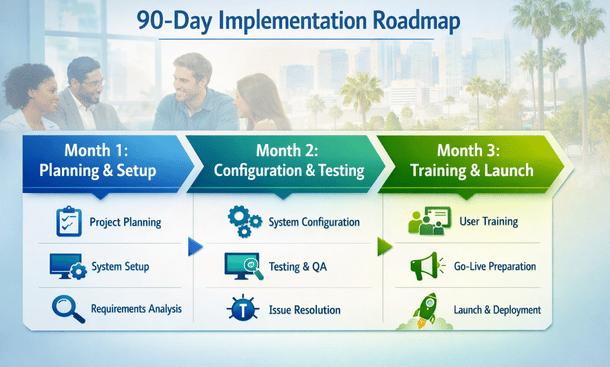
You’ve decided to implement mobile ERP. Smart move. But now comes the hard part. Getting from signed contract to productive team using the system effectively.
I’ve guided dozens of California small businesses through mobile ERP implementations. Some finish in 90 days with teams loving the new system. Others drag on for six months, blow past budget, and still have employees complaining about the tools.
The difference isn’t the software. It’s the implementation approach.
Let me show you the exact framework that gets California businesses mobile-ready in 90 days without the chaos and frustration that usually accompanies major system changes.
Why 90 Days Is the Sweet Spot
Faster implementations sacrifice quality. You rush through planning. Skip important configuration. Provide inadequate training. Your team launches on a half-baked system and struggles for months fixing problems that should have been addressed upfront.
Slower implementations lose momentum. Six-month projects drag. Enthusiasm fades. Requirements change mid-stream. You spend more money and still end up with a system that doesn’t quite fit. Teams develop workarounds that persist long after launch.
90 days provides enough time to do things properly without dragging on forever. You maintain urgency and momentum. You thoroughly plan, configure, test, and train. You launch confidently knowing the system works and your team knows how to use it.
The 90-day timeline assumes you’re implementing mobile ERP for a small to medium California business, maybe 10 to 50 employees. Larger implementations need more time. Tiny businesses might move faster. Adjust the timeline to your specific situation but maintain the same structured approach.
Month One: Planning and Foundation Work
The first 30 days establish the foundation everything else builds on. Rush this phase and problems compound throughout the remaining timeline.
Week 1: Assemble Your Implementation Team
Success requires dedicated people focused on implementation. You can’t treat this as something people handle between their regular jobs. They need time and authority to make decisions.
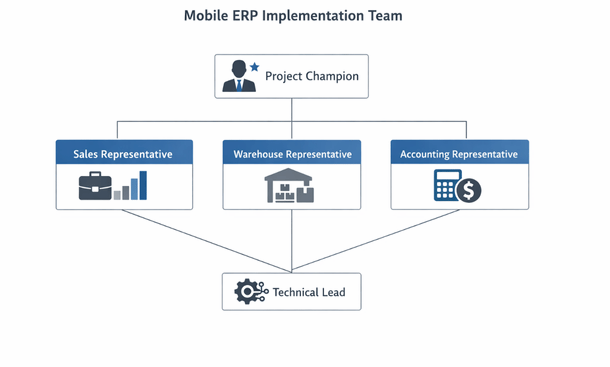
Identify your project champion. This person drives the implementation forward. They remove obstacles, make decisions, and keep everyone accountable. Usually an operations manager or business owner. Someone with authority and deep understanding of your business processes.
Select department representatives. You need someone from sales, warehouse operations, accounting, and any other area that will use the system heavily. These people understand how work actually happens. They identify requirements and test whether the system meets needs.
Assign a technical lead. Even with cloud ERP, you need someone comfortable with technology. They handle technical setup, coordinate with the vendor, and troubleshoot issues. This might be an internal IT person or a trusted technical contractor.
Define time commitments. Your implementation team needs dedicated hours. Maybe 10-15 hours per week during planning. More during configuration and testing. Less during training and launch. Document these expectations upfront so people plan accordingly.
Establish communication cadence. Weekly implementation meetings keep everyone aligned. Daily standups during critical phases maintain momentum. Document decisions and action items so nothing gets lost.
Week 2: Document Current Processes
You need to understand how work currently happens before you can design how it should happen in the new system.
Map your order-to-cash process. How do sales orders enter the system? Who approves them? How does fulfillment happen? When do you invoice? How do you track payments? Document every step with the actual people involved.
Document your procure-to-pay workflow. How do purchase requests start? What approvals are required? Who creates purchase orders? How do you receive goods? When do you pay vendors? These details determine how you configure the system.
Understand inventory management practices. How do you track stock? When do you reorder? How do you handle multiple locations? What about returns and adjustments? These workflows need mobile support.
Review financial close procedures. Who enters transactions? How do you reconcile accounts? What reports do you need? When? Mobile access to financial data requires careful planning around accuracy and controls.
Identify pain points in current processes. Where do things bog down? What causes errors? Which tasks waste time? The new system should eliminate these problems, not just digitize the same broken processes.
Week 3: Define Requirements and Configure Access
Requirements translate business needs into system configuration. Specific requirements prevent scope creep and keep implementation focused.
List must-have mobile capabilities. What do people absolutely need to do from their phones? Approve orders? Check inventory? Create quotes? Update project status? These core functions get priority.
Define nice-to-have features. What would be convenient but isn’t critical? These capabilities can wait for phase two. Trying to implement everything at once delays launch and overwhelms users.
Document integration requirements. What other systems need to connect? Accounting software? E-commerce platform? Shipping carriers? Email? Define what data flows where and how often.
Establish user roles and permissions. Based on your current processes, define who needs access to what. Create role templates for common job functions. Document exception cases that need special handling.
Plan your data migration. What existing data needs to transfer to the new system? Customers, vendors, products, inventory, open orders? Clean the data before migration. Bad data in the old system becomes bad data in the new system.
Week 4: Vendor Kickoff and Initial Configuration
With planning complete, you’re ready to work with your vendor on actual system setup.
Conduct a formal kickoff meeting. Review your requirements. Discuss the implementation timeline. Clarify responsibilities. Establish communication channels. Get everyone aligned on expectations.
Complete initial system configuration. Set up your company information. Configure tax settings. Define fiscal periods. Set up locations. This foundational data supports everything else.
Create user accounts. Set up accounts for your implementation team first. Configure their permissions appropriately. They need access to test the system as configuration progresses.
Configure mobile app settings. Define which features appear on mobile. Set up dashboards for different roles. Configure notification preferences. Test the mobile app to verify basic functionality.
Import master data. Load customers, vendors, products, and employees. Start with a small subset for testing. Verify data imported correctly before loading everything. Clean data as you go.
Month Two: Configuration, Testing, and Refinement
Month two focuses on getting the system configured exactly right and testing thoroughly. This phase determines whether your launch succeeds or struggles.
Week 5: Configure Core Workflows
Now you translate those documented processes into actual system configuration.
Set up your order management workflow. Configure how sales orders enter the system. Define approval routing based on order value or customer credit status. Set up fulfillment processes. Configure invoicing and payment tracking.
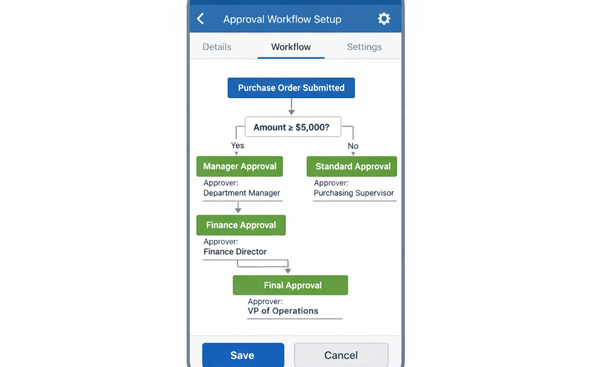
Configure purchasing workflows. Set up purchase requisitions. Define approval hierarchies. Configure how purchase orders route to vendors. Set up receiving processes. Configure accounts payable.
Implement inventory management. Set up reorder points. Configure transfer orders between locations. Implement cycle counting procedures. Set up barcode scanning if you’re using it.
Configure financial workflows. Set up your chart of accounts. Define journal entry processes. Configure bank reconciliation. Set up expense reporting and approval.
Build custom reports and dashboards. Create the views people need for daily work. Configure mobile dashboards for different roles. Test reports to ensure they show accurate data.
Week 6: Configure Mobile-Specific Features
Mobile functionality requires specific attention to work properly.
Optimize mobile dashboards. Desktop dashboards show too much for mobile screens. Configure mobile versions that surface the most critical information. Different roles need different dashboards.
Configure mobile notifications. What alerts do people need on their phones? Approval requests? Low inventory? Failed transactions? Configure push notifications appropriately without overwhelming users.
Set up mobile approval workflows. Test the complete approval process from mobile. Create a request. Verify the right person gets notified. Complete the approval on mobile. Confirm the transaction processes correctly.
Configure offline functionality. Determine what data should cache on devices for offline access. Test offline workflows thoroughly. Verify synchronization works properly when connectivity returns.
Implement mobile scanning. If you’re using barcode or QR code scanning, configure it now. Test with your actual products or assets. Verify scans create the right transactions.
Week 7: User Acceptance Testing
Testing verifies the system works as designed before training your whole team.
Create test scenarios covering common workflows. Write specific step-by-step procedures for testing. Include expected results so testers know what success looks like. Cover both happy path scenarios and error cases.
Have department representatives test their areas. Sales tests order management. Warehouse tests inventory and fulfillment. Accounting tests financial functions. They know the nuances and can spot problems.
Test mobile functionality extensively. Try every mobile workflow under various conditions. Test on different devices. Test with poor connectivity. Test offline scenarios. Mobile is often the weakest link if not tested thoroughly.
Document every issue discovered. Use a simple tracking system. Categorize issues by severity. Critical issues block launch. Major issues need fixing before launch but don’t completely block it. Minor issues can wait for post-launch.
Retest after fixes. Don’t assume fixes work. Verify that corrections actually resolve the problems without creating new issues. Regression testing ensures fixes don’t break previously working functionality.
Week 8: Training Preparation and Data Migration
With testing mostly complete, prepare for the final month’s training and launch.
Finalize training materials. Create simple guides for common tasks. Focus on what people do daily, not everything the system can do. Make materials mobile-friendly since people will reference them on phones.
Record video walkthroughs. Short videos showing specific tasks work great for training and ongoing reference. Three-minute videos on single topics beat 30-minute comprehensive videos that nobody watches.
Complete full data migration. Import all your historical data. Verify accuracy. Reconcile totals to ensure nothing got lost. Data issues discovered after launch create major headaches.
Configure production environment. Your testing happened in a sandbox. Now configure production with final settings. Copy tested configurations from sandbox. Don’t make changes you haven’t tested.
Establish support procedures. How will people get help after launch? Who answers questions? How do they submit issues? Set up a help channel in Slack, Teams, or email. Document the process clearly.
Month Three: Training, Launch, and Stabilization
The final month focuses on getting your team comfortable with the system and launching successfully.
Week 9: Train Your Team
Training determines whether people embrace or resist the new system.
Start with training for trainers. Train your implementation team thoroughly first. They become your first line of support after launch. They can answer questions and help colleagues.
Conduct role-based training sessions. Don’t train everyone on everything. Sales reps need sales training. Warehouse staff need inventory training. Targeted training is more efficient and relevant.
Make training hands-on. Lecture-style training doesn’t work. Have people complete actual tasks in the system during training. Use real scenarios from your business. Practice builds competence and confidence.

Keep sessions short and focused. 45-minute sessions work better than three-hour marathons. Cover one area thoroughly rather than rushing through everything. Schedule multiple sessions over several days.
Provide immediate support during training. Have knowledgeable people available to answer questions. Don’t wait until after training to address confusion. Real-time support prevents misconceptions from taking root.
Record training sessions. People who miss sessions can watch recordings. People who attended can review later. Videos become ongoing reference materials.
Week 10: Pilot Launch
Full company-wide launches are risky. Pilot with a small group first.
Select pilot users carefully. Choose people who are tech-savvy and patient. They’ll identify issues without getting frustrated. They can help train others after the pilot.
Launch pilot users on production system. They use real data and complete actual work. This isn’t testing anymore. It’s real operations with a safety net.
Monitor pilot users closely. Check in daily. Ask about problems. Watch for confusion or frustration. Address issues immediately before they become ingrained bad habits.
Collect feedback systematically. Use surveys or structured interviews. Ask specific questions about functionality, usability, and pain points. General “how’s it going” conversations don’t surface detailed issues.
Refine based on pilot feedback. Make configuration adjustments. Update training materials. Fix any remaining bugs. The pilot identifies problems before they affect your whole team.
Week 11: Full Launch
With the pilot successful, you’re ready to launch to everyone.
Communicate launch plans clearly. Everyone should know when the cutover happens. What they need to do. Where to get help. Send multiple reminders leading up to launch.
Choose launch timing strategically. Don’t launch during your busiest period. Monday morning launches give you the full week to support. Friday launches mean problems wait until Monday.
Provide extra support during launch week. Have your implementation team available for questions. Expect lots of basic questions even after training. Quick responses build confidence.
Monitor system usage closely. Watch for people who aren’t logging in. They might be stuck or avoiding the system. Proactively reach out and help them get started.
Celebrate the launch. Acknowledge the effort everyone put in. Thank your implementation team. Build positive momentum around the change.
Week 12: Stabilization and Optimization
The first few weeks after launch focus on stabilization.
Hold daily standups during week one. Quick 15-minute meetings to surface issues and share solutions. These meetings catch problems before they escalate.
Document workarounds and fixes. Keep a running log of common questions and solutions. This becomes your knowledge base for ongoing support.
Identify quick wins. Look for small improvements that make big impacts. Maybe a dashboard tweak or a simplified workflow. These wins maintain momentum.
Plan phase two enhancements. You didn’t implement everything in phase one. Now that the system is running, start planning the next round of improvements.
Conduct post-implementation review. What went well? What could improve? Document lessons learned while they’re fresh. These insights help with future projects.
Critical Success Factors Throughout Implementation
Certain factors determine success regardless of which phase you’re in.
Executive Sponsorship
Implementation requires executive support beyond just budget approval. Your project champion needs authority to make decisions quickly. They need to prioritize implementation work over business as usual. Without strong executive sponsorship, implementations drag as people squeeze them around regular work.
The executive sponsor removes obstacles. When departments disagree on processes, the sponsor makes the call. When resources get tight, the sponsor ensures implementation stays staffed. When the team needs budget for something unexpected, the sponsor approves or denies quickly.
Change Management
New systems change how people work. Change management helps people through that transition.
Explain why you’re implementing mobile ERP. People resist changes they don’t understand. Connect the new system to business goals. Show how it makes their jobs easier. Create enthusiasm instead of just mandating compliance.
Address concerns proactively. Some people worry about job security. Others fear looking incompetent learning new tools. Acknowledge these concerns. Provide reassurance and support.
Celebrate early adopters. Some people embrace new systems immediately. Recognize and reward them. Their enthusiasm encourages others.
Be patient with resisters. Some people resist any change. Don’t write them off. Provide extra support. Often resisters become advocates once they experience the benefits.
Clear Communication
Communication prevents confusion and builds confidence.
Communicate frequently. Regular updates keep everyone informed. Don’t go silent for weeks then dump information all at once. Consistent communication maintains awareness.
Use multiple channels. Email updates. Team meeting announcements. Slack or Teams messages. Posters in break rooms. Different people prefer different communication methods.
Tailor messages to audiences. Executives need high-level progress updates. Department staff need details about how changes affect them. One-size-fits-all communication misses everyone.
Be honest about challenges. Don’t pretend everything’s perfect. Acknowledge difficulties. Explain how you’re addressing them. Honesty builds trust.
Adequate Resources
Implementation requires time, money, and people. Trying to do it on the cheap creates problems.
Budget for implementation costs beyond software licenses. Implementation services from vendors or consultants. Training time. Potential productivity dips during transition. Plan for these costs upfront.
Dedicate people to implementation. Part-time attention produces part-time results. Your implementation team needs protected time for this work. Cover their regular duties or explicitly reduce their normal workload.
Expect productivity dips during transition. People work slower learning new systems. This is temporary but unavoidable. Plan accordingly. Don’t schedule major deadlines during the launch period.
Realistic Expectations
Understand what’s achievable in 90 days and what isn’t.
You won’t implement every feature. Focus on core workflows first. Add advanced features later. Trying to do everything at once delays launch and overwhelms users.
Some processes will need adjustment. The new system might not support your exact current process. You’ll need to adapt. Fight these battles selectively. Change processes that need changing anyway. Push back on changes that break critical workflows.
Adoption takes time. Don’t expect 100% adoption on day one. Some people adapt quickly. Others need weeks. Measure progress over months, not days.
Problems will occur. Systems have bugs. Configuration gets missed. Training gaps emerge. Plan for issues. Budget time to address them. Calm problem-solving beats panic.
Common Implementation Pitfalls to Avoid
Learn from others’ mistakes instead of making them yourself.
Scope Creep
Starting with focused requirements then continuously adding features delays everything. “While we’re at it, let’s also…” kills timelines. Defer nice-to-have features to phase two. Launch core functionality on time.
Inadequate Testing
Rushing testing to stay on schedule causes launch disasters. Every hour saved on testing costs ten hours fixing problems after launch. Test thoroughly. Delay launch if necessary but don’t skip testing.
Insufficient Training
One training session isn’t enough. People need hands-on practice and ongoing support. Skimp on training and people struggle for months. Invest in comprehensive training. It pays off immediately.
Ignoring Change Management
Focusing only on technical implementation while ignoring human factors creates resistance. Technical perfection means nothing if people won’t use the system. Balance technical work with change management.
Over-Customization
Excessive customization makes systems fragile and expensive to maintain. Use out-of-the-box functionality whenever possible. Customize only when standard features truly don’t work. Over-customized systems become maintenance nightmares.
Poor Data Migration
Migrating dirty data creates ongoing problems. Clean data before migration. Verify accuracy after migration. Bad data in the new system undermines everything else.
Weak Project Management
Without structured project management, implementations drift. Missed deadlines compound. Issues don’t get resolved. Assign someone to manage the project actively. Track progress against plan. Hold people accountable.
Post-Launch Optimization
Launch isn’t the end. It’s the beginning of continuous improvement.
Gather User Feedback
Schedule feedback sessions one month post-launch. What’s working well? What’s frustrating? What’s missing? This input drives your improvement roadmap.
Anonymous surveys capture honest feedback. People say things in surveys they won’t say in meetings. Use both surveys and face-to-face conversations.
Monitor System Usage
Usage analytics show what features people actually use. Low usage might indicate training gaps or features that don’t work well. High usage shows what’s valuable.
Identify super users who really embrace the system. They become trainers and advocates. Leverage their enthusiasm to help others.
Address Pain Points
Some issues only emerge after weeks of real usage. Address pain points quickly. Small fixes maintain goodwill. Let issues fester and frustration grows.
Prioritize based on impact. Fix things that affect many people or block critical work first. Nice-to-have improvements wait.
Plan phase two during stabilization. Collect ideas from users. Evaluate what would deliver the most value. Create a roadmap for the next six months.
Measure Success
Define success metrics before launch. Track them consistently. Common metrics include:
System adoption rate – what percentage of people use it regularly? User satisfaction scores – are people happy with the system? Process efficiency – are workflows faster? Error rates – are mistakes decreasing? Mobile usage – how many people use mobile access actively?
Share metrics with the team. Celebrate improvements. Address areas that aren’t meeting goals.
Making Your 90-Day Implementation Successful
Mobile ERP transforms how you run your business. That transformation happens when you understand what you’re getting into and make deliberate choices based on your specific situation rather than vendor marketing promises or trends.
The California business environment demands mobility. Your competitors are already managing operations from their phones. Your customers expect rapid responses regardless of where you physically happen to be. Your team wants flexibility to work effectively from anywhere. Mobile ERP provides the infrastructure making all of this possible.
But mobile ERP only delivers value when implemented thoughtfully. The wrong platform wastes money and frustrates your team for years. The right platform poorly implemented creates the same problems. Missing security protections expose your business to catastrophic data breaches. Inadequate training means expensive software sitting unused while people stick with old manual processes.
Success comes from systematic decision-making at each stage. Platform selection determines your foundation. This isn’t a decision to rush or make based on slick demos and sales pitches. The platform you choose affects every aspect of your mobile operations for years to come. Evaluate options based on your actual needs rather than impressive feature lists. Consider your team’s technical sophistication, your budget constraints, your growth trajectory, and most importantly, how the platform performs in real-world mobile scenarios.
Making the right platform choice requires understanding what each option actually delivers for California small businesses. Our comprehensive review of the best mobile ERP apps for small business breaks down the top platforms with honest assessments of pricing, mobile functionality, user experience, and ideal use cases, helping you identify which solution matches your specific business needs rather than just picking the most expensive or most heavily marketed option.
NetSuite provides enterprise power for businesses ready to invest in comprehensive functionality. Odoo delivers surprising capability at budget-friendly prices. SAP Business One brings established reliability. Acumatica offers cloud-native design optimized for mobile from inception. Each serves different business profiles, budgets, and technical requirements.
The features you prioritize make or break daily experiences. Real-time synchronization and offline functionality aren’t negotiable. Intuitive mobile interfaces determine whether people actually use the system. Role-based dashboards surface relevant information efficiently. Approval workflows eliminate bottlenecks that slow business. Barcode scanning prevents inventory errors. Financial visibility enables informed decisions anywhere.
Architecture choices affect everything that follows. Cloud ERP delivers superior mobile experiences through infrastructure specifically designed for remote access. Traditional ERP forces clunky VPN connections and sluggish performance. The cost difference favors cloud when you account for total ownership over time. The security advantages favor cloud for most small businesses lacking dedicated security teams. The scalability benefits favor cloud for growing companies.
Security protections prevent disasters that destroy businesses. Multi-factor authentication blocks unauthorized access. Encryption protects data in transit and at rest. Granular permissions limit information exposure. Device management handles loss and theft. Network security protects public wifi connections. Team training prevents human errors that compromise technical protections. Monitoring detects problems before they escalate. Regular updates close vulnerabilities before exploitation.
Implementation execution determines whether your mobile ERP investment pays off or wastes resources. The 90-day implementation framework provides the structure California businesses need to go from contract signing to productive mobile operations. Plan thoroughly in month one, configure and test in month two, train and launch in month three. This systematic approach maintains momentum while ensuring quality at each stage.
The businesses succeeding with mobile ERP in 2026 didn’t get lucky. They made informed decisions. They planned thoroughly. They implemented systematically. They supported their teams generously. They treated mobile ERP as a strategic capability rather than just technology purchase.
Your California business can achieve the same results. Mobile operations that let you manage everything from anywhere. Teams that stay productive regardless of location. Customers that get rapid responses. Inventory that stays accurate. Finances that remain visible. Approvals that happen instantly. Operations that scale smoothly as you grow.
The opportunity costs of delaying mobile ERP grow daily. Every day you wait is another day your competitors gain advantages. Another day your team works inefficiently. Another day you miss opportunities because information wasn’t available at the right moment. Another day your business operates with unnecessary friction.
Start with honest assessment of where your business stands today. How do your current processes handle remote access? What bottlenecks slow operations when people aren’t at their desks? Which information do people need on-the-go but can’t easily access? Where do errors happen because people work with outdated data? These pain points identify where mobile ERP delivers immediate value.
Move to structured evaluation of your options. Don’t just watch vendor demos and pick whatever looks impressive. Test platforms with your actual workflows. Have your team try completing real tasks during trials. Verify that features vendors demonstrate actually work reliably in daily use. Check references from similar businesses in California. Understand total costs beyond monthly subscription fees.
Plan your implementation deliberately. Assemble your team with clear roles and time commitments. Document current processes identifying what works and what doesn’t. Define requirements prioritizing must-have capabilities over nice-to-have features. Configure thoroughly and test exhaustively. Train comprehensively and support generously during launch.
Mobile ERP isn’t future technology anymore. It’s current competitive necessity for California businesses. The question isn’t whether mobile access makes sense. It’s whether you’ll implement it strategically or reactively. Whether you’ll choose platforms that actually work or settle for mediocre solutions. Whether you’ll protect your data properly or create security vulnerabilities. Whether you’ll support your team effectively or leave them struggling.
You now have the framework for making these decisions well. The platform options and selection criteria. The feature priorities and architecture considerations. The security protections and implementation approach. For the complete strategic overview of how all these elements work together to transform California businesses, our complete guide to ERP mobile apps and managing your business on-the-go provides the comprehensive context that connects platform selection, feature evaluation, architecture decisions, security implementation, and deployment execution into a cohesive roadmap for building mobile-first operations that compete effectively in 2026 and beyond.
The businesses thriving five years from now will be the ones that embraced mobile operations thoughtfully today. Your competitors are already making this transition. Your customers already expect the responsiveness mobile access provides. Your team already wants the flexibility mobile tools enable. The only question is whether you’ll lead this transformation for your business or scramble to catch up later.
Start now. Evaluate your options. Choose deliberately. Implement systematically. Support your team. Build the mobile-first business California’s competitive environment demands. The tools exist. The frameworks work. The only missing piece is your decision to begin.
About the Author

mike
Mike is a tech enthusiast passionate about SaaS innovation and digital growth. He explores emerging technologies and helps businesses scale through smart software solutions.
Did you find this helpful?
Your feedback helps us curate better content for the community.