
Your phone holds everything about your business. Customer data. Financial records. Employee information. Inventory details. Vendor contracts. All of it sitting in your pocket while you grab coffee in Santa Monica or meet clients in San Francisco.
That’s incredibly powerful. It’s also incredibly risky if you don’t handle security properly.
I’ve seen California businesses get burned by mobile security gaps. A lost phone exposed customer credit cards. A stolen tablet gave competitors access to pricing strategies. An unsecured app leaked employee social security numbers. These aren’t hypothetical scenarios. They’re real situations that cost real businesses serious money and reputation damage.
Let me walk you through exactly how to protect your business data on mobile ERP apps without making security so annoying that your team works around it.
Why Mobile ERP Security Demands Special Attention
Mobile devices create security challenges that don’t exist with desktop computers. You don’t leave your office computer at Starbucks. You don’t lose your desktop on the train. Nobody pickpockets your server from the back of your pants.
Phones go everywhere. They get left on restaurant tables. They fall out of pockets. They get stolen from cars. Each time your phone leaves your hand, your business data potentially falls into the wrong hands.
Public networks compound the risk. Your office network probably has firewalls, intrusion detection, and security monitoring. The wifi at that Venice Beach coffee shop has none of that. When you access your ERP on public networks, your data travels through infrastructure you don’t control and can’t trust.
Personal and business use blend on mobile devices. Your team uses the same phone for Instagram, personal email, and business ERP access. A malicious app installed for fun might harvest data from your business apps. A phishing link clicked in personal email might compromise the entire device.
California’s data privacy laws raise the stakes. The California Consumer Privacy Act creates serious liability for businesses that don’t protect customer data properly. A mobile security breach can trigger regulatory penalties on top of the direct business damage.
The good news is that mobile ERP security doesn’t require a PhD in cybersecurity. You just need to implement the right protections systematically. Let’s go through them.
Implement Strong Authentication That People Will Actually Use
Authentication is your first line of defense. If someone can’t log into your ERP, they can’t access your data. Simple concept, but the implementation details matter enormously.
Passwords alone don’t cut it anymore. People choose weak passwords. They reuse passwords across multiple services. They write passwords on sticky notes. Passwords provide minimal security when they’re the only protection.
Multi-factor authentication adds crucial security. Even if someone steals a password, they can’t access the system without the second authentication factor. This typically involves something you know, the password, plus something you have, like your phone, or something you are, like your fingerprint.
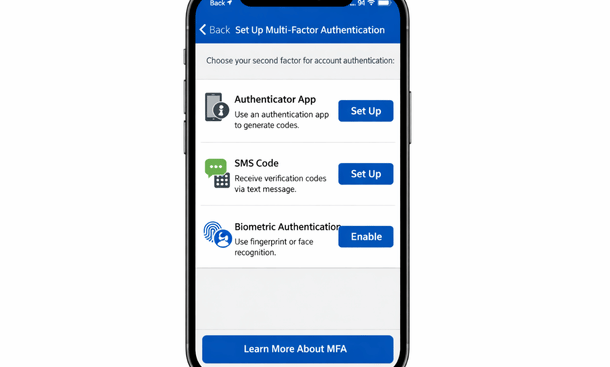
Time-based one-time passwords through authenticator apps provide solid security. Apps like Google Authenticator or Microsoft Authenticator generate six-digit codes that change every thirty seconds. You enter your password plus the current code from the app. Nobody can log in without physical access to your phone.
SMS-based codes work too but are less secure. Text messages can be intercepted through SIM swapping attacks. If you must use SMS codes, understand they provide better security than passwords alone but worse security than authenticator apps.
Biometric authentication balances security and convenience beautifully. After the initial login with password and second factor, you can configure fingerprint or face recognition for subsequent access. This encourages people to actually enable security instead of disabling it because it’s annoying.
The implementation should remember trusted devices. Require the full authentication process when someone logs in from a new phone. For their regular device, fingerprint or face recognition provides quick access without constantly entering passwords and codes.
Single sign-on integration reduces password fatigue. If your business uses Google Workspace or Microsoft 365, configure your ERP to authenticate through those systems. Employees use one set of credentials they already know. You manage access centrally. When someone leaves the company, disabling their Google or Microsoft account automatically revokes ERP access too.
Automatic logout after inactivity prevents unauthorized access if someone walks away from their phone. Configure a timeout period that balances security and convenience. Maybe fifteen minutes makes sense. The app logs out automatically, requiring re-authentication. This simple feature prevents the “I left my unlocked phone on the table” scenario.
Password policies should require reasonable complexity without driving people crazy. Require eight characters minimum. Mix letters and numbers. That’s sufficient. Don’t require special characters, capital letters, and monthly changes. Those policies just make people choose passwords like “Password1!” and write them down.
Encrypt Everything, Everywhere
Encryption protects your data even if other security measures fail. If someone intercepts encrypted data, they get meaningless gibberish without the decryption keys.
Data in transit must be encrypted. Every communication between your mobile app and ERP servers should use TLS encryption, the same technology that protects online banking. Modern cloud ERP platforms do this automatically. Verify that your specific platform uses TLS 1.2 or newer. Older protocols have known vulnerabilities.
Man-in-the-middle attacks try to intercept data between your phone and servers. TLS encryption defeats these attacks. Even if someone captures the network traffic, they can’t read the encrypted contents. This protection matters enormously on public wifi networks where attackers commonly operate.
Certificate pinning adds another layer of protection against sophisticated attacks. The mobile app only trusts specific encryption certificates instead of any valid certificate. This prevents attackers from using fraudulent certificates to intercept traffic. Not all ERP platforms implement certificate pinning, but it’s a nice bonus when available.
Data at rest encryption protects information stored on your phone. Modern smartphones encrypt storage by default, but this only works if you set a passcode or use biometric unlock. A phone without a passcode isn’t encrypted. Require your team to use device passcodes as a basic security hygiene measure.
The ERP app should encrypt any data it stores locally. Cached records, offline data, attached documents, all need encryption. Quality ERP platforms handle this automatically. Don’t assume they do though. Ask the vendor specifically about local data encryption during your evaluation.
Backup encryption matters too. Phone backups to iCloud or Google Drive should be encrypted. These backups might contain cached ERP data. Unencrypted backups sitting in cloud storage create a security gap. Most modern backup systems encrypt by default, but verify your specific configuration.
Database encryption protects data on the server side. Your cloud ERP provider should encrypt the database where your business data lives. This protects against attackers who might compromise the server infrastructure. Major cloud providers implement database encryption as standard practice.
Key management determines encryption strength. The encryption keys themselves need protection. Cloud ERP providers use hardware security modules and key management services designed specifically for this purpose. Your vendor should be able to explain their key management practices if you ask.
Control Access with Granular Permissions
Not everyone needs access to everything. Proper permission configuration ensures each team member sees only the data they need for their job.
Role-based access control groups permissions by job function. Create roles like warehouse staff, sales rep, manager, accountant. Assign specific permissions to each role. Then assign employees to appropriate roles. This approach scales better than managing permissions individually for each person.
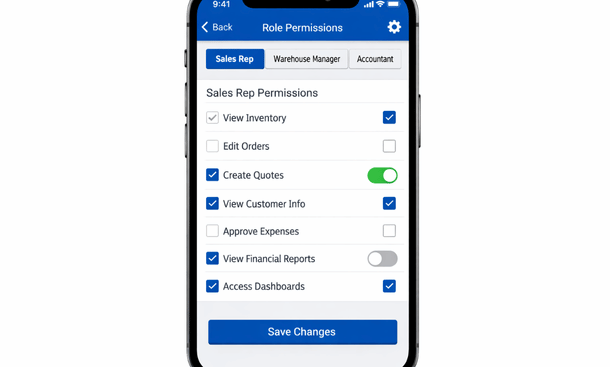
Financial data requires particularly careful access control. Your sales team doesn’t need to see detailed cost breakdowns or profit margins. Warehouse staff don’t need access to employee salary information. Configure permissions so people can do their jobs without accessing sensitive data they don’t need.
Customer data access should be limited too. Maybe sales reps only see their own customers. Managers see their team’s customers. Executives see everything. This segmentation limits damage if an account gets compromised or an employee acts maliciously.
Field-level permissions provide fine-grained control. Perhaps everyone can see customer names and contact information. Only managers can see credit limits. Only accounting can see payment terms. This granularity lets you share appropriate information while protecting sensitive details.
Transaction approval hierarchies implement business controls through permission structure. Junior employees can create purchase requests but can’t approve them. Managers can approve requests up to certain dollar amounts. Larger purchases require executive approval. These workflows enforce proper oversight.
Time-based access restrictions work well for temporary needs. A seasonal employee needs access during peak season. An external consultant needs access during a project. Configure their accounts to expire automatically. This prevents forgotten accounts from becoming security vulnerabilities.
Location-based restrictions add another control layer. Maybe warehouse staff only access the ERP from warehouse locations. Remote access gets blocked automatically. This prevents compromised credentials from being used outside your facilities. Not all platforms support this, but it’s valuable when available.
Audit logs track who accessed what data and when. These logs help you detect unusual access patterns that might indicate compromised accounts. They also provide accountability and help troubleshoot issues when data appears incorrect. Quality ERP platforms maintain detailed audit trails automatically.
Regular permission reviews catch access creep. Employees change roles. Responsibilities shift. Someone who needed financial access last year might not need it anymore. Review permissions quarterly and remove access that’s no longer necessary. This principle of least privilege minimizes risk.
Protect Against Device Loss and Theft
Phones get lost. They get stolen. Your security strategy needs to account for physical device compromise.
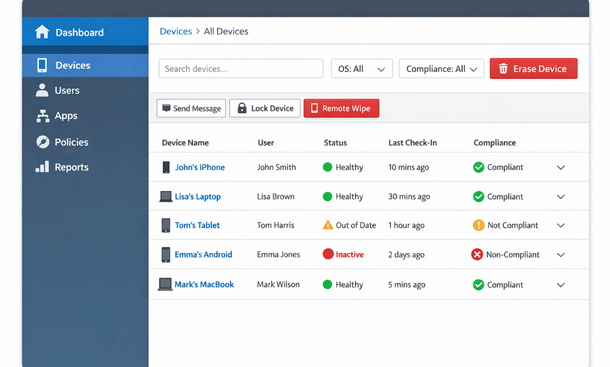
Remote wipe capability is essential. If an employee reports a lost or stolen phone, your IT admin should be able to remotely erase all business data from that device. The device becomes useless to whoever has it. Your data stays protected.
Mobile device management platforms provide centralized control. Solutions like Microsoft Intune, VMware Workspace ONE, or Google Workspace mobile management let you configure security policies, deploy apps, and remotely wipe devices. These platforms integrate with most major ERP systems.
Container or sandbox approaches separate business and personal data. Business apps and data live in an encrypted container on the phone. Personal apps remain completely separate. If you need to wipe business data, the personal side stays untouched. This separation makes employees more comfortable with security measures since their personal information isn’t at risk.
Find My Phone features help recover lost devices. Both iOS and Android include built-in tracking. If someone leaves their phone at a restaurant, you might locate and recover it before needing to wipe it. This prevents unnecessary data loss from false alarms.
Automatic wipe after failed login attempts provides protection if someone tries to crack the device passcode. Configure the phone to erase itself after ten failed attempts. This defeats brute force attacks. Make sure employees know about this policy so they don’t accidentally wipe their own phones.
Device registration requirements ensure you maintain an inventory of phones accessing your ERP. Employees can’t just install the app on any device. They need to register devices with IT first. This visibility lets you track what’s accessing your systems and revoke access when needed.
Jailbroken or rooted device detection blocks compromised phones. These modified devices bypass normal security protections. Quality ERP apps detect jailbroken iOS devices or rooted Android devices and refuse to run. This prevents intentionally weakened devices from accessing your data.
Geofencing adds location-based protection. If a device suddenly appears in Russia or Nigeria when your employee is in California, that’s suspicious. Geofencing can automatically lock the device or require additional authentication. This helps detect stolen devices being used far from normal locations.
Lost device protocols need clear documentation. Employees should know exactly who to contact immediately when a device goes missing. Every minute of delay increases risk. A simple process with 24/7 contact information ensures quick response.
Secure Your Network Connections
The networks you connect through matter as much as the device and app security. Public networks create opportunities for attackers to intercept data.
VPN usage should be mandatory on untrusted networks. Virtual private networks encrypt all traffic between your device and the VPN server. Someone monitoring the network sees encrypted gibberish instead of your actual data. Modern VPN apps work transparently. Connect once and the VPN handles everything automatically.
Automatic VPN connection on public networks removes the human element. Configure the VPN to activate automatically when connecting to any network except your trusted office and home networks. Employees don’t need to remember to enable it. Protection happens automatically.
Corporate wifi should use WPA3 encryption with strong passwords. Your office network isn’t automatically secure just because it’s yours. Proper encryption and authentication prevent unauthorized access. Don’t use WEP or WPA. These older protocols are easily compromised.
Guest networks should be completely isolated from your business network. Customers and visitors need internet access but shouldn’t be on the same network as your business systems. Create a separate guest network that can’t reach internal resources.
Cellular connections are generally safer than public wifi. LTE and 5G networks include built-in encryption. If you’re choosing between sketchy coffee shop wifi and your cellular hotspot, use cellular. The data charges are worth the security improvement.
Network segmentation protects critical systems. Your ERP servers shouldn’t be on the same network segment as regular workstations. IoT devices should be isolated further. Proper segmentation limits damage if one network area gets compromised.
Intrusion detection monitors for suspicious network activity. Cloud ERP providers implement this at their infrastructure level. For on-premise systems, you need to deploy and maintain intrusion detection yourself. These systems alert you to potential attacks in progress.
Firewall rules should follow the principle of least privilege. Only allow the specific network traffic that’s necessary. Block everything else by default. This approach minimizes attack surface and limits what compromised systems can do.
Train Your Team on Security Best Practices
Technology alone doesn’t secure your data. Your team needs to understand security and make good decisions daily.
Security awareness training should cover mobile-specific risks. Explain why security matters. Show real examples of breaches and consequences. Make it relevant to their daily work instead of abstract concepts. People follow security practices when they understand the reasoning.
Phishing awareness is critical. Attackers frequently use phishing emails or text messages to steal credentials. Train your team to recognize suspicious messages. Verify requests through a different communication channel before clicking links or providing information.
Social engineering tactics need attention too. Attackers might call pretending to be IT support and ask for credentials. Employees should know legitimate IT will never ask for passwords. Establish clear policies about who can request sensitive information and how.
Safe browsing habits on mobile matter as much as on desktop. Don’t click suspicious links. Verify website URLs before entering credentials. Be careful what apps you install. These basic practices prevent many common attacks.
Password hygiene deserves reinforcement. Use unique passwords for different services. Don’t share passwords. Change passwords if you suspect compromise. Use password managers to generate and store complex passwords safely.
Physical security awareness reminds people to guard their devices. Don’t leave phones unattended. Be aware of shoulder surfing in public places. Lock your screen when stepping away. These simple habits prevent opportunistic theft.
Incident reporting procedures must be clear and non-punitive. Employees should report security concerns immediately without fear of blame. A lost phone reported quickly can be wiped before data compromise. A lost phone that someone hides for days because they’re scared creates serious risk.
Regular security refreshers keep awareness high. Annual training isn’t enough. Brief monthly reminders, simulated phishing tests, and security tips in team meetings maintain focus. Security needs to be part of your culture, not an annual compliance checkbox.
Monitor and Respond to Security Events
Proactive monitoring catches problems before they become disasters. You need visibility into how your mobile ERP gets used and early warning when something looks wrong.
Login monitoring tracks authentication patterns. Where are people logging in from? When? Which devices? Unusual patterns might indicate compromised credentials. Someone logging in from two continents simultaneously is impossible and indicates credential theft.
Failed login alerts warn about potential brute force attacks. Multiple failed login attempts on an account might mean someone is trying to crack the password. Automated alerts let you investigate and lock the account if necessary.
Data access anomalies deserve investigation. If someone who normally accesses ten customer records daily suddenly downloads your entire customer database, that’s suspicious. Behavioral analytics identify these abnormal patterns automatically.
Unusual transaction patterns might indicate fraud or compromised accounts. A sales rep who typically creates five quotes daily suddenly creates fifty. An accountant who never approves expenses suddenly approves a large batch. These anomalies warrant immediate review.
Device compliance monitoring ensures mobile devices meet security requirements. Are they running current operating systems? Do they have required security apps installed? Are they jailbroken or rooted? Compliance monitoring flags devices that don’t meet standards.
Incident response plans document exactly what happens when security events occur. Who investigates? What information gets collected? When do you involve law enforcement? How do you communicate with affected parties? Having these procedures written down prevents chaos during actual incidents.
Security information and event management platforms aggregate logs and security data from multiple systems. They correlate events to identify patterns that might not be obvious looking at individual systems. Cloud ERP providers typically implement these at the infrastructure level.
Regular security assessments identify vulnerabilities before attackers do. Penetration testing, vulnerability scanning, and security audits help you find and fix weaknesses. Annual assessments provide good baseline. More frequent testing provides better protection.
Stay Current with Updates and Patches
Software vulnerabilities get discovered constantly. Vendors release patches to fix them. Staying current with updates closes security holes before they can be exploited.
Mobile app updates should be applied promptly. Enable automatic updates in your app store settings. This ensures security patches get installed without depending on users to manually update. Most security breaches exploit known vulnerabilities that patches already fixed.
Operating system updates matter as much as app updates. iOS and Android regularly release security patches. Devices running outdated operating systems are vulnerable to known exploits. Require your team to keep devices current.
Update policies should balance security and stability. Apply security patches immediately. Major version updates might warrant brief testing before rolling out to everyone. This approach gets critical security fixes deployed fast while avoiding disruption from bugs in major updates.
End-of-life devices need replacement. Manufacturers stop supporting older devices eventually. These unsupported devices don’t receive security updates anymore. Set policies requiring device replacement when manufacturer support ends.
Testing updates in limited deployment catches problems before widespread rollout. Deploy updates to a small group first. Verify everything works properly. Then roll out to everyone. This staged approach prevents breaking your entire mobile workforce simultaneously.
Backup before major updates protects against update failures. Phone backups ensure you can recover if an update goes wrong. Cloud ERP systems handle backups automatically, but verify your backup strategy covers all critical data.
Patch management for traditional on-premise ERP requires more active management. Cloud providers patch their infrastructure automatically. On-premise systems need manual patch application. Establish regular patching schedules and stick to them.
Communication about updates helps users understand why updates matter. Explain what each update fixes. Highlight security improvements. People are more likely to apply updates promptly when they understand the importance.
Choose ERP Platforms with Security Built In
Not all ERP platforms provide equal security capabilities. Choosing wisely upfront saves enormous effort maintaining security over time.
Security certifications indicate serious vendor commitment. Look for SOC 2 Type II compliance, which verifies security controls. ISO 27001 certification demonstrates comprehensive information security management. These aren’t perfect guarantees but show the vendor takes security seriously.
Regular security audits by independent third parties provide validation. Vendors should be willing to share audit results. If they’re secretive about security practices, that’s concerning. Transparency indicates confidence.
Platform architecture affects security fundamentally. Our comparison of cloud versus traditional ERP systems examines how different architectures create different security challenges and opportunities, which directly impacts your mobile security posture and implementation complexity.
Data residency options matter for certain compliance requirements. If regulations require your data stay within specific geographic boundaries, verify the vendor can accommodate this. Major cloud providers offer regional data centers that keep data within specified areas.
Encryption implementation varies widely. Some platforms encrypt everything by default. Others require manual configuration. Some use weak encryption that provides minimal protection. Evaluate specific encryption practices during vendor selection.
Access control granularity determines how precisely you can configure permissions. Platforms with robust role-based access control and field-level permissions give you fine-grained control. Simpler platforms might only offer basic user access with minimal customization.
Audit logging completeness affects your ability to investigate issues and detect problems. Comprehensive audit trails log every access and modification. Limited logging leaves gaps that hide security events. Detailed logging is essential for security and compliance.
Incident response capabilities show vendor preparedness. How quickly do they respond to security issues? What communication do they provide during incidents? Review their security incident history if available. Past performance indicates future response.
Integration security matters when connecting multiple systems. APIs should use strong authentication like OAuth 2.0. Data exchanged between systems needs encryption. Weak integration security creates vulnerabilities even if individual systems are secure.
Maintain Compliance with Data Protection Regulations
California businesses face specific regulatory requirements for data protection. Mobile ERP security needs to address these compliance obligations.
The California Consumer Privacy Act gives consumers rights over their personal data. Your ERP needs capabilities to identify, retrieve, and delete specific individuals’ data on request. Mobile access to these functions helps respond to requests promptly.
GDPR applies if you handle data from European customers. Similar requirements around data access, deletion, and breach notification. Your mobile ERP security needs to support these processes regardless of where your team physically works.
Industry-specific regulations add requirements. Healthcare businesses need HIPAA compliance. Financial services face various regulatory frameworks. Your ERP vendor should understand these requirements and provide appropriate controls.
Breach notification obligations require quick response. California law mandates notifying affected individuals when breaches occur. Your security monitoring and incident response capabilities need to detect breaches quickly so you can meet notification deadlines.
Data processing agreements document vendor responsibilities. Your ERP provider should sign agreements specifying how they protect your data and what happens if breaches occur. These agreements establish clear liability and responsibility.
Regular compliance audits verify you’re meeting requirements. Third-party audits provide independent validation. Internal audits help catch issues before they become violations. Mobile access to audit data helps compliance teams work efficiently.
Documentation of security practices demonstrates compliance efforts. Maintain records of security policies, training completion, incident responses, and control implementations. This documentation proves due diligence if questions arise.
Privacy by design principles should guide your mobile ERP implementation. Build privacy and security into processes from the beginning rather than bolting them on later. This approach creates better security and easier compliance.
Build a Security Culture That Lasts
Technology and policies create the foundation. Culture determines whether security actually happens daily.
Leadership commitment makes security a priority. When executives take security seriously and follow the rules themselves, everyone else does too. Security culture starts at the top.
Making security convenient encourages compliance. If security measures are painful, people will find workarounds. Biometric authentication, single sign-on, and automatic VPN connection make security easy. Easy security gets used.
Celebrating good security behavior reinforces positive actions. Recognize employees who report security concerns. Thank people who follow procedures. Positive reinforcement builds culture better than punishment.
Learning from incidents without blame encourages reporting. When something goes wrong, focus on fixing the problem and preventing recurrence. Blame discourages people from reporting issues, which leaves problems hidden.
Regular communication keeps security top of mind. Security tips in team meetings. Brief updates about new threats. Reminders about best practices. Consistent communication makes security part of daily awareness.
Continuous improvement shows security is ongoing, not one-time. Review and update security measures regularly. Adapt to new threats. Improve processes based on lessons learned. Security culture requires constant attention.
Security is just one component of successful mobile ERP implementation. Our complete guide to managing business operations on the go provides the full picture of how mobile access transforms businesses while maintaining the security, performance, and reliability that California entrepreneurs need to compete effectively.
Mobile ERP security isn’t optional and it doesn’t have to be overwhelming. Implement these protections systematically. Train your team properly. Choose platforms with strong security. Monitor continuously. Your business data stays protected while your team stays productive from anywhere. That’s how you get mobile flexibility without mobile risk.
About the Author

mike
Mike is a tech enthusiast passionate about SaaS innovation and digital growth. He explores emerging technologies and helps businesses scale through smart software solutions.
Did you find this helpful?
Your feedback helps us curate better content for the community.