
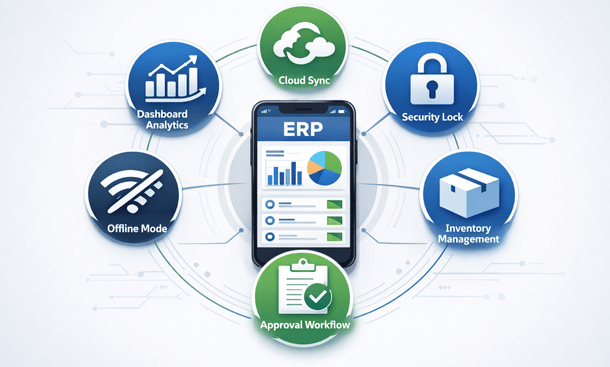
Choosing a mobile ERP system can feel overwhelming. Sales reps throw around terms like real-time synchronization, role-based dashboards, and multi-tier approval workflows. Half the time, you’re nodding along wondering which features actually matter for your business.
I get it. I’ve watched too many California entrepreneurs drop serious cash on mobile ERP platforms loaded with features they never use. Meanwhile, they’re missing the capabilities that would actually make their lives easier.
Let me cut through the noise and show you exactly which mobile ERP features deserve your attention and which ones are just expensive distractions.
Real-Time Data Synchronization: The Non-Negotiable Foundation
Real-time sync means changes made on mobile instantly update your main system and vice versa. This isn’t just a nice-to-have feature. It’s absolutely critical.
Picture this scenario. Your warehouse manager updates inventory levels on their phone while doing a physical count. Simultaneously, your sales rep is creating a quote for a customer. Without real-time sync, that sales rep might promise products you don’t actually have in stock. That’s how you end up with angry customers and embarrassing backorder conversations.
Good real-time synchronization happens invisibly. You update a record, and it’s immediately available everywhere. No manual syncing, no waiting periods, no “refresh” buttons you need to remember to hit.
The technology behind this involves continuous data exchange between your mobile app and cloud servers. Most modern platforms handle this seamlessly over wifi or cellular connections. The sync happens in milliseconds, so fast you never notice it’s happening.
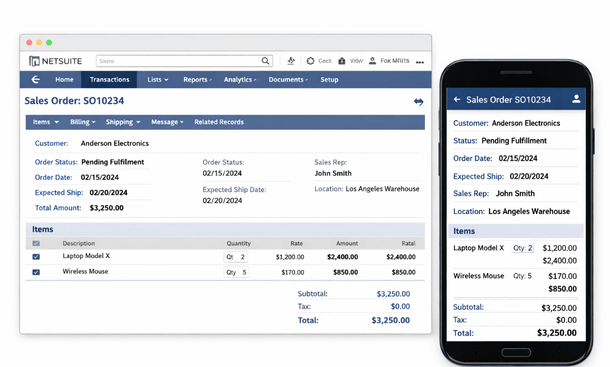
Watch out for platforms that claim real-time sync but actually batch updates every few minutes. That delay creates the exact problems you’re trying to avoid. Test this during your demo by making a change on mobile and immediately checking if it appears on desktop.
Some systems struggle with sync when you have poor connectivity. The best platforms queue your changes locally and push them through as soon as connection improves. This resilience matters when you’re working in warehouses, basements, or areas with spotty cellular coverage.
Offline Functionality: Your Safety Net
Offline mode lets you keep working even without internet connectivity. This feature separates professional-grade mobile ERP from systems that become useless the moment your connection drops.
California might have decent connectivity most places, but you’ll eventually find yourself in a dead zone. Trade shows with overloaded wifi. Warehouses with concrete walls blocking cell signals. Rural client locations. Flying between San Francisco and Los Angeles. These situations happen constantly.
The best offline functionality gives you access to recently viewed records and lets you create new transactions. When connectivity returns, everything syncs automatically. You shouldn’t need to remember what you did offline or manually transfer data.
Different platforms handle offline mode with varying levels of sophistication. Basic implementations might let you view cached data but not create new records. Advanced systems let you take orders, update inventory, and approve requests completely offline.
Pay attention to how much data the app caches for offline use. Some systems only keep a few days of recent records. Others let you configure what syncs to your device. If you frequently work offline, you need robust caching that gives you access to the information you typically need.
The sync conflict resolution matters too. What happens if you change a record offline while someone else changes the same record on the desktop system? Quality platforms detect these conflicts and help you resolve them intelligently instead of just overwriting data.
Intuitive Mobile Interface: Design That Actually Works
A mobile ERP interface needs to be designed for phones, not just squeezed onto a smaller screen. This seems obvious, but you’d be shocked how many platforms get this wrong.
Navigation should work with thumbs, not require a stylus or precise finger placement. Buttons need to be large enough to tap accurately. Text should be readable without zooming. Forms should minimize typing by offering dropdown selections, date pickers, and smart defaults.
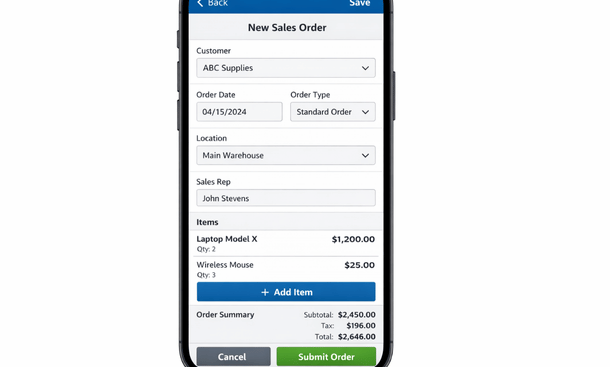
The information hierarchy matters enormously on small screens. Desktop interfaces can show dozens of data points simultaneously. Mobile screens force prioritization. The most important information should be immediately visible. Secondary details should be one tap away. Rarely needed information can be buried deeper in the navigation.
Dashboards exemplify good mobile interface design. A desktop dashboard might display ten widgets with detailed charts and tables. The mobile version of that same dashboard should show the three most critical metrics prominently, with the ability to drill down for more detail.
Context-sensitive menus reduce clutter. The actions available should match what you’re viewing. Looking at a customer record? Show options to call them, email them, or create a new order. Viewing a product? Show inventory levels, recent sales, and reorder options.
Gesture support makes navigation feel natural. Swipe to delete items. Pull down to refresh data. Long-press for additional options. These interactions feel intuitive because they match how people use their phones for everything else.
Test the interface yourself during demos. Can you complete common tasks easily while standing? What about if you’re holding a coffee in your other hand? If the app frustrates you during a demo, it’ll drive you crazy in daily use.
Role-Based Dashboards and Permissions
Not everyone needs access to everything. Role-based features ensure each team member sees relevant information and available actions based on their job function.
Your warehouse staff needs inventory levels, picking lists, and receiving functions. They don’t need access to financial reports or customer payment history. Your sales team needs customer data, pricing, and order creation. They probably shouldn’t see detailed cost breakdowns or employee payroll.
Good role-based design goes beyond just hiding sensitive data. It actively surfaces the information each person needs to do their job effectively. A warehouse manager’s dashboard might highlight low stock items and pending receiving tasks. A sales rep’s dashboard shows pipeline value, upcoming follow-ups, and this month’s quota progress.
Permissions control what actions people can take. Some team members can only view data. Others can create and edit records. A select few can approve transactions or modify master data. This granular control prevents accidental changes and maintains data integrity.
The implementation should be flexible enough to match your organizational structure. You might have regional managers who need broader access than individual contributors but less than executives. Custom roles let you define exactly what each level can see and do.
Security extends beyond just access control. Audit trails track who viewed or modified sensitive information. This accountability matters for compliance and helps you troubleshoot issues when data looks incorrect.
Approval Workflows: Decision Making on the Go
Approval workflows let managers review and authorize transactions from their phones. This feature dramatically speeds up business processes that traditionally created bottlenecks.
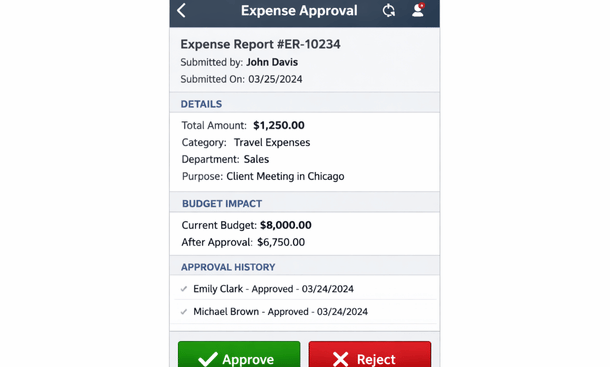
Purchase order approvals showcase this functionality perfectly. A team member creates a purchase request. The system routes it to the appropriate manager based on your business rules, maybe determined by dollar amount or department. The manager gets a notification on their phone. They open the app and see the request with full context including budget impact, vendor history, and whether similar items were purchased recently. They approve or reject with one tap, optionally adding comments.
This process that might have taken days when managers needed to be at their desks now happens in minutes. The requester gets instant feedback. Vendors receive orders faster. Your business moves at the speed it needs to compete.
Multi-level approvals work the same way but route through multiple people sequentially or in parallel. Large purchases might need department head approval followed by CFO sign-off. The mobile app handles this routing automatically and shows each approver exactly where the request stands in the process.
The notification system makes or breaks approval workflows. Push notifications alert managers immediately when their approval is needed. Email notifications serve as backup. In-app notification centers show all pending approvals in one place.
Smart routing considers manager availability. If someone’s out of office, the system can automatically escalate to their backup approver. This prevents approvals from sitting in queues waiting for someone who’s on vacation.
Look for platforms that let you configure approval rules without writing code. You should be able to define thresholds, routing paths, and escalation policies through a visual interface. This flexibility lets you match the system to your processes instead of changing your processes to match the system.
Barcode and QR Code Scanning
Scanning capabilities turn your phone into a powerful data collection tool. Instead of manually typing product codes or serial numbers, you scan them instantly and accurately.
Inventory management benefits enormously from scanning. Receiving shipments becomes a matter of scanning items as you unpack them. Physical counts involve walking through your warehouse scanning products. Picking orders means scanning items to verify you’re grabbing the right products.
The reduction in errors alone justifies this feature. Manual data entry leads to typos, transposed numbers, and incorrect quantities. Scanning eliminates these mistakes. When you scan a barcode, you know you’ve captured the right product identifier.
Speed improvements compound over time. Scanning an item takes two seconds. Manually typing a product code might take fifteen seconds. When you’re processing hundreds or thousands of items, those seconds add up to hours of saved labor.
Modern platforms support various barcode formats including UPC, EAN, Code 128, and QR codes. The camera-based scanning works reliably in various lighting conditions. Some systems even let you scan multiple codes in quick succession without navigating back and forth between screens.
Integration with other mobile features creates powerful workflows. Scan a product to check inventory. See it’s running low. Create a purchase order right there with a few taps. The entire process takes less than a minute.
For businesses without existing barcodes, most ERP platforms can generate and print barcode labels. You can label your inventory, bins, locations, and assets. Once everything’s labeled, your mobile workflows become dramatically more efficient.
Financial Visibility and Reporting
Access to financial data on mobile gives you business intelligence wherever you are. This doesn’t mean recreating complex financial analysis on a phone screen. It means surfacing the key metrics that help you make decisions throughout your day.
Cash flow visibility tops the list for most small business owners. How much money is actually available right now? What’s coming in this week? What’s going out? These questions shouldn’t require waiting until you’re back at your desk.
Profit and loss snapshots show your current financial performance. Revenue trends over the past month. Expense categories consuming the most cash. Profit margins by product line or customer segment. This information formatted clearly for mobile screens helps you spot problems or opportunities quickly.
Outstanding receivables and payables deserve mobile attention too. Which customers owe you money and how overdue are they? Which vendor invoices need payment soon? These insights help you manage working capital proactively.
The best financial mobile features let you drill down from summary to detail. See that office expenses are running high? Tap through to see the specific transactions. Notice a customer has a large overdue balance? View their payment history and contact information so you can follow up immediately.
Budget versus actual comparisons show whether you’re on track. These reports highlight variances automatically so you can spot areas that need attention without manually comparing numbers.
Real-time data matters enormously for financial features. Yesterday’s financial snapshot doesn’t help much when you’re making decisions today. The mobile app should pull current data so you’re working with accurate information.
Document Management and Attachment Support
The ability to capture and attach documents from your phone integrates your physical and digital workflows seamlessly. This feature eliminates the awkward process of taking photos with your phone then emailing them to yourself to upload to your ERP later.
Receipt capture exemplifies this functionality. You’re at lunch with a client. The meal ends and you get the receipt. Instead of stuffing it in your wallet to deal with later, you open your ERP app, snap a photo, and attach it directly to the expense record. Done. The receipt is safely stored and linked to the right transaction.
The same capability works for proof of delivery signatures, damaged goods documentation, site photos for project management, signed contracts, and any other paperwork your business generates. Immediate capture means documents don’t get lost and you save time on administrative work.
Good implementations include optical character recognition that extracts key data from documents automatically. Photograph a vendor invoice and the system might automatically pull out the invoice number, date, and amount. You verify the extracted data rather than typing everything manually.
Document organization matters as much as capture. The ERP should automatically file documents with related records. That receipt photo should live with the expense report. The signed contract should attach to the customer record. You shouldn’t need to manually organize files or remember where you saved things.
Search functionality lets you find documents later. Search by document type, date range, customer name, or even text contained within scanned documents. This beats digging through filing cabinets or scrolling through hundreds of files.
Cloud storage integration expands these capabilities. Link your ERP to Google Drive, Dropbox, or SharePoint. Documents automatically sync between systems. Your team can collaborate on files while keeping everything connected to the relevant ERP records.
Communication and Collaboration Tools
Built-in communication features reduce the need to switch between apps. When you can discuss ERP data without leaving the ERP app, workflows stay focused and information stays connected to context.
Internal messaging lets team members discuss specific records. Comment threads on purchase orders, customer accounts, or inventory items keep all relevant discussion in one place. New team members can read through the history and understand the full context instantly.
Activity streams show what’s happening across your business. Recent orders, updated inventory levels, approved expenses, completed tasks. This visibility helps remote teams stay coordinated without constant status meetings.
Task assignment and tracking capabilities let managers delegate work through the mobile app. Assign a team member to follow up with a late-paying customer. Create a task to count inventory in a specific location. Set a reminder to check on a delayed shipment. The assigned person gets notified on their phone and can mark tasks complete from the mobile app.
Customer-facing communication benefits from ERP integration too. Send quotes or invoices directly to customers through the app. They receive professional documents generated from your ERP data. You can track when they open emails and follow up appropriately.
Automated notifications keep everyone informed without manual updates. When a purchase order gets approved, the requester receives a notification. When inventory hits reorder points, purchasing gets alerted. When a customer pays an invoice, accounting sees the update. These automatic communications reduce emails and keep operations running smoothly.
Integration with Other Business Tools
Your mobile ERP shouldn’t exist in isolation. Integration with other tools multiplies its value by creating seamless workflows across your technology stack.
Email integration is foundational. View customer communication history within their ERP record. Send quotes and invoices through your regular email client while the ERP tracks delivery and opens. This connection between ERP data and email correspondence saves enormous amounts of time.
Calendar sync ensures your schedule stays current everywhere. Customer meetings, delivery appointments, and team deadlines from your ERP appear on your phone’s calendar automatically. Changes sync both directions so updating one updates the other.
Payment processing integration lets you collect money through mobile. A sales rep meeting with a customer can create an invoice and process payment immediately. The transaction updates your accounting automatically. No separate systems, no manual reconciliation.
Shipping carrier integration provides real-time tracking. Create shipping labels from the mobile app. Track packages without logging into separate carrier websites. Customers receive automatic tracking notifications. The entire shipping workflow happens within your ERP.
CRM platform connections ensure customer data stays synchronized. Updates in your CRM appear in your ERP and vice versa. Sales teams don’t need to duplicate data entry across systems. Everyone works with the same current customer information.
eCommerce integration connects your online store to inventory and order management. Online orders flow into your ERP automatically. Inventory updates synchronize so your website shows accurate availability. Fulfillment teams process online and offline orders through the same system.
Location and GPS Features
Location awareness adds powerful context to mobile ERP transactions. Your phone knows where you are, and modern ERP systems use that information intelligently.
Geolocation timestamping creates accountability for field operations. When your delivery driver marks an order delivered, the system records the GPS coordinates and time. You have proof of when and where the delivery occurred. This documentation protects you from disputes and helps optimize routes.
Location-based check-ins work well for service businesses. Technicians arriving at job sites check in through the mobile app. The system verifies they’re actually at the customer location. Time tracking starts automatically. When they complete work and check out, the GPS data confirms they were on-site for the stated duration.
Proximity-based features surface relevant information automatically. When a sales rep arrives near a customer location, the app can display that customer’s account information, recent orders, and any open issues. This contextual intelligence helps reps prepare for impromptu visits or scheduled meetings.
Territory management uses location data to assign leads and customers appropriately. The system knows which sales rep covers which geographic area. New leads get routed to the right person automatically based on location.
Route optimization helps field teams work efficiently. The system can suggest optimal routes between multiple stops based on current location and traffic conditions. Delivery drivers, service technicians, and sales reps all benefit from smarter routing.
Location analytics reveal patterns over time. Which geographic areas generate the most revenue? Where do you spend the most service time? Are certain locations more profitable than others? These insights help you allocate resources strategically.
Privacy considerations matter with location tracking. Good systems let employees control when location is shared. Tracking might only happen during work hours or when actively using the app. Transparent policies and appropriate controls maintain trust while providing business benefits.
Customization and Configurability
Every business operates differently. Customizable mobile features let you adapt the ERP to match your specific workflows rather than forcing your team to work around system limitations.
Dashboard customization puts relevant metrics front and center. A warehouse manager might prioritize inventory turnover and fulfillment rates. A sales manager focuses on pipeline value and win rates. An owner wants high-level financial performance. Each person should be able to configure their mobile dashboard to show what matters most to them.
Custom fields extend the data model to capture information specific to your business. Maybe you track products by vintage year for a wine distribution business. Perhaps you need custom attributes for manufacturing lots. The ability to add fields and have them appear appropriately in mobile interfaces prevents workarounds and maintains data quality.
Workflow automation adapts to your business rules. Configure when notifications trigger, how approval chains route, what happens when inventory reaches certain thresholds. These automations shouldn’t require custom programming. The best platforms offer visual workflow builders accessible to business users.
Report customization creates the exact views you need. Standard reports rarely match your specific requirements perfectly. Building custom reports that display well on mobile screens ensures you have actionable information rather than generic dashboards.
Form layouts can be optimized for how your team actually works. Reorder fields to match data entry patterns. Hide irrelevant fields to reduce clutter. Set smart defaults that minimize typing. These small customizations compound into significant time savings.
Integration customizations connect your specific tool stack. Maybe you use an industry-specific application alongside your ERP. Custom integrations ensure data flows between systems appropriately. APIs and webhooks make these connections possible without extensive development.
Security Features That Actually Matter
Mobile devices create security challenges that don’t exist with desktop computers. Phones get lost, stolen, left in coffee shops, and used on public wifi networks. Your mobile ERP needs robust security that protects business data without making the app painful to use.
Multi-factor authentication adds crucial protection beyond passwords. Even if someone steals your password, they can’t access the system without the second authentication factor. This might be a code sent to your phone, a biometric scan, or an authenticator app. The slight inconvenience provides massive security improvements.
Biometric login using fingerprint or face recognition balances security with convenience. After the initial authentication, you can access the app quickly with biometrics. This encourages people to actually enable security features instead of disabling them because they’re annoying.
Remote wipe capabilities protect you if a device goes missing. Your IT admin can remotely erase all ERP data from a lost or stolen phone. The device becomes useless to whoever has it, and your business data stays protected.
Automatic logout after inactivity prevents unauthorized access if you leave your phone unattended. Configure the timeout period to balance security and convenience. Maybe fifteen minutes makes sense for your business. The app logs out automatically, requiring re-authentication to access data again.
Encryption protects data both in transit and at rest. Information traveling between your phone and ERP servers gets encrypted so it can’t be intercepted. Data stored on your device is encrypted so physical access to the phone doesn’t compromise information.
Granular permissions ensure people only access what they need. Someone shouldn’t be able to view all financial data just because they need to approve expense reports. Detailed permission controls let you provide exactly the right level of access for each role.
Audit logging tracks who accessed what data and when. These logs help you detect unusual activity patterns that might indicate compromised accounts. They also provide accountability and help troubleshoot issues when data appears incorrect.
VPN support adds protection when using public networks. If your team needs to access the ERP from coffee shops or airports, VPN requirements ensure connections stay secure even on untrusted networks.
Features You Can Probably Skip
Not every feature deserves your attention or budget. Some capabilities sound impressive but rarely deliver value for small businesses.
Advanced analytics and artificial intelligence often fall into this category. Predictive demand forecasting using machine learning sounds amazing. In practice, small businesses often lack the historical data volume needed for accurate predictions. Simple reorder point calculations work fine for most situations.
Complex project management features may be overkill. If your business isn’t project-based, extensive project tracking tools just create interface clutter. Basic task management suffices for most operational needs.
Multi-currency and multi-language support only matters if you actually do international business. Don’t pay extra for features that handle transactions in foreign currencies if all your customers pay in dollars.
Extensive customization capabilities might sound appealing but can become maintenance nightmares. Heavy customization makes system updates complicated and can create technical debt. Start with out-of-the-box functionality and only customize when you’ve identified clear needs.
Industry-specific modules may or may not add value depending on your situation. A generic ERP with good fundamentals often serves you better than a supposedly specialized system that compromises on core functionality.
Making Your Feature Decisions
Choosing which features matter for your business requires honest assessment of how your team actually works. Shadow your employees for a day. Watch what they do, where they do it, and what information they need.
Before finalizing your feature requirements, make sure you understand the implementation timeline and process. Our 90-day roadmap for mobile ERP implementation walks through how feature selection impacts deployment complexity and helps you prioritize what to launch with versus what to add later.
Prioritize features that eliminate current pain points. If approval bottlenecks slow everything down, prioritize approval workflows. If inventory accuracy is a constant problem, focus on mobile inventory management with barcode scanning. Don’t get distracted by cool features that don’t solve actual problems.
Consider your team’s technical sophistication. A platform with amazing capabilities doesn’t help if your team can’t figure out how to use it. Sometimes simpler systems with fewer features actually deliver better results because people use them consistently.
Think about training requirements. Each additional feature needs explanation and practice. A system with fifty features might be more powerful than one with twenty features, but it definitely requires more training time. Balance capability against the learning curve.
For a broader perspective on how these features fit into your overall mobile strategy, our complete guide to ERP mobile apps and on-the-go business management provides context on which capabilities drive the most value for California small businesses at different growth stages.
Test features during evaluation. Don’t just watch demos. Get trial access and have your team try completing actual tasks. You’ll discover whether features work as advertised and whether they match your workflows.
The right mobile ERP features transform your business operations. The wrong ones waste money and frustrate your team. Choose thoughtfully based on your actual needs, and you’ll build a mobile-first operation that competes effectively in California’s dynamic business environment.
About the Author

mike
Mike is a tech enthusiast passionate about SaaS innovation and digital growth. He explores emerging technologies and helps businesses scale through smart software solutions.
Did you find this helpful?
Your feedback helps us curate better content for the community.