

Running a small business in California means juggling a million things at once. Between managing inventory, tracking finances, coordinating with your team, and actually serving customers, you need tools that work as hard as you do. That’s where mobile ERP apps come into play.
I’ve spent the last six months testing and reviewing mobile ERP platforms specifically for California small businesses. What I found surprised me. The gap between the best and worst mobile ERP experiences is absolutely massive. Some apps feel like they were designed for actual humans who run real businesses. Others feel like someone just shrunk a desktop interface and called it a day.
Let me walk you through the platforms that actually deliver.
What Makes a Mobile ERP App Great for Small Business
Before we dive into specific platforms, you need to understand what separates the winners from the pretenders. A great mobile ERP app isn’t just about cramming features onto a smaller screen.
First, it needs to handle the tasks you actually do on mobile. Nobody’s running complex financial reports while waiting in line at Trader Joe’s. But you might need to approve a purchase order, check inventory levels, or view your cash flow. The best apps understand this distinction.
Second, it needs to work offline. California might have solid internet coverage, but try pulling up your ERP system in a warehouse with spotty wifi or at a trade show with terrible convention center connectivity. You’ll understand why offline functionality matters.
Third, the interface needs to make sense on a phone. Tiny buttons, microscopic text, and interfaces that require constant zooming are deal breakers. Your mobile ERP should feel as natural as checking Instagram.
NetSuite Mobile: The Heavyweight Champion
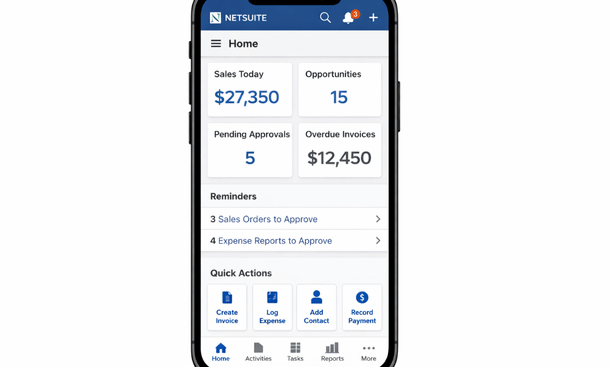
NetSuite dominates the mobile ERP space for good reason. This platform gives you legitimate access to almost everything you can do on desktop, but it’s redesigned for mobile workflows instead of just being a shrunk-down version.
The dashboard hits you with the metrics that actually matter. Revenue trends, outstanding invoices, inventory alerts, and pending approvals all sit right there when you open the app. No digging through menus to find basic information.
What really sets NetSuite apart is how it handles approvals. Purchase orders, expense reports, time off requests – you can knock these out in seconds. The app shows you the context you need, like budget impact or historical spending, right alongside the approval request. That’s the kind of thoughtful design that saves you hours every week.
The inventory management tools shine for retail and wholesale businesses. Scan barcodes, update stock levels, create purchase orders, and transfer inventory between locations. All from your phone. I watched a client manage their entire inventory count during a slow Tuesday afternoon using just their iPhone.
Pricing sits around 99 dollars per user per month for the basic package, scaling up based on modules and customization. It’s not cheap, but you’re getting enterprise-grade functionality that actually works on mobile.
The downside? The learning curve is real. NetSuite packs in so much functionality that it takes time to master. Plan on dedicating at least a few weeks to training your team properly.
Odoo: The Budget-Friendly Powerhouse
If NetSuite’s pricing makes you wince, Odoo deserves your attention. This open-source platform offers surprisingly robust mobile capabilities at a fraction of the cost.
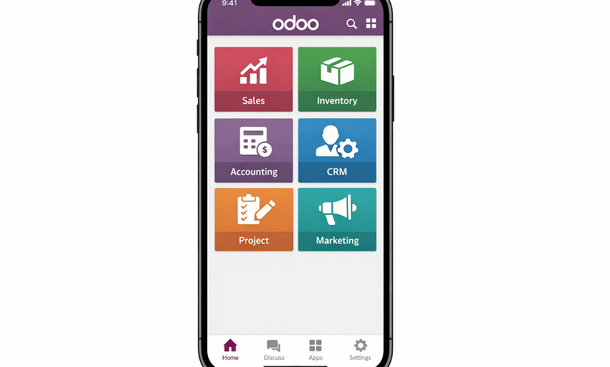
Odoo takes a modular approach. You start with the core ERP functions and add modules as you need them. Sales, inventory, accounting, project management – each module has its own mobile-optimized interface. This modularity means you’re not paying for features you’ll never use.
The mobile app feels snappy and responsive. Creating sales orders, checking product availability, and processing payments all happen quickly. The barcode scanning works reliably, which matters when you’re doing physical inventory counts or receiving shipments.
Where Odoo really shines is customization. Because it’s open source, you can modify it to match your exact workflows. Got a weird process that doesn’t fit standard ERP patterns? You can probably build it in Odoo. This flexibility makes it popular with California’s creative businesses and startups that do things differently.
Pricing starts at around 24 dollars per user per month for the basic online version. Self-hosted options run cheaper but require technical expertise. For most small businesses, the online version hits the sweet spot of affordability and ease of use.
The trade-off is polish. Odoo doesn’t feel as refined as NetSuite. Some features feel a bit clunky on mobile. But at less than a quarter of NetSuite’s price, that’s a compromise many small businesses gladly accept.
SAP Business One: Enterprise Features, Small Business Size
SAP Business One brings big company capabilities to small business budgets. The mobile app focuses on the core workflows small business owners actually need when they’re away from their desks.
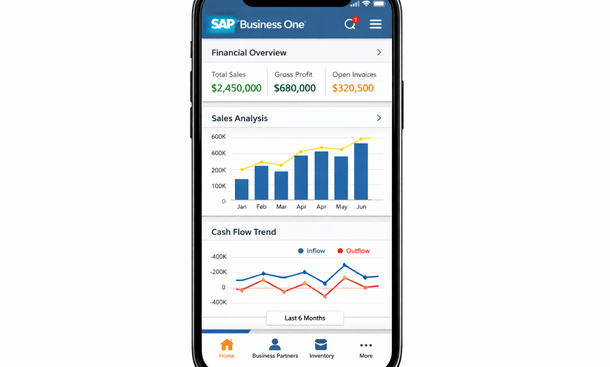
The financial reporting on mobile impresses me every time. Profit and loss statements, balance sheets, cash flow reports – all formatted perfectly for your phone screen. You can drill down into specific accounts or transactions without squinting at tiny numbers. This capability alone makes SAP Business One worth considering if financial visibility matters to your business.
The approval workflows rival NetSuite’s functionality. You can review and approve documents with full context about your business rules and thresholds. The app even lets you add notes or request changes before approving, which speeds up communication with your team.
Inventory and warehouse management tools work well for businesses with physical products. The app handles receiving, picking, packing, and shipping workflows. Barcode scanning integrates smoothly, and you can update inventory in real time as you work.
Pricing typically runs 60 to 100 dollars per user per month depending on your specific needs and implementation partner. You’ll also need to factor in implementation costs, which can add up.
The main limitation is mobile-specific features. SAP Business One’s mobile app gives you access to core functionality but lacks some of the mobile-first innovations you’ll find in newer platforms. It’s more about accessing your ERP on mobile than being designed for mobile workflows.
Acumatica: The Cloud Native Contender
Acumatica built their entire platform for cloud and mobile from day one. That cloud-native approach shows in how smoothly the mobile experience works.
The interface adapts intelligently to your screen size. Everything scales and rearranges itself automatically. Dashboards that show six widgets on desktop might show two on your phone, but you’re seeing the most relevant information first. That kind of smart design makes a huge difference in daily use.
Role-based dashboards mean your sales team sees different information than your warehouse staff. Acumatica automatically presents the tools and data each person needs based on their job function. This cuts down on training time and reduces errors.
The offline mode actually works reliably. You can access recent data, create transactions, and make updates even without internet connectivity. When you reconnect, everything syncs automatically. This feature saves the day when you’re working in areas with spotty coverage.
Pricing varies widely based on your specific needs and transaction volume. Expect to pay somewhere between 50 to 150 dollars per user per month. Acumatica uses consumption-based pricing instead of per-user pricing for some modules, which can work out cheaper for small teams processing lots of transactions.
The learning curve sits somewhere between Odoo and NetSuite. It’s more complex than simple accounting software but more approachable than full enterprise ERP systems.
Choosing the Right Mobile ERP for Your Business
Picking between these platforms comes down to your specific situation. NetSuite makes sense if you need comprehensive functionality and can afford the investment. Odoo works great for budget-conscious businesses willing to trade some polish for flexibility. SAP Business One fits established small businesses that want enterprise capabilities without enterprise complexity. Acumatica suits businesses that prioritize true cloud-native architecture and mobile-first design.
Think about your team’s technical comfort level too. Some platforms require more training than others. Consider who will actually use the mobile app daily. A warehouse manager needs different capabilities than a sales rep or your CFO.
Also consider your growth trajectory. Will you outgrow this platform in two years? Switching ERP systems is painful and expensive. Better to choose something that scales with your business even if it costs a bit more upfront.
Before making your final decision, make sure you understand the security implications of mobile access. Our guide on protecting your business data on mobile ERP apps walks through the critical security measures you need to implement, especially given California’s strict data privacy regulations.
For more insights on how mobile access fits into your broader ERP strategy, check out our detailed breakdown of essential mobile ERP features that drive real business value. And if you’re still figuring out whether mobile ERP makes sense for your operation, our comprehensive guide to managing your business operations on the go covers the fundamental benefits and considerations that California entrepreneurs need to evaluate.
The right mobile ERP app transforms how you run your business. It gives you visibility and control no matter where you are. That flexibility matters in California’s fast-paced business environment. Choose wisely, and you’ll wonder how you ever managed without it.
About the Author

mike
Mike is a tech enthusiast passionate about SaaS innovation and digital growth. He explores emerging technologies and helps businesses scale through smart software solutions.
Did you find this helpful?
Your feedback helps us curate better content for the community.