
Table of Contents
- The Real Cost Ranges You Should Expect
- What Drives ERP Customization Costs
- Breaking Down Customization by Type
- California-Specific Cost Factors
- Hidden Costs Most Businesses Miss
- How to Budget for Your Customization Project
- Cost-Saving Strategies That Actually Work
- Getting the Most Value for Your Investment
Let’s talk money—because that’s usually the biggest question holding entrepreneurs back from pulling the trigger on ERP customization. In California, customization costs can range anywhere from $5,000 for simple tweaks to $500,000+ for comprehensive enterprise solutions. The wild variation depends on factors like system complexity, vendor rates, and how extensively you’re modifying core functionality. Understanding these cost drivers upfront is essential for anyone exploring how to tailor your system to your business without breaking the bank. I’ll break down the actual numbers you should expect in 2025.
The Real Cost Ranges You Should Expect
I’m going to give you straight numbers based on what I’m seeing in the California market right now. These ranges reflect what small to mid-sized businesses actually pay for professional customization work in 2025.
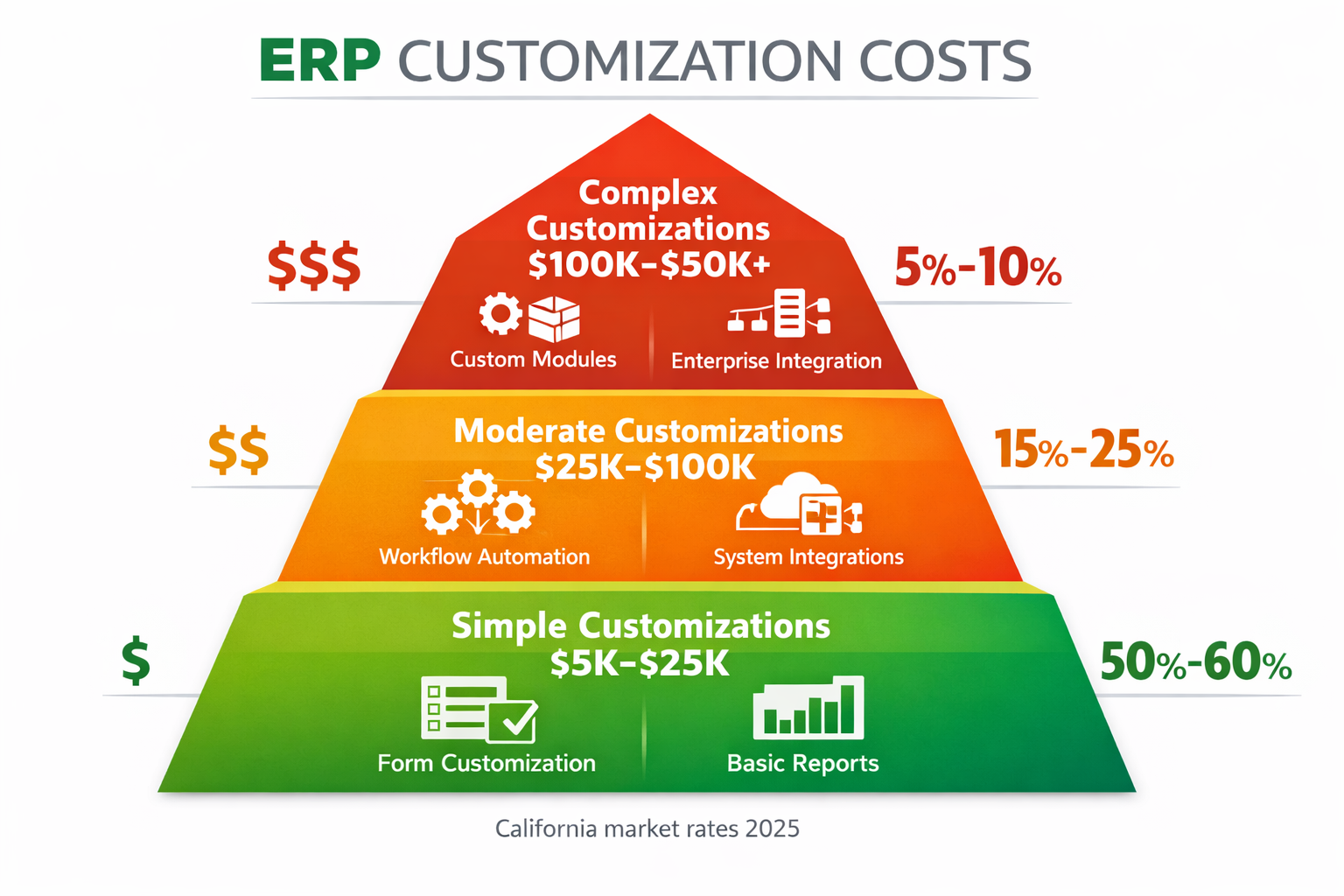
Simple customizations typically run between $5,000 and $25,000. This category includes things like adding custom fields to existing forms, creating basic calculated fields, building straightforward reports using the vendor’s report writer, configuring simple approval workflows, and making minor UI adjustments. These projects usually take one to four weeks and involve maybe twenty to eighty hours of consultant or developer time.
Moderate customizations fall in the $25,000 to $100,000 range. You’re looking at more complex workflows with multiple decision points, custom dashboards pulling data from various modules, basic third-party integrations using existing APIs, custom business logic that requires scripting, and modified forms with validation rules. These projects might take two to four months with one to three resources working part-time.
Complex customizations start at $100,000 and can easily exceed $500,000 for enterprise-scale implementations. This includes building custom modules from scratch, developing sophisticated integrations with legacy systems or multiple platforms, creating mobile applications connected to your ERP, extensive database modifications, and enterprise-wide automation spanning multiple departments. These are multi-month projects requiring dedicated development teams.
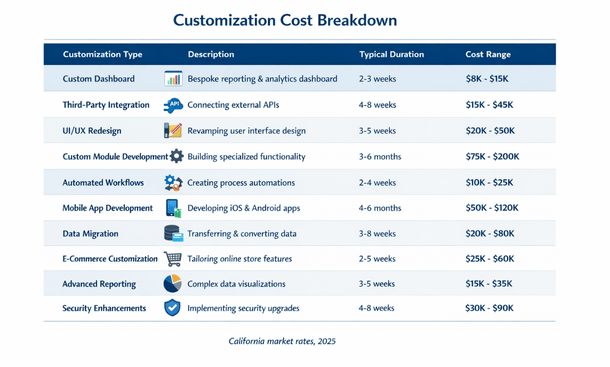
The hourly rates behind these numbers are pretty consistent across California. ERP consultants who handle configuration and simple customizations typically charge $150 to $250 per hour. Experienced developers working on moderate to complex customizations run $200 to $350 per hour. Specialized developers for niche platforms or enterprise architects can command $350 to $500+ per hour.
For context, a two-person team working full-time for three months at $250 per hour average burns through about $240,000. That’s before accounting for project management overhead, testing, documentation, and deployment activities. This is why complex customizations get expensive fast.
What Drives ERP Customization Costs
Understanding the cost drivers helps you make smarter decisions about where to invest your customization budget.
Platform complexity is a huge factor. Customizing a modern cloud ERP with good documentation, active developer community, and clean APIs costs less than working with a legacy on-premise system with limited documentation and outdated technology. Some platforms are designed for customization with low-code tools that reduce development time. Others require extensive coding for even simple modifications.
Developer availability and expertise matter significantly. Popular platforms like NetSuite, SAP Business One, or Microsoft Dynamics have large talent pools, which creates competitive pricing. Niche or older systems have fewer qualified developers, and scarcity drives rates up. In California’s competitive tech market, demand for skilled ERP developers keeps rates elevated compared to other regions.
Scope clarity at project start dramatically impacts final costs. Vague requirements like “we need better reporting” lead to scope creep and budget overruns. Specific requirements like “we need a dashboard showing daily revenue by product category, customer acquisition cost by channel, and inventory turn rates updated every four hours” let developers estimate accurately and work efficiently.
Integration complexity scales with the number of systems involved and the quality of their APIs. Integrating with a modern SaaS platform that has well-documented REST APIs might take forty hours. Integrating with a legacy mainframe system requiring file transfers and custom parsing logic could take four hundred hours. Every additional system multiplies complexity exponentially rather than linearly.
Testing and quality assurance requirements vary by business criticality. Financial customizations affecting accounting accuracy need extensive testing and potentially external audit review. Operational customizations with lower risk tolerance might get by with lighter testing. More rigorous QA adds twenty to forty percent to development costs but prevents expensive production issues.
Change management and training shouldn’t be overlooked. Even perfect customizations fail if users don’t understand how to use them. Budget for creating documentation, conducting training sessions, and supporting users through the transition. This soft cost can add another ten to twenty percent beyond pure development expenses.
Breaking Down Customization by Type
Different categories of customization have different typical cost profiles. This helps you budget based on what you’re actually planning to do.
User interface customizations are usually on the lower end of the cost spectrum. Adding custom fields might cost $2,000 to $8,000 depending on complexity and how many forms need updating. Redesigning dashboards typically runs $5,000 to $20,000 per role-specific dashboard. Complete UI overhauls for multiple modules can reach $50,000 to $150,000 for comprehensive redesigns affecting dozens of screens.
Workflow automation costs depend on complexity and the number of steps. Simple approval workflows with one or two decision points might cost $5,000 to $15,000. Multi-stage workflows with parallel approvals, conditional logic, and integration touchpoints can run $25,000 to $75,000. Enterprise-wide workflow orchestration connecting multiple departments and systems can exceed $100,000.
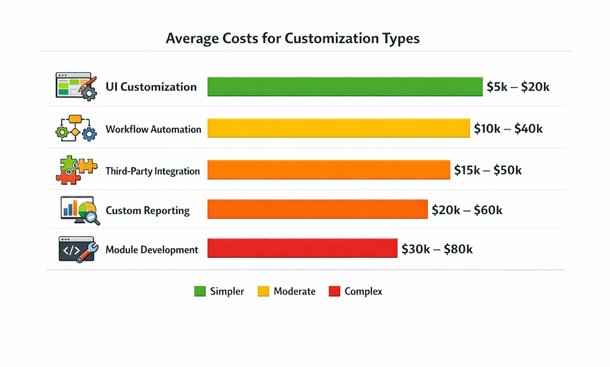
Third-party integrations vary wildly. Simple integrations using pre-built connectors might cost $3,000 to $10,000 for setup and configuration. Custom API integrations with modern platforms typically run $15,000 to $50,000. Complex integrations with legacy systems, real-time sync requirements, or data transformation logic can hit $75,000 to $200,000. Each additional system adds roughly sixty to eighty percent of the first integration cost, not one hundred percent, due to reusable patterns.
Custom reporting starts affordably but scales with sophistication. Basic reports using standard report writers cost $1,000 to $5,000 each. Complex reports with advanced calculations, multiple data sources, and sophisticated formatting run $5,000 to $15,000. Interactive dashboards with drill-down capabilities and real-time data might cost $15,000 to $40,000. Enterprise business intelligence solutions with comprehensive analytics can exceed $100,000.
Module development represents the highest cost category. Building a simple custom module with basic CRUD operations, meaning create, read, update, and delete functionality, starts around $50,000. Moderate modules with business logic, workflows, and reporting might cost $100,000 to $250,000. Complex modules with sophisticated features, mobile access, and extensive integration points can easily surpass $500,000.
Data migration and conversion often gets underestimated. Simple data imports might cost $5,000 to $15,000. Complex migrations from legacy systems with data cleansing, transformation rules, and validation logic can run $30,000 to $100,000+. Historical data with complex relationships and audit requirements pushes costs even higher.
California-Specific Cost Factors
Operating in California adds some unique cost considerations compared to other markets.
Labor costs in California run fifteen to thirty percent higher than the national average for technical talent. A developer who might charge $200 per hour in Texas or Florida commands $250 to $280 per hour in San Francisco or Los Angeles. Even in secondary California markets like Sacramento or Fresno, rates exceed most other states due to overall higher cost of living and competitive tech market.
Remote work has somewhat leveled the playing field. You can now hire developers from lower-cost regions while maintaining your California operation. However, time zone coordination, communication overhead, and ensuring quality with remote teams add their own complexities and potential costs.
Regulatory compliance requirements in California can drive additional customization needs and costs. California’s strict data privacy laws, labor regulations, and industry-specific rules sometimes require customizations that businesses in other states don’t need. For example, customizations to support California’s unique payroll tax rules or data handling requirements add five to twenty percent to HR and finance module costs.
The competitive California market means access to highly skilled specialists. While rates are higher, you’re often getting senior-level talent with experience across multiple implementations. This expertise can actually reduce total project costs by avoiding mistakes and delivering better solutions faster.
Sales tax complexity in California affects retail and e-commerce businesses. Customizing your ERP to handle district taxes, special assessment areas, and various exemption rules properly might cost $10,000 to $30,000 beyond standard sales tax configuration. Getting this right avoids expensive compliance issues and potential audits.
Hidden Costs Most Businesses Miss
The obvious development costs are just the starting point. Here are the expenses that catch entrepreneurs off guard.
Ongoing maintenance is the biggest hidden cost. Budget ten to twenty-five percent of initial customization costs annually for maintenance. A $100,000 customization project needs $10,000 to $25,000 per year to keep running smoothly, handle vendor updates, and fix issues that arise. Over five years, that maintenance can equal or exceed the original development cost.
Testing and quality assurance often gets shortchanged in initial budgets. Proper testing should consume fifteen to thirty percent of development time. If you budgeted $50,000 for development, you should add $7,500 to $15,000 for comprehensive testing. Skipping this to save money typically backfires when bugs surface in production.
Documentation is frequently overlooked. Creating proper technical documentation for developers and user guides for staff might add five to fifteen percent to project costs. But without documentation, you’re vulnerable when the original developer leaves or users need to reference how customizations work.
Project management overhead for complex customizations can add twenty to thirty percent beyond direct development costs. Coordinating requirements gathering, managing developer schedules, facilitating communication between technical and business teams, and tracking progress all require dedicated resources.
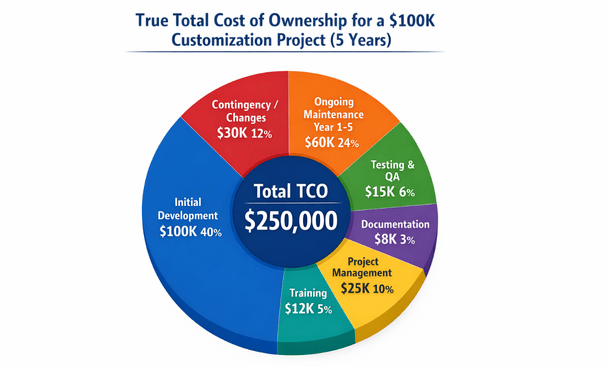
Training costs get underestimated routinely. Plan for at least twenty to fifty hours of training time across your user base when rolling out significant customizations. At $150 per hour for a trainer or consultant, that’s $3,000 to $7,500. For larger organizations, multiply accordingly.
Infrastructure and licensing changes sometimes result from customizations. Adding custom modules might require higher-tier licensing. Integrations might necessitate additional API calls beyond your current plan. Database modifications could require more storage or computing resources. These ongoing costs add up.
Opportunity costs from project delays can dwarf direct expenses. If a customization project takes six months instead of three, that’s three additional months of operating without the efficiency gains you expected. For a business that could save $20,000 monthly with the new customization, that delay costs $60,000 in unrealized benefits.
Failed customization attempts are another hidden cost. Not every customization project succeeds. I’ve seen businesses spend $30,000 or $50,000 on customizations that never fully worked and eventually got abandoned. Minimizing this risk through proper planning and phased approaches is crucial.
How to Budget for Your Customization Project
Creating a realistic budget requires understanding your needs and building in appropriate contingencies.
Start with a detailed requirements document. Vague requirements lead to budget overruns because scope creep becomes inevitable. Spend time upfront documenting exactly what you need, complete with data flows, business rules, user interface mockups, and acceptance criteria. This clarity lets vendors estimate accurately.
Get multiple quotes from different implementation partners or developers. Prices can vary thirty to fifty percent between vendors for the same scope. Compare not just on cost but on experience, references, and approach. The cheapest option often isn’t the best value.
Build in a twenty-five to forty percent contingency for unexpected complexities. Almost every customization project encounters surprises—requirements that weren’t obvious initially, technical challenges that take longer than expected, or business needs that evolve during development. This buffer prevents budget crises mid-project.
Phase your customization roadmap over time rather than trying to do everything at once. Start with the highest-ROI customizations that deliver immediate value. Use savings or revenue gains from early phases to fund later customizations. This approach reduces upfront capital requirements and ensures each investment proves its value before making the next.
Consider financing options for larger customization projects. Some vendors offer payment plans spreading costs over twelve to thirty-six months. While you pay interest, preserving cash flow often makes sense for growing businesses. Monthly payments of $5,000 might be more manageable than a $150,000 upfront expense.
Calculate expected ROI to justify customization investments. If a $40,000 workflow automation saves your team thirty hours weekly at a blended rate of $50 per hour, that’s $78,000 in annual savings. The payback period is roughly six months, making it a solid investment. Customizations without clear ROI should be questioned.
Plan for the total cost of ownership over three to five years, not just initial implementation. A $30,000 customization with $8,000 annual maintenance costs $62,000 over five years. Compare that against alternative approaches—maybe a more expensive $50,000 solution with minimal maintenance costs $55,000 over the same period and is actually the better choice.
Cost-Saving Strategies That Actually Work
You can reduce customization costs without sacrificing quality if you’re strategic about it.
Maximize configuration before customizing. Modern ERP systems offer extensive configuration capabilities. What seems like it requires custom code might actually be achievable through advanced configuration. Spend time really learning your platform’s capabilities. This can cut customization needs by thirty to fifty percent.
Prioritize ruthlessly and implement in phases. Instead of ten customizations simultaneously, do the top three first. This focused approach delivers faster value, uses budget more efficiently, and lets you learn from early implementations before tackling more complex work.
Use pre-built connectors and templates whenever possible. Many common integrations have existing solutions that cost a fraction of custom development. A Shopify integration might cost $3,000 using a pre-built connector versus $25,000 for custom API development. The pre-built option works for ninety percent of use cases.
Consider offshore or nearshore development for appropriate parts of projects. Complex business logic and requirements gathering need local expertise, but straightforward coding work can often be done by quality offshore teams at forty to sixty percent cost savings. Manage this carefully—cheap offshore work that’s poor quality costs more long-term than paying for local talent.
Negotiate pricing structures that align incentives. Fixed-price contracts transfer risk to the vendor and can save money if scope is well-defined. Time-and-materials works better for evolving requirements but needs strong project management. Value-based pricing where costs tie to achieved benefits ensures focus on outcomes.
Reuse and standardize wherever possible. If you’re building custom reports, create templates that work across multiple departments with minor variations. Develop one solid integration pattern, then reuse it for connecting additional systems. This reusability reduces marginal costs dramatically.
Train internal resources to handle simple customizations over time. Not everything needs external consultants. Building internal capability for basic report creation, workflow modifications, and dashboard adjustments reduces ongoing costs significantly. Budget for training your team on the platform’s customization tools.
Getting the Most Value for Your Investment
Cost matters, but value matters more. Here’s how to ensure your customization investment delivers maximum business impact.
Focus on customizations that eliminate manual work at scale. If a process happens once a month, even a time-consuming manual approach might be fine. If it happens fifty times daily, automation pays for itself quickly. Target high-frequency pain points first.
Measure and track actual benefits after implementation. Too many businesses spend money on customizations then never verify whether they achieved expected savings or improvements. Instrument your customizations to capture metrics proving ROI. This data justifies future investments and helps optimize what you’ve built.
Plan for scalability from the start. A customization that works fine for processing fifty orders daily might break at five hundred orders. Building with growth in mind costs maybe twenty percent more initially but avoids expensive rebuilds later when you’ve outgrown the original solution.
Insist on proper documentation and knowledge transfer. Your investment loses value if only one person understands how customizations work. Comprehensive documentation protects against key person risk and makes future modifications easier and cheaper.
Build relationships with quality implementation partners rather than always choosing the lowest bidder. A partner who understands your business delivers better solutions faster. They recognize patterns from previous work and can suggest approaches you wouldn’t have considered. This relationship value compounds over multiple projects.
Remember that not customizing also has costs. Operating with inefficient manual processes, maintaining complex workarounds, or limiting growth because your ERP can’t support expanded operations all carry real expenses. Sometimes the cost of not customizing exceeds the cost of doing it.
Ready to explore what specific customizations make sense for your business? Check out our detailed breakdown of Industry-Specific ERP Customization to avoid expensive mistakes. And for comprehensive guidance on building your customization strategy, our complete guide on tailoring your system to your business covers everything from planning through execution.
Understanding the real costs helps you budget appropriately and make smart investment decisions. Customization done right delivers returns that far exceed the initial expense, turning your ERP into a competitive advantage that grows with your business.
About the Author

mike
Mike is a tech enthusiast passionate about SaaS innovation and digital growth. He explores emerging technologies and helps businesses scale through smart software solutions.
Did you find this helpful?
Your feedback helps us curate better content for the community.