
Table of Contents
- What ERP Customization Really Means for Your Business
- Understanding the Different Types of Customization
- The Configuration vs Customization Decision
- What You’ll Actually Spend on Customization
- Best Practices That Prevent Expensive Mistakes
- Industry-Specific Customization Strategies
- Finding the Right Implementation Partner
- Building Your Customization Roadmap
You’ve invested in an ERP system to streamline operations and scale your California business. But here’s what nobody tells you during the sales pitch: that out-of-the-box system probably handles about sixty percent of what you actually need. The remaining forty percent? That’s where customization comes in.
I’ve watched hundreds of entrepreneurs struggle with this reality. They spend months selecting the perfect ERP platform, implement it exactly as designed, and then realize it doesn’t quite fit how their business actually operates. Sales teams complain about clunky workflows. Operations folks build elaborate spreadsheet workarounds. Finance creates manual processes to handle calculations the system can’t do. Sound familiar?
The good news is that modern ERP systems are built to be tailored. Customization transforms generic business software into a tool that actually matches your unique workflows, industry requirements, and competitive strategy. Done right, it eliminates manual workarounds, accelerates processes, and creates operational advantages your competitors can’t easily replicate.
The challenge is figuring out what to customize, how much to invest, and how to avoid the expensive mistakes that derail so many projects. I’ve seen businesses spend $200,000 on customizations that never got used and others invest $30,000 that transformed their operations and paid for themselves in six months. The difference comes down to making smart, strategic decisions about customization.
This guide walks you through everything you need to know about ERP customization in 2025. Whether you’re implementing your first system or looking to enhance what you’ve already got, you’ll learn how to make customization decisions that deliver real business value without breaking your budget or creating maintenance nightmares.
What ERP Customization Really Means for Your Business
ERP customization is the process of modifying your enterprise resource planning software beyond its standard configuration to match your specific business requirements. Think of your ERP as a powerful framework designed to handle core business processes—accounting, inventory management, customer relationships, human resources. That framework works for the masses, but your business isn’t average.
Customization molds that framework into something that fits your unique operational reality. Maybe you need custom fields to capture data specific to your industry. Perhaps you require automated workflows that eliminate manual coordination across departments. You might need integrations connecting your ERP with specialized tools your team relies on daily. Or you could need custom reports surfacing the exact metrics driving your business decisions.
The fundamental difference between setup and customization is depth. Every ERP implementation includes basic setup—choosing which modules to activate, configuring user permissions, importing your company data, and adjusting available settings. That’s working within the boundaries the vendor built. Customization goes deeper, actually changing the functionality, interface, or data structure of the software itself.
Standard ERP systems struggle with three common challenges. First, they can’t handle industry-specific requirements that fall outside general business processes. A food distributor needs expiration date tracking and lot management built into every transaction. A creative agency needs project-based billing with complex approval hierarchies. These specialized needs aren’t standard features in most platforms.
Second, integration with existing tools creates friction. Your sales team lives in a specific CRM that the ERP doesn’t natively support. You have legacy systems containing years of historical data that need to communicate with your new platform. Manufacturing equipment needs to send production data to your ERP automatically. Out-of-the-box solutions rarely handle these scenarios gracefully.
Third, reporting gaps frustrate everyone. The system comes with dozens of pre-built reports, but somehow none show exactly what you need to see. You end up exporting data to spreadsheets and rebuilding analyses manually every week. That’s not just frustrating—it’s a massive waste of time and introduces errors.
The benefits of addressing these gaps through customization are substantial. When your ERP mirrors how your team naturally works, adoption becomes dramatically easier. Instead of training employees to follow unfamiliar workflows dictated by software, you’re giving them tools supporting their existing expertise and processes.
Productivity gains compound quickly. I’ve watched California businesses cut their month-end close from ten days to three simply by customizing financial reporting workflows. When you eliminate manual data entry, reduce duplicate work, and automate routine decisions, those hours multiply across your entire organization. A customization saving five hours weekly delivers 260 hours annually—that’s a month and a half of productive time.
Competitive advantage emerges when you customize capabilities that execute your unique value proposition more efficiently. Your competitors using the same ERP platform in its standard form operate with the same limitations you’d have without customization. When you tailor your system to your specific strategy, you’re creating an operational advantage that’s difficult for others to replicate.
Data accuracy improves when you build validation rules and automation directly into workflows. Instead of relying on employees to remember complex business rules or manually check for errors, the software enforces consistency automatically. This reduces mistakes that could cost money or damage customer relationships.
Understanding what ERP customization is and why your business needs it provides the foundation for making smart investment decisions. The key is approaching customization strategically rather than reactively—focusing on high-impact areas where your unique processes create value while avoiding over-customizing features that work fine in their standard form.
Understanding the Different Types of Customization
Not all customizations are created equal. Understanding the five major categories helps you identify which types deliver the most value for your specific situation and budget.
User interface customization affects what users see and interact with daily. This is often the most visible type because it directly impacts everyone’s experience. Dashboard personalization puts relevant information front and center for each role—your sales team sees pipeline visibility and customer interaction history while operations folks monitor inventory levels and fulfillment status. Field customization adds, removes, or rearranges data entry forms so your team captures exactly the information your business needs without cluttering screens with irrelevant fields.
Navigation customization streamlines how users move through the system. Standard ERP platforms have complex menu structures accommodating every possible feature. Customizing navigation to show only the functions your team uses regularly eliminates confusion and speeds up common tasks. Some businesses create role-based navigation where warehouse staff see completely different menus than accounting staff.
Branding customization incorporates your company logo, colors, and visual identity. While this might seem superficial, it actually matters for user adoption. When your ERP feels like part of your business ecosystem rather than foreign corporate software, employees engage with it more naturally. The psychological impact shouldn’t be underestimated.
Workflow automation and business logic customization builds your company’s rules directly into the system so decisions happen automatically. Approval workflows route purchase requisitions to the right managers based on dollar thresholds. Status-based automation triggers actions when records reach certain states—when a sales order moves to “ready to ship” status, the system generates picking lists, notifies warehouse staff, and reserves inventory automatically.
Calculation automation handles complex business logic that would otherwise require manual computation. Commission structures considering product categories, customer tiers, quarterly targets, and team performance get built directly into your ERP. Accurate calculations generate automatically with every sale, eliminating tedious manual work and reducing errors.
Notification automation keeps everyone informed without manual communication. When inventory drops below reorder points, purchasing gets alerted. When payments are overdue, account managers receive notifications. When production runs complete, quality control gets pinged for inspection. These automated alerts ensure nothing falls through the cracks even as operations scale.
Third-party integration customization builds bridges between your ERP and other business systems. E-commerce integration flows orders from your website into your ERP automatically, triggers inventory reservation, generates picking instructions, and updates accounting records. When inventory changes in your ERP, updates push back to your website so you’re not selling products you don’t have.
CRM integration connects customer relationship management with your ERP for complete customer visibility. Sales activity and support tickets from your CRM combine with order history, payment records, and shipping information from your ERP. This unified view helps both sales and service teams deliver better experiences with complete context.
Shipping carrier integration automates logistics workflows. Instead of manually entering shipment details on carrier websites, your ERP pushes data automatically, retrieves tracking numbers, generates labels, and sends tracking notifications to customers. For businesses shipping dozens or hundreds of packages daily, this integration saves hours and reduces errors.
Custom reporting and analytics customization surfaces the specific insights driving your business decisions. Operational dashboards provide real-time visibility into metrics that matter—orders pending processing, items picked today versus target, shipping accuracy rate, average fulfillment time. Financial reports customized to your structure show consolidated profit and loss statements that roll up divisions or locations exactly how you think about your business.
Customer analytics combine transaction data with behavioral patterns to identify opportunities. Which customers have high lifetime value but decreasing order frequency? Which products are frequently bought together? What’s the typical progression from first order to becoming a repeat customer? These insights inform marketing, sales, and product strategies in ways standard reports can’t capture.
Exception reports automatically flag issues requiring attention—items that haven’t moved in six months, vendors with unusual price increases, customers with declining order values, projects trending over budget. These alerts let you manage by exception rather than reviewing everything manually.
Module extensions create entirely new capabilities that weren’t part of your original ERP system. Industry-specific modules address unique requirements of your vertical. A field service module for businesses dispatching technicians includes GPS tracking, mobile job completion forms, and parts usage capture. A quality management module for manufacturers handles inspection protocols, non-conformance tracking, and corrective action workflows.
Customer and vendor portal extensions give clients and suppliers direct access to relevant information. Customers log in to track shipments, download invoices, review order history, and place new orders directly. Suppliers view purchase orders, submit invoices electronically, update shipping information, and access your specifications. This bidirectional visibility speeds up cycles and reduces miscommunication.
Mobile extensions bring ERP functionality to smartphones and tablets. Warehouse staff perform cycle counts, receive inventory, and pick orders from mobile devices instead of being tethered to desktop terminals. Sales reps access customer information, check product availability, and enter orders from anywhere. Field technicians view job details, record time, and capture customer signatures on-site.
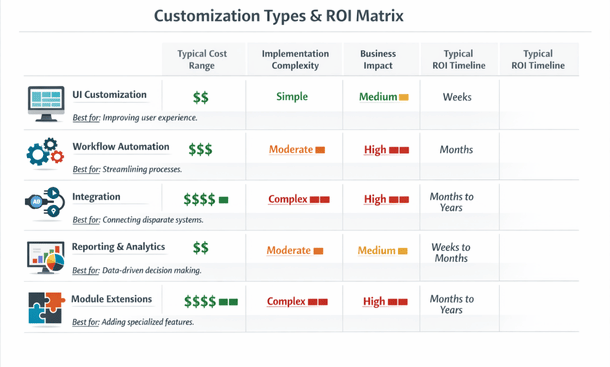
Most businesses eventually implement multiple customization types over time. The key is sequencing them strategically so early wins fund later investments and your team isn’t overwhelmed by too much change at once. Understanding these five types of ERP customization every business should know helps you evaluate what your operation actually needs and prioritize investments that deliver the highest returns first.
The Configuration vs Customization Decision
One of the most critical decisions you’ll make is when to use configuration versus when to invest in true customization. This choice impacts your budget, upgrade path, and long-term flexibility in ways that compound over years.
Configuration works within boundaries your ERP vendor already built. You’re adjusting settings, choosing options, and arranging features the vendor designed for customer modification. This includes activities like setting up your chart of accounts, defining user roles and permissions, choosing which modules to activate, creating workflow approval paths from dropdown menus, and building reports using the vendor’s report writer tool. Everything happens through interfaces the vendor provides specifically for customers to adjust settings.
Customization goes beyond those guardrails. You’re modifying underlying code, database structure, or core functionality. This might mean writing custom scripts, developing new modules, changing how existing features calculate or display data, or building entirely new interfaces. You’re not just using the tools the manufacturer provided—you’re fundamentally altering how the system works.
The practical implication is that configuration changes are reversible and relatively risk-free. If you configure a workflow one way and it doesn’t work, you can reconfigure it differently without major consequences. Customization changes are harder to undo and can create dependencies affecting your system’s stability and upgradeability.
Configuration-heavy systems upgrade relatively smoothly. When your vendor releases new versions with improved features, better performance, or security patches, you can typically upgrade with minimal hassle. Your configurations migrate automatically or require minor adjustments. The vendor has tested the upgrade path because you’re using the system as designed.
Customization-heavy systems face upgrade challenges. Your custom code might not be compatible with new versions. Features you customized might work differently in updated releases. You need to budget time and money for regression testing—making sure everything still works after the upgrade. Sometimes you’ll need to modify or rebuild customizations to work with new versions.
I’ve seen California startups postpone vendor upgrades for years because they feared breaking critical customizations. They missed out on new features, performance improvements, and security patches because the risk and cost of upgrading with extensive customizations was too high. That’s a dangerous position that accumulates technical debt and security vulnerabilities.
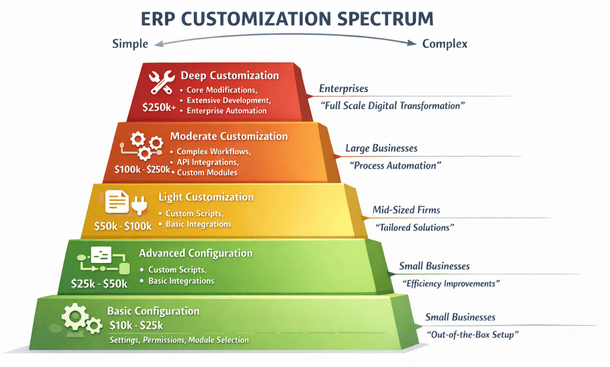
Cost differences between configuration and customization are substantial and predictable. Configuration work typically runs $150 to $250 per hour with consultants, and a typical small business configuration project might consume fifty to two hundred hours. That puts you somewhere between $7,500 and $50,000 for professional configuration services. Many businesses handle simpler configurations themselves after initial training, reducing costs further.
Customization costs vary wildly based on complexity. Simple customizations like adding calculated fields might run a few thousand dollars. Moderate customizations like complex reports or basic integrations range from $5,000 to $25,000. Complex customizations like custom modules or extensive API development easily hit $50,000 to $200,000 or more. Hourly rates for customization work run higher too—between $200 and $350 per hour for experienced ERP developers.
But initial development is only part of the cost equation. Configuration maintenance is minimal—you just adjust settings as needs change. Customization maintenance is ongoing. Every time your ERP vendor releases an update, you need to test your customizations and potentially fix compatibility issues. Budget at least ten to twenty percent of initial customization costs annually for maintenance and updates.
Choose configuration when standard features meet your needs with reasonable adjustments, your processes align reasonably well with industry best practices, you want lower costs and faster implementation, your team has limited technical resources, you value easy upgrades and vendor support, and your business is still evolving and needs flexibility to change quickly.
Choose customization when you have truly unique processes creating competitive advantage, no amount of configuration can achieve what you need, the ROI clearly justifies higher investment and ongoing maintenance, you have technical resources to support custom code long-term, your processes are stable and unlikely to change drastically, and the customization addresses core capabilities central to your business model.
Many times the answer is both—configure everything possible and customize only specific gaps where configuration falls short. This hybrid approach maximizes benefits of each while minimizing downsides. A practical strategy is starting with configuration only for your initial implementation. Get live with the system, let your team learn it, and identify what really needs customization versus what just seemed necessary before you understood the platform’s capabilities.
Understanding the differences between ERP customization and configuration helps you make decisions that balance immediate needs with long-term sustainability. The most future-proof approach is maximal configuration with minimal, strategic customization focused on capabilities that truly differentiate your business.
What You’ll Actually Spend on Customization
Let’s talk real numbers, because understanding costs upfront prevents budget surprises that derail projects halfway through implementation.
In the California market right now, customization costs range from $5,000 for simple tweaks to $500,000+ for comprehensive enterprise solutions. I know that’s a massive range, but the variation reflects genuine differences in complexity, scope, and business requirements.
Simple customizations typically run between $5,000 and $25,000. This category includes adding custom fields to existing forms, creating basic calculated fields, building straightforward reports using the vendor’s report writer, configuring simple approval workflows, and making minor UI adjustments. These projects usually take one to four weeks and involve maybe twenty to eighty hours of consultant or developer time.
Moderate customizations fall in the $25,000 to $100,000 range. You’re looking at more complex workflows with multiple decision points, custom dashboards pulling data from various modules, basic third-party integrations using existing APIs, custom business logic requiring scripting, and modified forms with validation rules. These projects might take two to four months with one to three resources working part-time.
Complex customizations start at $100,000 and can easily exceed $500,000 for enterprise-scale implementations. This includes building custom modules from scratch, developing sophisticated integrations with legacy systems or multiple platforms, creating mobile applications connected to your ERP, extensive database modifications, and enterprise-wide automation spanning multiple departments. These are multi-month projects requiring dedicated development teams.
The hourly rates behind these numbers are fairly consistent across California. ERP consultants who handle configuration and simple customizations typically charge $150 to $250 per hour. Experienced developers working on moderate to complex customizations run $200 to $350 per hour. Specialized developers for niche platforms or enterprise architects can command $350 to $500+ per hour.
Several factors drive these costs higher or lower for your specific situation. Platform complexity is huge—customizing a modern cloud ERP with good documentation, active developer community, and clean APIs costs less than working with a legacy on-premise system with limited documentation and outdated technology. Some platforms are designed for customization with low-code tools that reduce development time.
Developer availability and expertise matter significantly. Popular platforms like NetSuite, SAP Business One, or Microsoft Dynamics have large talent pools creating competitive pricing. Niche or older systems have fewer qualified developers, and scarcity drives rates up. In California’s competitive tech market, demand for skilled ERP developers keeps rates elevated compared to other regions.
Scope clarity at project start dramatically impacts final costs. Vague requirements like “we need better reporting” lead to scope creep and budget overruns. Specific requirements like “we need a dashboard showing daily revenue by product category, customer acquisition cost by channel, and inventory turn rates updated every four hours” let developers estimate accurately and work efficiently.
Integration complexity scales with the number of systems involved and the quality of their APIs. Integrating with a modern SaaS platform that has well-documented REST APIs might take forty hours. Integrating with a legacy mainframe system requiring file transfers and custom parsing logic could take four hundred hours. Every additional system multiplies complexity exponentially rather than linearly.
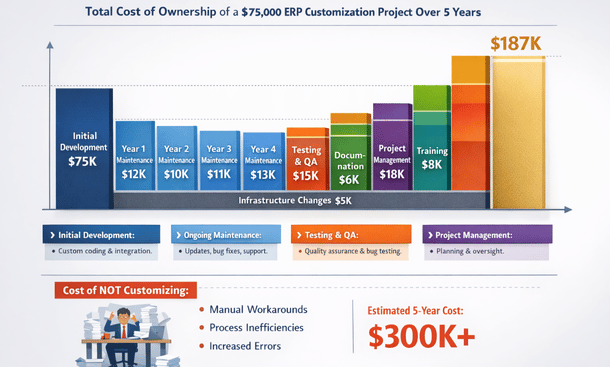
Hidden costs catch most businesses off guard. Ongoing maintenance is the biggest—budget ten to twenty-five percent of initial customization costs annually. A $100,000 customization project needs $10,000 to $25,000 per year to keep running smoothly, handle vendor updates, and fix issues. Over five years, that maintenance can equal or exceed the original development cost.
Testing and quality assurance often gets shortchanged in initial budgets. Proper testing should consume fifteen to thirty percent of development time. If you budgeted $50,000 for development, add $7,500 to $15,000 for comprehensive testing. Skipping this to save money typically backfires when bugs surface in production.
Documentation frequently gets overlooked. Creating proper technical documentation for developers and user guides for staff might add five to fifteen percent to project costs. But without documentation, you’re vulnerable when the original developer leaves or users need to reference how customizations work.
Project management overhead for complex customizations can add twenty to thirty percent beyond direct development costs. Coordinating requirements gathering, managing developer schedules, facilitating communication between technical and business teams, and tracking progress all require dedicated resources.
Training costs get underestimated routinely. Plan for at least twenty to fifty hours of training time across your user base when rolling out significant customizations. At $150 per hour for a trainer or consultant, that’s $3,000 to $7,500. For larger organizations, multiply accordingly.
California-specific factors add costs compared to other markets. Labor costs in California run fifteen to thirty percent higher than the national average for technical talent. A developer who might charge $200 per hour in Texas or Florida commands $250 to $280 per hour in San Francisco or Los Angeles. Even in secondary California markets like Sacramento or Fresno, rates exceed most other states.
Regulatory compliance requirements in California can drive additional customization needs. California’s strict data privacy laws, labor regulations, and industry-specific rules sometimes require customizations that businesses in other states don’t need. Customizations supporting California’s unique payroll tax rules or data handling requirements add five to twenty percent to HR and finance module costs.
Creating a realistic budget requires understanding your needs and building in appropriate contingencies. Start with a detailed requirements document—vague requirements lead to budget overruns because scope creep becomes inevitable. Spend time upfront documenting exactly what you need, complete with data flows, business rules, user interface mockups, and acceptance criteria.
Get multiple quotes from different implementation partners or developers. Prices can vary thirty to fifty percent between vendors for the same scope. Compare not just on cost but on experience, references, and approach. The cheapest option often isn’t the best value.
Build in a twenty-five to forty percent contingency for unexpected complexities. Almost every customization project encounters surprises—requirements that weren’t obvious initially, technical challenges that take longer than expected, or business needs that evolve during development. This buffer prevents budget crises mid-project.
Phase your customization roadmap over time rather than trying to do everything at once. Start with the highest-ROI customizations that deliver immediate value. Use savings or revenue gains from early phases to fund later customizations. This approach reduces upfront capital requirements and ensures each investment proves its value before making the next.
Calculate expected ROI to justify customization investments. If a $40,000 workflow automation saves your team thirty hours weekly at a blended rate of $50 per hour, that’s $78,000 in annual savings. The payback period is roughly six months, making it a solid investment. Customizations without clear ROI should be questioned.
Understanding how much ERP customization actually costs helps you budget appropriately and make smart investment decisions. Plan for the total cost of ownership over three to five years, not just initial implementation. A $30,000 customization with $8,000 annual maintenance costs $62,000 over five years. Compare that against alternative approaches to ensure you’re making the most cost-effective choice.
Best Practices That Prevent Expensive Mistakes
I’ve watched enough California startups flame out on ERP customization to recognize the patterns separating successful implementations from disasters. The difference usually comes down to following proven best practices consistently throughout the project.
Document your requirements before writing any code. This might be the single most important practice. The biggest mistake entrepreneurs make is jumping straight into development without really nailing down what they need. It feels counterintuitive because you’re excited to start building, but spending time on detailed requirements upfront saves massive headaches later.
Start by documenting your current process exactly as it works today. Map out every step, every decision point, every piece of data that moves through the workflow. Don’t skip steps because they seem obvious. The obvious stuff is often where miscommunication happens between you and your developers.
Get specific about what success looks like. Instead of “we need better inventory management,” write something like “when inventory drops below ten units for any SKU, the system should automatically create a purchase requisition, email the purchasing manager, and flag the item as low stock on the dashboard.” That level of detail eliminates ambiguity and prevents building the wrong thing.
Define your data requirements explicitly. What fields do you need to capture? What are the valid values for each field? What calculations need to happen? How should data relate to other records in the system? A field called “customer type” could mean a dozen different things—be crystal clear about your data model.
Include acceptance criteria for each requirement. How will you verify that the customization works correctly? What test scenarios need to pass before you consider it complete? These criteria become your testing checklist and prevent arguments about whether something is done.
Start small and scale gradually. There’s a strong temptation to solve all your ERP problems at once with a massive customization project. Resist that urge. Pick one high-impact, well-defined process for your first customization. Maybe it’s automating your purchase order approval workflow or creating a custom dashboard for your operations team. Choose something important enough to matter but contained enough to complete relatively quickly.
Aim for a first customization that delivers results within four to eight weeks. This quick win builds momentum, proves the value of customization to skeptics in your organization, and gives your team experience with the process before tackling more complex projects. The learning curve on ERP customization is steeper than most people expect. Better to learn these lessons on a $15,000 project than a $150,000 one.
Exhaust configuration options before customizing. This might be the practice that saves the most money. Modern ERP systems offer way more flexibility through configuration than most users realize. Exploring these options thoroughly before writing custom code saves enormous amounts of money.
Spend real time learning your ERP platform’s configuration capabilities. Take training courses, watch tutorial videos, read documentation, and experiment in a sandbox environment. Many features you think require customization actually exist as advanced configuration options you just haven’t discovered yet.
Work with an experienced consultant who knows your platform inside and out for at least your initial implementation. These experts know configuration tricks and features that took them years to learn. Their knowledge can redirect twenty potential customizations into ten configurations and ten true customizations, cutting your costs in half.
Test whether you can achieve ninety percent of your goal through configuration. Sometimes the perfect solution requires customization, but a ninety percent solution through configuration delivers nearly the same business value at a fraction of the cost. Perfect is the enemy of good in ERP implementation.
Involve end users throughout the process. The people who’ll actually use your customizations daily need to be involved from the beginning, not just shown the finished product at the end. User involvement dramatically improves adoption and ensures you build the right solution.
Identify power users from each affected department to serve on your implementation team. These aren’t necessarily managers—they’re the people who live in the ERP every day and understand the detailed realities of current workflows. Their practical knowledge is invaluable.
Have users review mockups, wireframes, and prototypes before development starts. Even simple sketches of what screens will look like help users visualize the solution and provide feedback when changes are still easy and inexpensive. Conduct user acceptance testing before rolling customizations to production. Give real users access to the customization in a test environment and have them run through actual scenarios they encounter in their daily work.
Test thoroughly in a sandbox environment. Inadequate testing is probably the second-biggest reason customization projects fail after poor requirements. Set up a dedicated sandbox or development environment that mirrors your production system. This isolated environment lets you break things, test edge cases, and experiment without risking your live business data.
Create a structured test plan covering all functionality. Don’t just test the happy path where everything works perfectly. Test error conditions, boundary cases, and unusual scenarios. What happens if someone enters negative numbers? What if required fields are left blank? What if the system tries to process a thousand records at once?
Include integration testing when customizations connect multiple systems. Testing the customization in isolation isn’t enough—you need to verify that data flows correctly between systems, error handling works across boundaries, and performance is acceptable under realistic load.
Test with real data, not just toy examples. If your customization processes sales orders, test it with actual order data including all the weird edge cases that exist in your business. That customer who orders a hundred line items, the one with special pricing rules, the rush order with overnight shipping—test all of them.
Document everything for future maintenance. Documentation feels like busy work when you’re eager to finish a project, but it’s absolutely essential for long-term success. Create technical documentation explaining how customizations work—data flows, logic explanations, integration points, dependencies, and any quirks or gotchas. Write this for someone with general ERP development skills who’s seeing your customization for the first time.
Document why design decisions were made. In six months, when someone questions why you built something a particular way, you’ll want a record of the reasoning. Maybe you considered three approaches and chose one for specific reasons—capture that thinking.
Create user documentation explaining how to use customizations. Screen captures, step-by-step instructions, and examples help new employees learn the system. Video walkthroughs work particularly well for complex customizations.
Plan for vendor updates and system upgrades. One of the most overlooked aspects of customization is how it affects your ability to upgrade your ERP when vendors release new versions. Planning for this from the start prevents being stuck on outdated software.
Understand your vendor’s upgrade model. Cloud ERPs with continuous updates require different approaches than on-premise systems with major version releases every few years. Know what you’re signing up for and how customizations need to accommodate the update cadence.
Follow vendor best practices for customization architecture. Most platforms have recommended patterns for building customizations that minimize upgrade conflicts. Using these patterns costs nothing extra but dramatically improves upgrade compatibility.
Avoid modifying core vendor code when possible. Build customizations as extensions or add-ons that sit alongside core functionality rather than changing the vendor’s code directly. This separation makes upgrades much cleaner.
Test customizations after every vendor update, even minor ones. Schedule a testing cycle immediately after your vendor releases updates to verify everything still works correctly. Catching issues early prevents production problems.
These seven ERP customization best practices work together to create a comprehensive approach to successful implementation. None of them is optional—skip any one and you significantly increase your risk of expensive problems. The common thread through all these practices is thoughtfulness and discipline. Customization is powerful but demands respect
Industry-Specific Customization Strategies
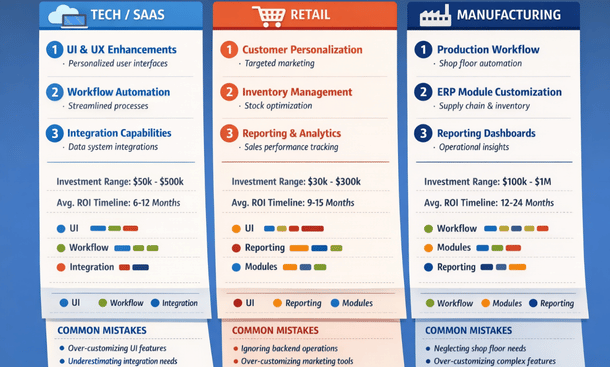
A SaaS startup in San Francisco has completely different ERP needs than a manufacturing plant in San Diego or a retail chain in Los Angeles. Generic customization advice misses the unique workflows, compliance requirements, and competitive dynamics of your particular sector.
Each industry has its own operational DNA. The way a software company manages projects bears little resemblance to how a clothing retailer manages inventory, which is completely different from how a manufacturer manages production schedules. These aren’t just minor variations—they’re fundamental differences in business models, workflows, and success metrics that drive customization decisions.
Tech and SaaS companies face unique customization requirements driven by their subscription business models and development processes. Subscription revenue management is probably the most critical customization area. Standard ERP systems handle one-time sales well but struggle with recurring revenue, usage-based billing, tiered pricing, and complex subscription modifications. Custom billing engines calculate monthly recurring revenue correctly, handle prorations when customers upgrade mid-cycle, manage trial periods and grace periods, and automate renewal processes.
Project management customizations support agile development workflows that traditional project accounting doesn’t handle well. Tech companies need sprint planning integrated with resource allocation, time tracking that maps to stories and epics rather than just projects, and burndown charts connecting development work to financial performance. Custom dashboards show velocity metrics, feature completion rates, and project profitability in ways meaningful to development teams.
API and integration capabilities matter enormously for tech companies whose products often require connecting multiple systems. Custom integration frameworks let your ERP communicate with development tools like GitHub and Jira, customer success platforms like Gainsight, and analytics tools like Mixpanel. These integrations surface operational data in your ERP for holistic business visibility.
Customer success tracking connects operational metrics with financial data. Customizations that link product usage data to customer accounts help identify expansion opportunities and churn risks. When your ERP knows that a customer’s usage dropped thirty percent this quarter, your customer success team can intervene before renewal time.
Retail and e-commerce businesses face completely different challenges. Omnichannel inventory management is fundamental for modern retailers. Customers expect to buy online and pick up in store, return online purchases to physical locations, or check in-store availability before visiting. Custom inventory allocation logic reserves stock appropriately across channels, prevents overselling when the same item appears in multiple places, and provides accurate availability across all touchpoints.
Point of sale integration connects your physical store systems with your ERP. Real-time transaction sync ensures every sale immediately updates inventory, customer purchase history, and financial records. Return processing in stores needs to properly credit customers and return inventory to available stock. Employee discounts, gift cards, and loyalty programs require proper system support.
Size and color matrix management handles product variants efficiently. A t-shirt in five colors and six sizes creates thirty SKUs that need coordinated management. Customizations let buyers manage inventory at the style level while tracking individual SKUs, generate purchase orders that consider total style needs, and create reports showing performance by attribute rather than requiring analysis across dozens of individual SKUs.
Seasonal planning and merchandise assortment customizations help retailers prepare for buying cycles. Tools for open-to-buy management ensure purchasing stays within budget while maintaining appropriate inventory levels. Pre-season planning allocates budgets across categories, tracks actual spending against plans, and flags when buyers are over or under-spending.
Promotion and markdown management tracks the financial impact of sales, clearance events, and promotional pricing. Customizations calculate true margins after promotions, help plan markdown strategies to clear seasonal merchandise, and analyze which promotional tactics drive the best returns.
Manufacturing and distribution operations have perhaps the most specialized ERP requirements given the complexity of production processes, supply chains, and quality standards. Bill of materials and recipe management goes far beyond simple component lists. Multi-level BOMs show assemblies within assemblies within finished goods. Alternate BOMs handle situations where different component versions work depending on availability. Formula-based quantities calculate required materials based on batch sizes rather than fixed amounts.
Production scheduling and capacity planning customizations optimize manufacturing operations. Finite capacity scheduling considers actual machine and labor availability rather than assuming infinite capacity. Customizations factor in setup times, changeover requirements, and maintenance windows. Visual scheduling boards let production planners drag and drop jobs to optimize throughput.
Quality management systems ensure products meet specifications. Custom workflows route products through inspection stations, record test results and measurements, and hold or release lots based on pass or fail criteria. Statistical process control tracks metrics over time and flags when processes drift out of tolerance. Non-conformance tracking documents issues, root cause analysis, and corrective actions.
Lot and serial number traceability provides visibility from raw materials through finished goods and customer delivery. Complete traceability lets you answer questions like “which finished goods contain material from lot X” or “trace this serial number back to all components and their suppliers.” This capability is essential for recalls, quality investigations, and regulatory compliance.
Work order and job costing customizations track actual production costs against standards. Capture labor hours, material consumption, machine time, and overhead allocation at the work order level. Variance analysis shows where actual costs deviate from standards, highlighting opportunities for efficiency improvements.
Equipment maintenance management prevents unplanned downtime. Preventive maintenance schedules trigger work orders based on runtime hours, production counts, or calendar intervals. Maintenance history tracking helps predict equipment failures. Integration with production scheduling ensures maintenance happens during planned downtime rather than disrupting production.
Cross-industry patterns exist where similar customization needs appear across sectors with industry-specific variations. Advanced financial reporting customizations appear in every industry but with different focuses. Tech companies need detailed deferred revenue schedules. Retailers need margin analysis by category and location. Manufacturers need job costing and work-in-process reporting. The underlying need—better financial visibility—is universal, but implementations vary dramatically.
Customer portal customizations let clients access relevant information self-service. Tech companies provide product documentation and support tickets. Retailers show order history and tracking. Manufacturers give customers visibility into production status and quality certificates. The portal concept is cross-industry, but content and features are sector-specific.
Mobile access enables field work across industries. Retail store managers conduct cycle counts on tablets. Manufacturing quality inspectors record results on the factory floor. Service technicians access customer information and record time at job sites. Mobile customization requirements depend entirely on what work happens outside the office.
Choosing the right customizations for your vertical starts with identifying your industry’s critical success factors. What operational capabilities determine whether businesses in your sector win or lose? For SaaS companies, it’s often customer acquisition and retention efficiency. For retailers, inventory turnover and margin management. For manufacturers, production efficiency and quality consistency. Prioritize customizations that directly impact your critical success factors.
Analyze your competitive positioning within your industry. If you compete on price, customizations that reduce operational costs deserve priority. If you compete on speed, focus on customizations that accelerate processes. If you compete on quality, invest in quality management and compliance customizations. Your competitive strategy should guide customization decisions.
Talk to peers in your industry about their ERP implementations. Industry associations, conferences, and professional networks provide opportunities to learn what customizations delivered value for similar businesses. While every company is unique, businesses in the same industry face remarkably similar challenges.
Understanding industry-specific ERP customization strategies helps you focus investments on capabilities that matter most for your sector. The key is combining industry best practices with your unique competitive strategy to create customizations that support how your business specifically wins in your market.
Finding the Right Implementation Partner
Your choice of implementation partner might be the most critical decision in your entire ERP customization journey—even more important than selecting the software platform itself. A great partner brings deep technical expertise, understands your industry, and actually listens to your business challenges instead of just pushing their standard solutions. A bad one will burn through your budget, miss deadlines, and leave you with a system that’s harder to use than what you started with.
Your ERP platform is important, but it’s ultimately just software. Modern ERP systems from reputable vendors are all reasonably capable. What makes or breaks your implementation is how well that software gets configured and customized to fit your specific business needs. That’s entirely dependent on your implementation partner.
A skilled partner can make a mediocre ERP platform work brilliantly for your business. They know how to work around limitations, leverage hidden capabilities, and architect customizations that deliver maximum value. A poor partner can ruin even the best ERP system by implementing it badly, over-customizing unnecessarily, or under-delivering on critical features.
The cost of a bad partner extends far beyond the implementation budget. Failed implementations waste six to twelve months, consume enormous management attention, and create organizational change fatigue that makes future improvement efforts harder. I’ve seen businesses spend $100,000 with the wrong partner, abandon the implementation, and then spend another $150,000 with a different partner to do it right. That $250,000 total cost plus a year of lost time is devastating for a growing business.
Start with essential qualifications and certifications. Platform-specific certifications matter significantly. If you’re implementing NetSuite, your partner should have NetSuite certifications. For Microsoft Dynamics, look for Microsoft partner status and relevant certifications. SAP implementations require SAP partner credentials. These certifications prove the partner has invested in training and demonstrated competency on the platform.
Check the partner’s tier level with the vendor. Most ERP vendors have tiered partner programs—Gold, Platinum, Premier, or similar designations. Higher tiers typically require more certifications, completed implementations, and customer satisfaction scores. While tier doesn’t guarantee quality for your specific project, it shows sustained investment in the platform.
Individual consultant certifications within the partner organization matter as much as company credentials. Ask which specific consultants will work on your project and what certifications they hold. A partner firm with impressive company credentials but junior, uncertified staff assigned to your project isn’t what you’re paying for.
Industry experience dramatically impacts implementation quality. Partners who’ve implemented for businesses like yours understand your challenges intuitively and bring proven solutions. Ask specifically about implementations in your industry. Don’t accept vague statements like “we work with lots of different industries.” You want concrete examples like “we’ve implemented for eight apparel retailers in California over the past three years, ranging from single-store boutiques to fifteen-location chains.”
Request case studies or success stories from similar businesses. Good partners document their implementations and can share anonymized examples showing challenges faced, solutions delivered, and results achieved. Reading case studies from your industry helps you visualize what’s possible and evaluate whether the partner’s approach matches your needs.
Understand the depth of their industry expertise. Have they only done basic implementations in your sector, or have they built sophisticated industry-specific customizations? A partner who’s implemented point-of-sale integration for retailers has surface-level retail experience. A partner who’s built advanced allocation engines, markdown optimization tools, and omnichannel fulfillment orchestration brings deep retail expertise.
Assess their technical capabilities on your specific ERP platform. Different platforms require different technical skills—SuiteScript for NetSuite, X++ for Dynamics, ABAP for SAP. Ask about their development team size, experience levels, and whether developers are onshore, offshore, or mixed. Understanding the team composition helps assess capability and communication considerations.
Evaluate their integration expertise. Most implementations require connecting your ERP with other systems—CRM platforms, e-commerce sites, payment processors, shipping carriers, manufacturing equipment. Ask about integration approaches they use, APIs they’ve worked with, and how they handle error handling, logging, and monitoring.
Understand their testing methodologies. How do they ensure customizations work correctly? Do they have structured test plans, automated testing capabilities, and quality assurance processes? Partners without rigorous testing approaches create buggy implementations that require expensive fixes post-launch.
Check references and past performance thoroughly. Ask for at least three references from implementations similar to yours—same industry, comparable size, similar complexity. References from vastly different implementations don’t provide relevant insights.
Prepare specific questions for references beyond “were you happy?” Ask about timeline adherence, budget accuracy, communication quality, problem-solving ability, and post-implementation support. Ask what they’d do differently if starting over. Ask whether they’ve engaged the partner for additional work—repeat business indicates genuine satisfaction.
Evaluate communication and cultural fit. Technical skills matter, but so does working relationship quality. Assess their communication style during the sales process. Do they listen more than they talk? Do they ask insightful questions about your business? Do they explain things clearly or hide behind jargon? Sales interactions preview how they’ll communicate during implementation.
Consider their consulting philosophy. Do they position themselves as order-takers who’ll build whatever you request, or as advisors who’ll challenge your assumptions and suggest better approaches? You want partners confident enough to push back when you’re heading in a wrong direction.
Assess whether they understand entrepreneurship and small business dynamics. Large consulting firms accustomed to enterprise budgets and bureaucratic decision-making might struggle with the speed, resource constraints, and hands-on involvement typical in smaller businesses. Find partners who match your operational style.
Understand the pricing model—time-and-materials, fixed-price, or value-based. Each has advantages and disadvantages. Time-and-materials provides flexibility but creates budget uncertainty. Fixed-price transfers risk to the partner but requires extremely clear scope. Value-based pricing aligns incentives but demands trust and measurable outcomes.
For time-and-materials projects, get detailed rate cards showing costs for different resource types. Senior consultants should cost more than junior ones. Onshore resources typically cost more than offshore. Understand the full cost structure including project management, travel, and any markup on software licenses or third-party tools.
Ask about payment terms and schedules. Avoid partners demanding large upfront payments before delivering value. Milestone-based payments tied to deliverables protect you by ensuring you only pay for completed work. Typical structures might be 25% at contract signing, 25% at design approval, 25% at development completion, and 25% at successful go-live.
Understand what post-launch support is included. Most partners provide some hypercare period immediately after go-live—typically two to four weeks of elevated support as you stabilize on the new system. Clarify response times, hours of coverage, and what issues are covered during this phase.
Ask about ongoing support options after hypercare ends. Can you purchase support retainers or prepaid block hours? What response times apply for different issue severities? What’s covered versus what incurs additional charges? Having clear support options prevents scrambling when issues arise months after implementation.
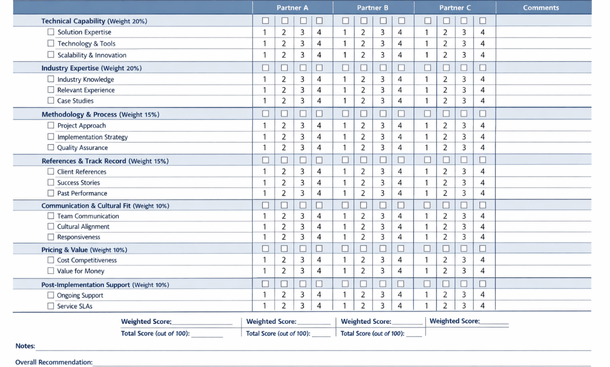
Create a structured scorecard evaluating each partner against your priority criteria. Don’t rely on gut feel alone—quantify assessments where possible. Rate partners on dimensions like technical capability, industry expertise, methodology, references, communication, pricing, and cultural fit. Weighted scoring based on your priorities produces data-driven decisions.
Involve key stakeholders in the decision. The people who’ll work with the partner daily—your operations manager, finance director, IT lead—should meet finalists and provide input. Their buy-in matters for successful collaboration during implementation.
Trust your instincts alongside data. If a partner scores well analytically but something feels off, don’t ignore that intuition. Conversely, if you feel great about a partner who scores lower in some areas, those concerns might be surmountable. Balance analytical evaluation with human judgment.
Learning how to choose the right ERP customization partner ensures you build a relationship that delivers compounding value as your business grows. The effort you invest in partner selection pays dividends throughout your entire ERP journey. Choose wisely, and your implementation partner becomes a strategic asset supporting your growth for years.
Building Your Customization Roadmap
ERP customization represents one of the most significant technology investments you’ll make as your California business grows. The difference between a system that constrains your operations and one that accelerates them comes down to making smart, strategic customization decisions.
The businesses that succeed with ERP customization share common approaches. They start by deeply understanding what customization actually means and which types deliver the most value for their specific situation. They thoughtfully balance configuration against true customization, maximizing what’s achievable through settings before writing custom code. They budget realistically for both initial implementation and ongoing maintenance, avoiding the sticker shock that derails projects mid-stream.
Successful implementations follow proven best practices religiously. They document requirements exhaustively before development starts. They begin with small, focused customizations that deliver quick wins rather than attempting to solve everything simultaneously. They involve end users throughout the process, test thoroughly in sandbox environments, and maintain comprehensive documentation for future maintenance. They plan proactively for vendor updates rather than being caught off guard when upgrades break customizations.
Industry matters enormously in customization planning. Tech companies need subscription billing and project management capabilities that retailers never think about. Retailers require omnichannel inventory and point-of-sale integration that manufacturers don’t need. Manufacturers demand production scheduling and quality management that service businesses can ignore. Understanding your industry’s specific requirements helps you prioritize investments toward capabilities that actually move the needle for your sector.
Perhaps most critically, your implementation partner determines whether customization projects succeed or fail. The right partner brings technical expertise, industry knowledge, proven methodology, and communication skills that transform implementation from a painful slog into a collaborative journey. They challenge your assumptions, suggest better approaches, and help you avoid expensive mistakes. The wrong partner burns money, misses deadlines, and leaves you worse off than when you started.
Your customization journey doesn’t end at go-live. The most successful businesses view ERP customization as an ongoing evolution rather than a one-time project. As your business grows, your operational requirements change. New competitive pressures emerge. Regulations shift. Technology advances. Your ERP system needs to evolve alongside these changes, which means continuous enhancement and optimization of customizations.
Build a three-year roadmap showing progression from foundational customizations through advanced capabilities. Year one might focus on operational basics and compliance requirements—the must-haves that let you operate competitively. Year two adds efficiency improvements and better analytics that increase productivity and inform decision-making. Year three implements sophisticated automation and competitive differentiators that create operational advantages competitors can’t easily replicate.
Create measurable success criteria for each customization. Don’t just implement features—define what success looks like quantitatively. A subscription billing customization should reduce billing errors by ninety percent and accelerate invoicing by five days. A retail allocation customization should improve sell-through rates by fifteen percent and reduce markdowns by ten percent. A manufacturing quality customization should cut defect rates by thirty percent and inspection time by twenty percent. Quantified targets focus implementation efforts and enable you to prove ROI.
Budget for the long term, not just initial implementation. The total cost of ownership over five years includes ongoing maintenance, periodic enhancements, training for new employees, and eventual upgrades or replacements. Understanding this complete picture helps you make investment decisions that remain sustainable as your business scales.
Approach customization strategically rather than reactively. Too many businesses customize in response to immediate pain points without considering how those customizations fit into a broader operational strategy. The result is a patchwork of disconnected modifications that create complexity without delivering coherent value. Strategic customization aligns each investment with your competitive positioning, ensuring modifications support how your business specifically creates value in your market.
Start your customization journey by getting the fundamentals right. Understand what you’re trying to achieve and why it matters for your business model. Evaluate whether you need true customization or whether configuration can deliver sufficient value. Budget realistically including ongoing costs. Follow best practices religiously. Choose implementation partners carefully based on demonstrated expertise rather than lowest bid. Measure results and iterate based on what you learn.
The businesses winning with ERP customization in 2025 aren’t necessarily spending the most money or implementing the most features. They’re making thoughtful, strategic decisions about where customization creates genuine competitive advantage. They’re balancing immediate needs with long-term maintainability. They’re involving users, testing thoroughly, and documenting comprehensively. They’re viewing customization as an ongoing capability rather than a one-time project.
Your ERP system should be an enabler, not a constraint. When customized thoughtfully, it amplifies your team’s capabilities, eliminates friction from critical workflows, and provides visibility that improves decision-making at every level. The investment required—both financial and organizational—is substantial, but so are the returns when you get it right.
The path forward starts with education and planning. Use the framework in this guide to evaluate your current situation and identify opportunities where customization could deliver meaningful value. If you’re just beginning your ERP journey, understanding these concepts before you select a platform helps you make smarter software decisions and avoid vendors whose customization approaches don’t fit your needs.
If you’ve already implemented an ERP system and are frustrated with gaps between what you have and what you need, this guide provides a roadmap for strategically enhancing your investment. You don’t need to accept the limitations of out-of-the-box software. Modern ERP platforms are designed to be tailored—the question is how to do it effectively.
For immediate next steps in planning your customization strategy, explore how to choose the right ERP customization partner who can guide you through the implementation process. The right partner transforms customization from a risky, expensive gamble into a managed investment delivering predictable returns.
ERP customization done right becomes a competitive weapon that scales with your business, adapting as you grow and evolve. The businesses that will dominate their markets in the coming years aren’t just using better software—they’re using software that’s been tailored specifically to execute their unique strategies more efficiently than anyone else can. That’s the power of strategic ERP customization, and it’s available to any California entrepreneur willing to approach it thoughtfully and systematically.
About the Author

mike
Mike is a tech enthusiast passionate about SaaS innovation and digital growth. He explores emerging technologies and helps businesses scale through smart software solutions.
Did you find this helpful?
Your feedback helps us curate better content for the community.