
Table of Contents
- Why Push Notifications Matter More Than You Think
- How Push Notifications Actually Work
- How Firebase Handles Push Notifications
- How Supabase Approaches Push Notifications
- Asking for Permission (And Why Users Say No)
- The Types of Notifications That Actually Work
- Timing, Frequency, and Quiet Hours
- Measuring What Actually Works
- Getting Started Without Overwhelming Users
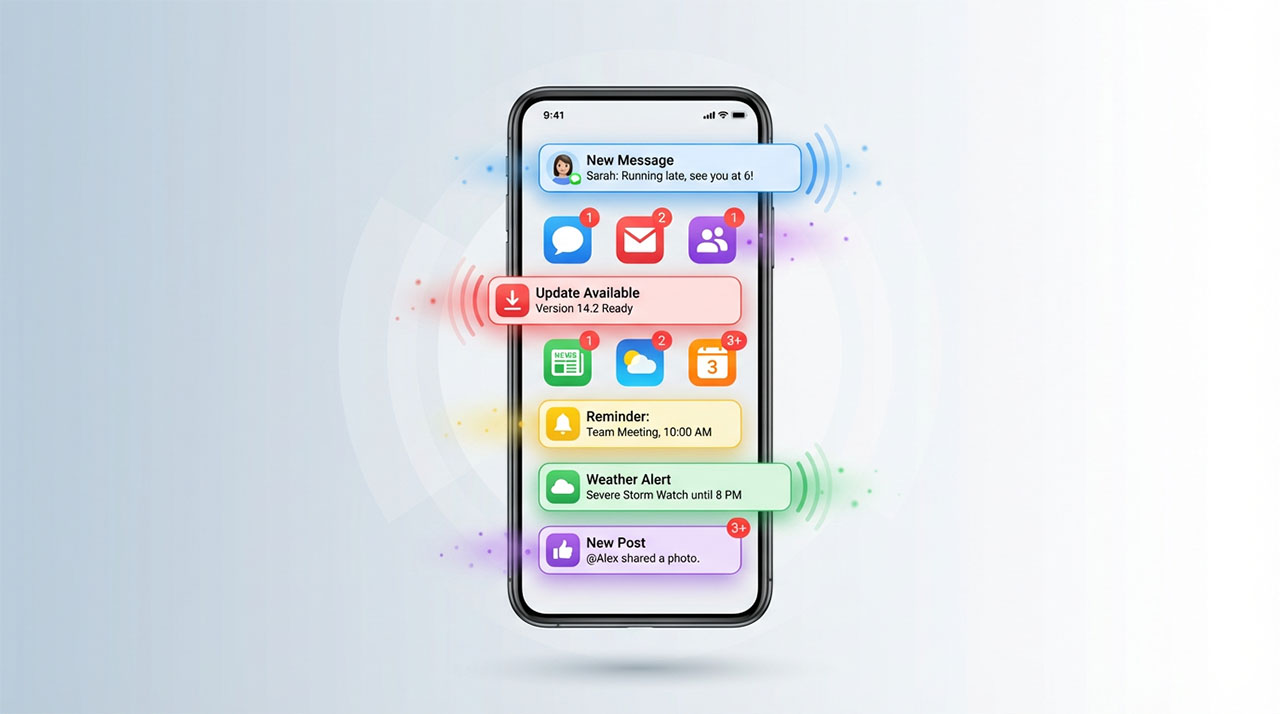
A user downloads your app, explores for five minutes, then disappears. Sound familiar? Push notifications are your lifeline to bring them back—but only if you use them thoughtfully. Send too many and users uninstall. Send too few and they forget you exist. The good news? Modern backend platforms handle the technical complexity of cross-platform notifications, letting you focus on crafting messages people actually want to receive. While we introduced push capabilities as one of the essential features in our mobile backend overview, this guide dives deep into implementation, timing strategies, and the surprising differences between how Firebase, Supabase, and other platforms approach user engagement.
Your user downloads your app, uses it for ten minutes, then closes it. Without push notifications, that might be the last time you ever reach them.
Push notifications are your lifeline to dormant users. A well-timed alert can bring someone back days, weeks, or even months after their last visit. A poorly executed notification strategy can get your app deleted within hours.
The difference comes down to understanding what makes users tap versus what makes them mute. Backend platforms handle the technical complexity of delivering notifications across iOS and Android. Your job is using that power thoughtfully, sending messages people actually want to receive at moments when they’re receptive.
Let’s explore how push notifications work, how different platforms implement them, and most importantly, how to use them without annoying the people you’re trying to engage.
Why push notifications matter more than you think
Consider the math. A typical app loses 77% of its daily active users within three days of installation. Within 30 days, that number climbs to 90%. Your app might be genuinely valuable, but if users forget about it, value doesn’t matter.
Push notifications cut through that forgetting. They create touchpoints that remind users why they downloaded your app in the first place. A fitness app nudges you when it’s time for your evening run. A shopping app alerts you when items on your wishlist go on sale. A productivity app reminds you about tasks due tomorrow.
These aren’t interruptions if done right. They’re value delivery mechanisms. The key word is “if done right.” Send too many notifications and users disable them or worse, uninstall your app. Send the wrong notifications and you train users to ignore all of them. Send them at inappropriate times and you create active resentment.
But get the balance correct and push notifications become your most effective engagement tool. They cost nothing to send, reach users instantly regardless of whether your app is open, and drive measurable behavior changes.
The challenge isn’t technical anymore. Modern backend platforms make sending notifications remarkably simple. The challenge is strategic: knowing what to send, when to send it, and to whom.
How push notifications actually work
Understanding the basic mechanics helps you make better decisions about implementation and strategy.
When a user installs your app and grants notification permission, their device registers with Apple Push Notification Service (APNS) for iOS or Firebase Cloud Messaging (FCM) for Android. This registration generates a unique token, essentially an address where notifications for that device should be delivered.
Your backend stores this token. When you want to send a notification, you tell your backend platform “send this message to this token.” The platform forwards your message to APNS or FCM, which delivers it to the device. The user sees your notification even if your app isn’t running.
This happens in milliseconds across the globe. You send a notification in New York, and a user in Singapore receives it almost instantly. The infrastructure handling this involves data centers, message queues, and retry logic, but platforms abstract all that complexity.
The important thing to understand is that notifications flow through Apple’s or Google’s systems. You don’t control delivery speed or guarantee delivery. Network conditions, device settings, and platform policies all affect whether and when notifications arrive.
How Firebase handles push notifications
Firebase Cloud Messaging is the dominant push notification system for mobile apps. It works natively for Android and integrates with APNS for iOS, giving you one unified system for both platforms.
The setup process is straightforward. You integrate Firebase’s SDK into your app, request notification permission from users, and Firebase generates tokens automatically. These tokens sync to your Firebase project where you can target them with messages.
Firebase offers three ways to send notifications, each suited for different use cases:
The Firebase Console provides a visual interface for sending notifications manually. This works for one-off announcements, testing, or emergency messages. You compose your notification, select target audiences, and send. No coding required.
Firebase Admin SDK lets you send notifications from your own backend code. This enables programmatic notifications triggered by events: a new message arrives, a payment processes, a reservation confirms. You control the logic determining when notifications send.
Firebase Cloud Functions are serverless functions that run in response to database changes or scheduled triggers. When a user receives a friend request, a Cloud Function automatically sends them a notification. When an auction is about to end, a scheduled function notifies interested bidders.
Firebase’s notification system includes helpful features like topic subscriptions. Instead of targeting individual users, you create topics like “sports-news” or “breaking-updates” and let users subscribe. Then you send one message to the topic and Firebase delivers it to all subscribers automatically.
Analytics integration shows notification performance: delivery rates, open rates, conversion rates. You can A/B test notification content to optimize engagement. Firebase tracks which notifications drive users back into your app and which get ignored.
The pricing model is generous. Firebase Cloud Messaging is completely free with no volume limits. You can send millions of notifications monthly without charges. This makes notifications one of the most cost-effective engagement tools available.
Push notifications are a powerful retention tool, but they’re only one part of what your mobile backend needs to deliver. Before settling on a platform purely based on its notification capabilities, it’s worth seeing how those same platforms stack up on authentication, real-time sync, offline support, and pricing at scale. The Founder’s Guide to Mobile Backends evaluates all of these together, so your backend choice works for your entire app — not just one feature.
How Supabase approaches push notifications
Supabase takes a different approach, providing the infrastructure to integrate with notification services but not managing delivery itself.
Rather than building a proprietary notification system, Supabase offers database triggers and Edge Functions that connect to existing push services. You can integrate with Firebase Cloud Messaging, OneSignal, Expo’s push service, or any notification provider through API calls.
This flexibility comes with tradeoffs. You have more control over notification logic and can switch providers without migrating off Supabase. But you’re responsible for more of the integration work. Setting up push notifications with Supabase requires configuring the external service, storing device tokens in your database, and writing functions that send notifications through the provider’s API.
For developers comfortable with this approach, Supabase’s flexibility is valuable. You’re not locked into one notification system. You can use different providers for iOS and Android if you prefer. You can integrate advanced notification platforms that offer features beyond basic push.
For non-technical founders or teams wanting the simplest possible implementation, Firebase’s integrated approach requires less setup and maintenance. The best tool depends on whether you value tight integration or flexibility.
Asking for permission (and why users say No)
Before you can send anyone notifications, they must grant permission. On iOS, this happens through a system prompt. On Android, notifications are enabled by default but users can disable them easily.
Your conversion rate on this permission request dramatically affects your notification strategy’s effectiveness. If only 20% of users grant permission, you can only reach one in five users with notifications. If 60% grant permission, you’ve tripled your potential reach.
The timing and context of your permission request matters enormously. Apps that ask immediately on first launch see permission rates around 40-50%. Users haven’t experienced your app’s value yet, so they’re skeptical about notifications.
Apps that wait until users have experienced value and then explain why notifications enhance that value see permission rates of 60-80%. For example, a food delivery app might wait until someone places their first order, then explain “Get notified when your order is out for delivery” before requesting permission.
This approach requires implementing a pre-permission prompt: your own dialog that explains notification benefits before triggering the system permission request. Users who understand why notifications help them are far more likely to grant permission.
Never request notification permission without context. “This app would like to send you notifications” tells users nothing about value. “Get notified when friends comment on your posts so you never miss a conversation” explains exactly why granting permission benefits them.
Once users deny permission, re-requesting is difficult on iOS and annoying on Android. You get one good shot at this. Make it count by waiting for the right moment and providing clear value proposition.
The types of notifications that actually work
Not all notifications deserve to interrupt someone’s day. The best notifications fall into a few categories that users consistently find valuable.
Transactional notifications update users about actions they initiated. Order confirmations, shipping updates, payment receipts, reservation confirmations—these notifications are expected and welcomed. Users want to know when things they care about happen. Send these liberally with confidence.
Time-sensitive alerts notify users about events requiring timely response. Upcoming appointments, expiring offers, limited-time opportunities, or urgent messages all justify interrupting users. The key is genuine urgency, not manufactured scarcity.
Personal milestones celebrate user achievements or progress. Completing a fitness goal, reaching a streak, unlocking a feature, or leveling up all create positive associations with notifications. These feel like rewards rather than interruptions.
Social interactions inform users when other people engage with them. Comments on posts, responses to messages, friend requests, or mentions all leverage social motivation to drive engagement. People care about how others interact with them.
Personalized recommendations suggest content or actions based on user behavior. These work when genuinely relevant—a podcast episode about a topic the user follows, a sale on items they’ve browsed, or a restaurant reservation for a cuisine they love.
Reminder notifications help users follow through on intentions. Medication reminders, task due dates, scheduled events, or habits they’re trying to build all assist users rather than interrupt them.
The notifications that don’t work are generic broadcasts with no personalization, frequent marketing messages that feel spammy, or notifications about things users don’t care about. Every notification should pass a simple test: would the user thank you for sending this, or would they wish you hadn’t?
Timing, frequency, and quiet hours
When you send notifications matters as much as what you send. A perfectly crafted message sent at 3 AM becomes an annoyance rather than engagement tool.
Respect time zones. If you’re sending notifications to a global user base, adjust delivery times based on each user’s location. A reminder notification that makes sense at 9 AM their time becomes obnoxious at 2 AM.
Consider user behavior patterns. Analytics show when individual users typically engage with your app. A user who checks your app during their morning commute probably welcomes notifications between 7-9 AM. A user who browses before bed prefers evening notifications.
Implement quiet hours that prevent notifications during typical sleeping hours, roughly 10 PM to 8 AM in the user’s time zone. Some platforms offer built-in quiet hours. Others require you to check user time zones before sending.
Frequency matters more than almost any other factor. One notification daily feels reasonable for most apps. Multiple notifications per hour feels aggressive. Find the threshold where engagement peaks before frequency causes opt-outs.
Different notification types warrant different frequencies. Transactional notifications can come as often as needed—users expect shipping updates. Marketing notifications should be rare and valuable. Social notifications can be more frequent if genuinely reflecting user activity.
Implement notification preferences in your app settings. Let users choose what types of notifications they receive and how often. This reduces opt-outs by giving users control. Someone who disables all notifications is gone forever. Someone who limits notifications to just what they care about remains reachable.
Measuring what actually works
Push notifications generate clear metrics that reveal what’s working and what’s annoying users.
Delivery rate shows what percentage of sent notifications actually reach devices. Rates below 90% suggest technical issues with token management or network problems. Both Firebase and most notification services track delivery automatically.
Open rate measures how many delivered notifications users tap on. Industry averages range from 2-10% depending on app category and notification type. Transactional notifications typically see higher open rates than marketing messages.
Conversion rate tracks users who complete desired actions after tapping notifications. This is your ultimate success metric. A notification that gets opened but doesn’t drive valuable behavior isn’t effective.
Opt-out rate reveals how many users disable notifications over time. Steady increases in opt-outs signal you’re sending too many notifications or the wrong types. This metric provides crucial feedback about notification strategy.
Test different notification approaches systematically. A/B test message copy, send times, frequency, and targeting criteria. Small changes often produce dramatic results. “Your order shipped” versus “Your order is on the way” might seem equivalent but could drive different open rates.
Firebase and other platforms provide analytics dashboards showing these metrics. Review them weekly at minimum. Notification strategy requires continuous refinement based on actual user behavior.
Getting started without overwhelming users
For first-time founders, the path to effective push notifications starts simple and evolves over time.
Begin with transactional notifications only. When users complete actions in your app, notify them about results. This builds trust that your notifications provide value rather than spam.
Add time-sensitive alerts next. If your app involves appointments, deadlines, or time-limited opportunities, notify users appropriately. These notifications justify their interruption through urgency.
Gradually introduce engagement notifications based on user behavior. If someone hasn’t opened your app in a week and previously engaged regularly, a gentle reminder might bring them back. Start conservatively with low frequency.
Always provide clear opt-out mechanisms in notification settings. Don’t make users hunt through system settings to disable notifications. Respect users who want less frequent contact.
Monitor metrics obsessively in the early stages. If open rates drop suddenly, your recent notifications aren’t resonating. If opt-outs spike, you’ve crossed into annoying territory. Let user behavior guide your strategy.
Push notifications transform how you engage users, creating touchpoints that keep your app relevant even when closed. Modern backend platforms have made implementation straightforward, removing technical barriers that once made notifications difficult.
The real challenge is strategic: sending valuable notifications at appropriate times without crossing into spam territory. Master this balance and push notifications become your most effective retention tool. Ignore it and you’ll watch users disable notifications or worse, uninstall your app entirely.
Push notifications bring customers back to your app, but offline functionality keeps them engaged once they arrive. Making your app work offline means customers can still browse products, read content, or complete tasks even when their connection drops, which prevents the frustration of tapping a notification only to stare at loading screens.
About the Author

AISalah
Bridges linguistics and technology at PointOfSaaS, exploring AI applications in business software. English Studies BA with hands-on back-end and ERP development experience.
Did you find this helpful?
Your feedback helps us curate better content for the community.