
Table of Contents
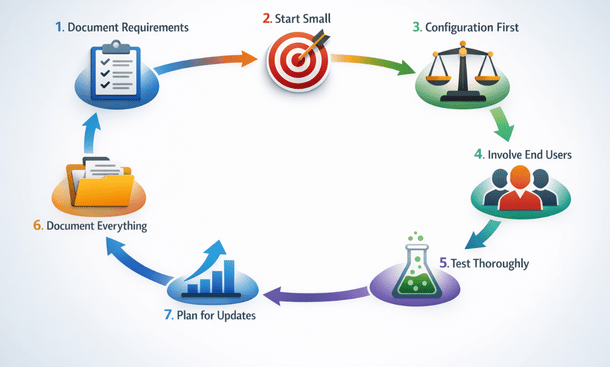
- Document Your Requirements Before Writing Any Code
- Start Small and Scale Gradually
- Exhaust Configuration Options Before Customizing
- Involve End Users Throughout the Process
- Test Thoroughly in a Sandbox Environment
- Document Everything for Future Maintenance
- Plan for Vendor Updates and System Upgrades
- Putting It All Together
Here’s the thing about ERP customization—it’s super powerful when done right, but it can turn into an expensive disaster if you skip the fundamentals. I’ve seen California startups nail their implementations and others completely flame out, and the difference usually comes down to following proven best practices. From documenting everything to planning for future upgrades, these seven guidelines will save you serious time, money, and stress. Whether you’re just starting your journey of tailoring your system to your business needs or already mid-implementation, these practices are game-changers. Let’s make sure you’re set up for success.
Document Your Requirements Before Writing Any Code
The biggest mistake I see entrepreneurs make is jumping straight into development without really nailing down what they need. It feels counterintuitive because you’re excited to start building, but trust me—spending time on detailed requirements upfront saves massive headaches later.
Start by documenting your current process exactly as it works today. Map out every step, every decision point, every piece of data that moves through the workflow. Don’t skip steps because they seem obvious. The obvious stuff is often where miscommunication happens between you and your developers.
Get specific about what success looks like. Instead of “we need better inventory management,” write something like “when inventory drops below ten units for any SKU, the system should automatically create a purchase requisition, email the purchasing manager, and flag the item as low stock on the dashboard.” That level of detail eliminates ambiguity.
Define your data requirements explicitly. What fields do you need to capture? What are the valid values for each field? What calculations need to happen? How should data relate to other records in the system? A field called “customer type” could mean a dozen different things—be crystal clear about your data model.
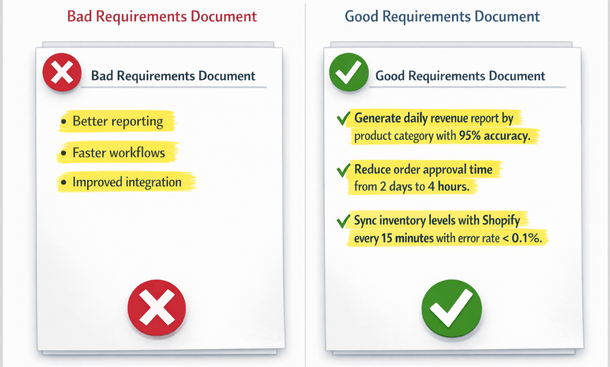
Include acceptance criteria for each requirement. How will you verify that the customization works correctly? What test scenarios need to pass before you consider it complete? These criteria become your testing checklist and prevent arguments about whether something is done.
Document your business rules in exhaustive detail. If commission calculations depend on product category, customer tier, quarterly targets, and team versus individual performance, write out the exact formula with examples. Don’t assume developers will intuit your business logic—they won’t.
Involve stakeholders from every affected department in requirements gathering. The warehouse staff who’ll use a custom shipping module know pain points that management might miss. The accounting team understands nuances in financial workflows that sales folks don’t consider. Cross-functional input creates more complete requirements.
Keep requirements in a living document that everyone can access. Use tools like Confluence, Notion, or even Google Docs where you can track changes, add comments, and ensure everyone’s working from the same information. Version control matters—knowing which requirements version the developer is implementing prevents confusion.
Budget at least ten to twenty percent of your total project timeline for requirements documentation. For a three-month customization project, that’s roughly two weeks upfront. It feels like a delay, but it prevents the much longer delays that come from building the wrong thing or constant mid-project scope changes.
Start Small and Scale Gradually
There’s a strong temptation to solve all your ERP problems at once with a massive customization project. Resist that temptation. Starting small and scaling gradually dramatically improves your success rate.
Pick one high-impact, well-defined process for your first customization. Maybe it’s automating your purchase order approval workflow or creating a custom dashboard for your operations team. Choose something important enough to matter but contained enough to complete relatively quickly.
Aim for a first customization that delivers results within four to eight weeks. This quick win builds momentum, proves the value of customization to skeptics in your organization, and gives your team experience with the process before tackling more complex projects.
The learning curve on ERP customization is steeper than most people expect. Your first project teaches you how to write good requirements, how to communicate with developers, how to test effectively, and how much time things actually take. Better to learn these lessons on a $15,000 project than a $150,000 one.
Use early customizations to validate your assumptions about ROI. That workflow automation you expected to save twenty hours weekly might only save twelve hours in practice. Understanding actual returns helps you make smarter decisions about which future customizations deserve investment.
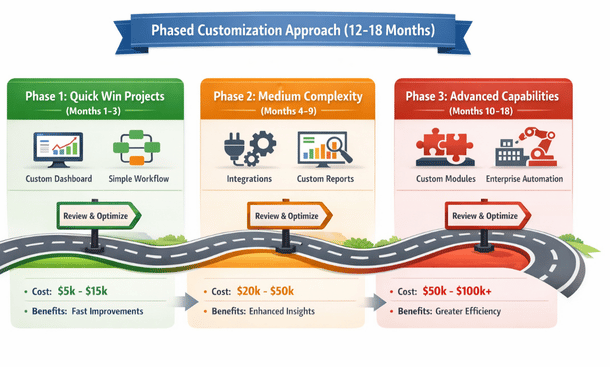
Build on proven successes rather than diversifying risk. If your first workflow automation worked beautifully, do a second similar workflow before jumping to integration projects. Developing expertise in one customization type before moving to others improves outcomes and reduces costs through learning effects.
Create a prioritized backlog of future customizations but commit resources to only one or two at a time. This focused approach prevents your team from getting overwhelmed and ensures quality attention to each implementation.
Celebrate and communicate wins from early customizations. When that first custom dashboard saves your operations manager five hours weekly, make sure people know about it. Visible success builds organizational support for future investments and makes users more receptive to subsequent changes.
Be willing to abandon approaches that aren’t working. If a customization is taking three times longer than estimated or the ROI isn’t materializing, don’t fall victim to sunk cost fallacy. Cut your losses, document lessons learned, and redirect resources to more promising opportunities.
Exhaust Configuration Options Before Customizing
This might be the single most important best practice. Modern ERP systems offer way more flexibility through configuration than most users realize. Exploring these options thoroughly before writing custom code saves enormous amounts of money.
Spend real time learning your ERP platform’s configuration capabilities. Take training courses, watch tutorial videos, read documentation, and experiment in a sandbox environment. Many features you think require customization actually exist as advanced configuration options you just haven’t discovered yet.
Work with an experienced consultant who knows your platform inside and out for at least your initial implementation. These experts know configuration tricks and features that took them years to learn. Their knowledge can redirect twenty potential customizations into ten configurations and ten true customizations, cutting your costs in half.
Test whether you can achieve ninety percent of your goal through configuration. Sometimes the perfect solution requires customization, but a ninety percent solution through configuration delivers nearly the same business value at a fraction of the cost. Perfect is the enemy of good in ERP implementation.
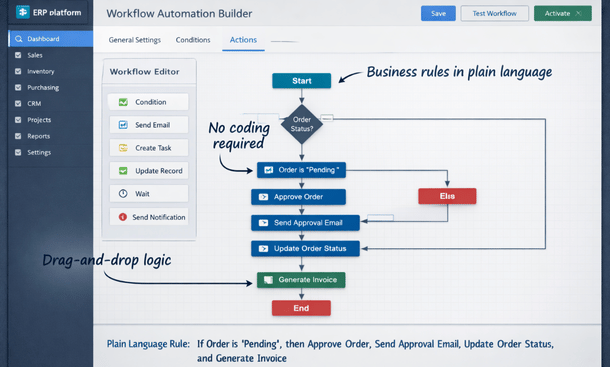
Use your platform’s workflow builders and automation tools to their full extent. Most modern ERPs include visual workflow designers that handle complex logic without coding. You can build multi-step approvals, conditional routing, automatic notifications, and data updates through configuration interfaces.
Leverage custom fields and flexible data structures available through configuration. You might be able to add the data points you need without modifying the database. Many platforms let you create custom objects, fields, and relationships through admin interfaces.
Explore third-party apps and add-ons in your platform’s marketplace. Many ERP ecosystems have app stores where vendors offer pre-built solutions for common needs. A $500 annual subscription for an app that does exactly what you need beats a $30,000 custom development project.
Ask the vendor about configuration capabilities before committing to customization. When you describe what you’re trying to accomplish, they might point you to existing features or configuration approaches you didn’t know existed. Vendors want you to succeed with their platform and can be valuable resources.
Document what you tried to accomplish through configuration and why it fell short. This documentation helps developers understand your constraints and might spark ideas for hybrid approaches combining configuration with minimal customization.
The principle here is simple: customization should be your last resort, not your first instinct. Configuration is faster, cheaper, easier to maintain, and won’t complicate future upgrades. Only customize when configuration genuinely can’t deliver what you need.
Involve End Users Throughout the Process
The people who’ll actually use your customizations daily need to be involved from the beginning, not just shown the finished product at the end. User involvement dramatically improves adoption and ensures you build the right solution.
Identify power users from each affected department to serve on your implementation team. These aren’t necessarily managers—they’re the people who live in the ERP every day and understand the detailed realities of current workflows. Their practical knowledge is invaluable.
Include end users in requirements gathering sessions. When you’re documenting how the purchase order process should work, have people who actually create purchase orders in the room. They’ll catch requirements that office-bound managers might miss.
Have users review mockups, wireframes, and prototypes before development starts. Even simple sketches of what screens will look like help users visualize the solution and provide feedback when changes are still easy and inexpensive.
Conduct user acceptance testing before rolling customizations to production. Give real users access to the customization in a test environment and have them run through actual scenarios they encounter in their daily work. They’ll find issues that formal QA testing might miss.
Create a feedback loop during development. Don’t wait until something is completely finished to show users. Regular check-ins where users can see work in progress and provide input prevent the disaster of building something nobody wants.
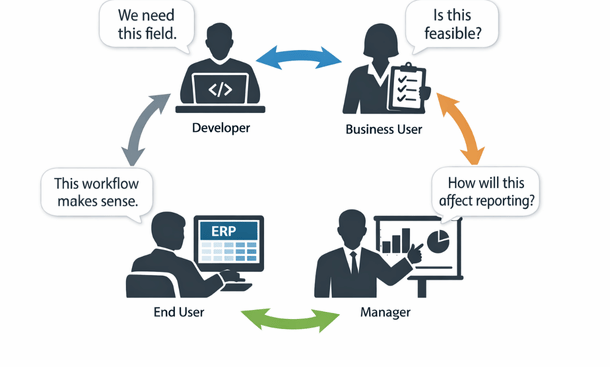
Train super users before company-wide rollout. Select a small group to learn the customization thoroughly, then use them as resources for other employees. This peer-to-peer training approach works better than top-down instruction for many users.
Be transparent about trade-offs and limitations. If a customization can’t do something users requested because of technical constraints or budget limits, explain why clearly. Users are surprisingly understanding when they know the reasoning behind decisions.
Gather feedback after go-live and be prepared to iterate. Even well-designed customizations need refinement once they’re in production use. Budget time and money for adjustments based on real-world usage patterns.
Recognize and reward users who contribute significantly to successful customizations. The warehouse supervisor who spent extra time testing your shipping module or the accountant who documented detailed requirements deserves recognition. This appreciation encourages continued engagement in future projects.
Test Thoroughly in a Sandbox Environment
Inadequate testing is probably the second-biggest reason customization projects fail after poor requirements. You absolutely need a proper testing environment and comprehensive testing process.
Set up a dedicated sandbox or development environment that mirrors your production system. This isolated environment lets you break things, test edge cases, and experiment without risking your live business data. Most ERP vendors provide development environments—use them.
Create a structured test plan covering all functionality. Don’t just test the happy path where everything works perfectly. Test error conditions, boundary cases, and unusual scenarios. What happens if someone enters negative numbers? What if required fields are left blank? What if the system tries to process a thousand records at once?
Include integration testing when customizations connect multiple systems. Testing the customization in isolation isn’t enough—you need to verify that data flows correctly between systems, error handling works across boundaries, and performance is acceptable under realistic load.
Conduct regression testing to ensure customizations didn’t break existing functionality. Adding a custom field to the customer record shouldn’t break the ability to create invoices, but stranger things have happened. Test all related processes to catch unintended side effects.
Test with real data, not just toy examples. If your customization processes sales orders, test it with actual order data including all the weird edge cases that exist in your business. That customer who orders a hundred line items, the one with special pricing rules, the rush order with overnight shipping—test all of them.
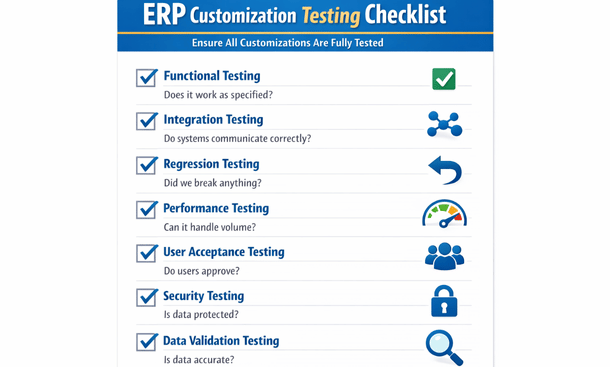
Involve multiple testers with different perspectives. Developers test differently than end users. Someone who understands the business deeply will catch issues that technical testers miss. Diverse testing perspectives improve quality.
Document all test cases and results. When something breaks in production three months later, you’ll want to know whether you tested that scenario originally. Good test documentation also helps with future customizations to similar functionality.
Budget adequate time for testing. A good rule of thumb is that testing should consume twenty-five to thirty-five percent of development time. If development takes eighty hours, plan for twenty-five to thirty hours of testing. Rushing testing to meet deadlines backfires when problems surface in production.
Fix issues discovered during testing before go-live. This seems obvious, but I’ve seen businesses launch with known bugs because they felt pressure to hit a deadline. Those shortcuts always create bigger problems later.
Perform a final round of testing in your production environment right before going live. Sometimes environmental differences between sandbox and production cause issues that didn’t appear during testing. A quick production verification catches these before they impact users.
Document Everything for Future Maintenance
Documentation feels like busy work when you’re eager to finish a project, but it’s absolutely essential for long-term success with customizations. Future you, or future developers, will be incredibly grateful.
Create technical documentation explaining how customizations work. This includes data flows, logic explanations, integration points, dependencies, and any quirks or gotchas. Write this for someone with general ERP development skills who’s seeing your customization for the first time.
Document why design decisions were made. In six months, when someone questions why you built something a particular way, you’ll want a record of the reasoning. Maybe you considered three approaches and chose one for specific reasons—capture that thinking.
Include code comments liberally in custom scripts and programs. Explain what each section does in plain language. Assume the next person reading your code knows the programming language but doesn’t understand your business logic or data structures.
Create user documentation explaining how to use customizations. Screen captures, step-by-step instructions, and examples help new employees learn the system. Video walkthroughs work particularly well for complex customizations.
Document data dictionary changes. If you added custom fields, tables, or relationships, document what they mean, what valid values are, and how they relate to other data. This prevents future confusion and helps with reporting and integration projects.
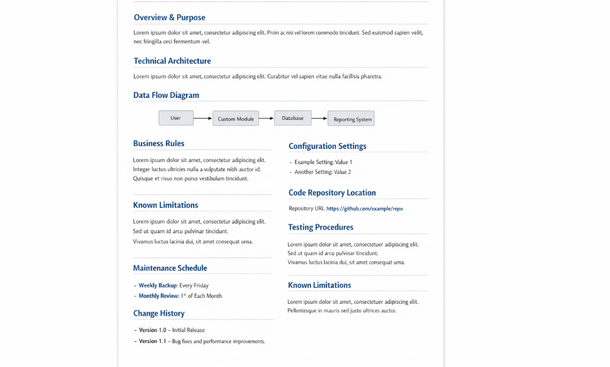
Maintain a change log tracking all modifications to customizations over time. When you update a custom workflow or modify a report, record what changed, why, who made the change, and when. This history becomes invaluable when troubleshooting issues.
Store documentation in a central, accessible location. Don’t let documentation live on someone’s local hard drive or in scattered email threads. Use a shared repository like Confluence, SharePoint, or your ERP vendor’s documentation tools.
Keep documentation current as customizations evolve. Outdated documentation is almost worse than no documentation because it misleads people. When you modify a customization, update the docs as part of the same project, not as a future task that never happens.
Include disaster recovery information. If your customization breaks, what’s the rollback procedure? Are there manual workarounds users can employ while you fix issues? This contingency planning reduces panic during incidents.
Plan for Vendor Updates and System Upgrades
One of the most overlooked aspects of customization is how it affects your ability to upgrade your ERP when vendors release new versions. Planning for this from the start prevents being stuck on outdated software.
Understand your vendor’s upgrade model. Cloud ERPs with continuous updates require different approaches than on-premise systems with major version releases every few years. Know what you’re signing up for and how customizations need to accommodate the update cadence.
Follow vendor best practices for customization architecture. Most platforms have recommended patterns for building customizations that minimize upgrade conflicts. Using these patterns costs nothing extra but dramatically improves upgrade compatibility.
Avoid modifying core vendor code when possible. Build customizations as extensions or add-ons that sit alongside core functionality rather than changing the vendor’s code directly. This separation makes upgrades much cleaner.
Test customizations after every vendor update, even minor ones. Schedule a testing cycle immediately after your vendor releases updates to verify everything still works correctly. Catching issues early prevents production problems.
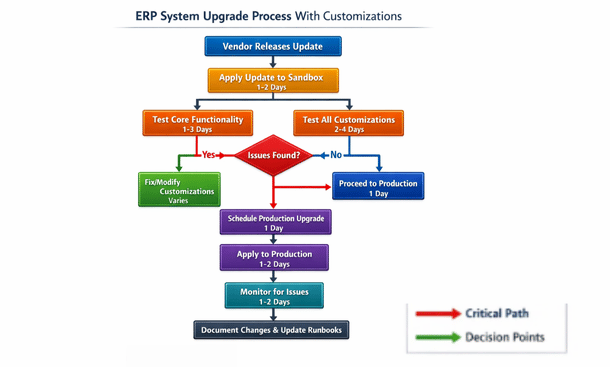
Build a regression test suite specifically for customizations. This standardized set of tests runs after every vendor update to verify your custom functionality still works. Automated testing tools can make this less time-consuming.
Budget for customization maintenance. Plan to spend five to fifteen percent of original customization costs annually on maintenance and updates. This ensures you have resources available when vendor updates require customization changes.
Stay current with vendor roadmaps. If you know your vendor is planning major architecture changes, factor that into customization decisions. Building something that will be obsolete in six months when the vendor releases native functionality wastes money.
Consider building customizations with abstraction layers that isolate them from vendor changes. This advanced technique requires more upfront development but can significantly reduce maintenance costs over time by minimizing how much customization code needs updating when the vendor changes things.
Don’t postpone upgrades indefinitely to avoid dealing with customization conflicts. Falling too far behind on versions creates security risks, prevents you from accessing new features, and eventually forces a massive, expensive catch-up upgrade. Stay reasonably current even if it requires some customization maintenance.
Putting It All Together
These seven best practices work together to create a comprehensive approach to successful ERP customization. None of them is optional—skip any one and you significantly increase your risk of expensive problems.
The common thread through all these practices is thoughtfulness and discipline. Customization is powerful but demands respect. Rushing into development without proper requirements, skipping testing to hit deadlines, or ignoring documentation to save time creates technical debt that compounds with interest.
Start your customization journey by committing to these practices. Make them non-negotiable standards for your organization. When pressure builds to cut corners, remind everyone that best practices exist because people learned expensive lessons the hard way.
Share these practices with any vendors or implementation partners you work with. Make it clear that you expect them to follow these standards. Good partners will appreciate that you understand what quality implementation requires.
Remember that the goal isn’t customization itself—it’s improving your business operations. These best practices ensure your customizations actually deliver the business value you’re investing money to achieve.
Want to understand what types of customizations these practices apply to? Check out our breakdown of the five types of ERP customization every business should know. And for comprehensive guidance on planning your entire customization strategy, our complete guide on how to tailor your system to your business covers everything from initial planning through long-term maintenance.
Follow these best practices consistently, and your customizations will deliver value for years while avoiding the costly mistakes that plague so many implementations. The discipline required pays dividends many times over
About the Author

mike
Mike is a tech enthusiast passionate about SaaS innovation and digital growth. He explores emerging technologies and helps businesses scale through smart software solutions.
Did you find this helpful?
Your feedback helps us curate better content for the community.